
Description
Experiment with several Neovim plugins that integrate AI model providers such as Gemini and Ollama.
Goals
Evaluate how these plugins enhance the development workflow, how they differ in capabilities, and how smoothly they integrate into Neovim for day-to-day coding tasks.
Resources
- Neovim 0.11.5
- AI-enabled Neovim plugins:
- avante.nvim: https://github.com/yetone/avante.nvim
- Gp.nvim: https://github.com/Robitx/gp.nvim
- parrot.nvim: https://github.com/frankroeder/parrot.nvim
- gemini.nvim: https://dotfyle.com/plugins/kiddos/gemini.nvim
- ...
- Accounts or API keys for AI model providers.
- Local model serving setup (e.g., Ollama)
- Test projects or codebases for practical evaluation:
- OBS: https://build.opensuse.org/
- OBS blog and landing page: https://openbuildservice.org/
- ...

This project is part of:
Hack Week 25
Activity
Comments
Be the first to comment!
Similar Projects
Switch software-o-o to store repomd in a database by hennevogel
Description
The openSUSE Software portal is a web app to explore binary packages of openSUSE distributions. Kind of like an package manager / app store.
https://software.opensuse.org/
This app has been around forever (August 2007) and it's architecture is a bit brittle. It acts as a frontend to the OBS distributions and published binary search APIs, calculates and caches a lot of stuff in memory and needs code changes nearly every openSUSE release to keep up.
As you can imagine, it's a heavy user of the OBS API, especially when caches are cold.
Goals
I want to change the app to cache repomod data in a (postgres) database structure
- Distributions have many Repositories
- Repositories have many Packages
- Packages have many Patches
The UI workflows will be as following
- As an admin I setup Distribution and it's repositories
- As an admin I sync all repositories repomd files into to the database
- As a user I browse a Distribution by category
- As a user I search for Package of a Distribution in it's Repositories
- As a user I extend the search to Package build on OBS for this Distribution
This has a couple of pro's:
- Less traffic on the OBS API as the usual Packages are inside the database
- Easier base to add features to this page. Like comments, ratings, openSUSE specific screenshots etc.
- Separating the Distribution package search from searching through OBS will hopefully make more clear for newbies that enabling extra repositories is kind of dangerous.
And one con:
- You can't search for packages build for foreign distributions with this app anymore (although we could consume their repomd etc. but I doubt we have the audience on an opensuse.org domain...)
TODO
 Introduce a PG database
- Add clockworkd as scheduler and delayed_job as ActiveJob backend
- Introduce ActiveStorage
- Build initial data model
- Introduce repomd to database sync
- Adapt repomd sync to Leap 16.0 repomod layout changes (single arch, no update repo)
 Make repomd sync idempotent
- Introduce database search
- Setup foreman to run
rails sandrake jobs:workoff - Adapt UI
- Build Category Browsing
- Build Admin Distribution CRUD interface
Improvements to osc (especially with regards to the Git workflow) by mcepl
Description
There is plenty of hacking on osc, where we could spent some fun time. I would like to see a solution for https://github.com/openSUSE/osc/issues/2006 (which is sufficiently non-serious, that it could be part of HackWeek project).
Testing and adding GNU/Linux distributions on Uyuni by juliogonzalezgil
Join the Gitter channel! https://gitter.im/uyuni-project/hackweek
Uyuni is a configuration and infrastructure management tool that saves you time and headaches when you have to manage and update tens, hundreds or even thousands of machines. It also manages configuration, can run audits, build image containers, monitor and much more!
Currently there are a few distributions that are completely untested on Uyuni or SUSE Manager (AFAIK) or just not tested since a long time, and could be interesting knowing how hard would be working with them and, if possible, fix whatever is broken.
For newcomers, the easiest distributions are those based on DEB or RPM packages. Distributions with other package formats are doable, but will require adapting the Python and Java code to be able to sync and analyze such packages (and if salt does not support those packages, it will need changes as well). So if you want a distribution with other packages, make sure you are comfortable handling such changes.
No developer experience? No worries! We had non-developers contributors in the past, and we are ready to help as long as you are willing to learn. If you don't want to code at all, you can also help us preparing the documentation after someone else has the initial code ready, or you could also help with testing :-)
The idea is testing Salt (including bootstrapping with bootstrap script) and Salt-ssh clients
To consider that a distribution has basic support, we should cover at least (points 3-6 are to be tested for both salt minions and salt ssh minions):
- Reposync (this will require using spacewalk-common-channels and adding channels to the .ini file)
- Onboarding (salt minion from UI, salt minion from bootstrap scritp, and salt-ssh minion) (this will probably require adding OS to the bootstrap repository creator)
- Package management (install, remove, update...)
- Patching
- Applying any basic salt state (including a formula)
- Salt remote commands
- Bonus point: Java part for product identification, and monitoring enablement
- Bonus point: sumaform enablement (https://github.com/uyuni-project/sumaform)
- Bonus point: Documentation (https://github.com/uyuni-project/uyuni-docs)
- Bonus point: testsuite enablement (https://github.com/uyuni-project/uyuni/tree/master/testsuite)
If something is breaking: we can try to fix it, but the main idea is research how supported it is right now. Beyond that it's up to each project member how much to hack :-)
- If you don't have knowledge about some of the steps: ask the team
- If you still don't know what to do: switch to another distribution and keep testing.
This card is for EVERYONE, not just developers. Seriously! We had people from other teams helping that were not developers, and added support for Debian and new SUSE Linux Enterprise and openSUSE Leap versions :-)
In progress/done for Hack Week 25
Guide
We started writin a Guide: Adding a new client GNU Linux distribution to Uyuni at https://github.com/uyuni-project/uyuni/wiki/Guide:-Adding-a-new-client-GNU-Linux-distribution-to-Uyuni, to make things easier for everyone, specially those not too familiar wht Uyuni or not technical.
openSUSE Leap 16.0
The distribution will all love!
https://en.opensuse.org/openSUSE:Roadmap#DRAFTScheduleforLeap16.0
Curent Status We started last year, it's complete now for Hack Week 25! :-D
[W]Reposync (this will require using spacewalk-common-channels and adding channels to the .ini file) NOTE: Done, client tools for SLMicro6 are using as those for SLE16.0/openSUSE Leap 16.0 are not available yet[W]Onboarding (salt minion from UI, salt minion from bootstrap scritp, and salt-ssh minion) (this will probably require adding OS to the bootstrap repository creator)[W]Package management (install, remove, update...). Works, even reboot requirement detection
Create a page with all devel:languages:perl packages and their versions by tinita
Description
Perl projects now live in git: https://src.opensuse.org/perl
It would be useful to have an easy way to check which version of which perl module is in devel:languages:perl. Also we have meta overrides and patches for various modules, and it would be good to have them at a central place, so it is easier to lookup, and we can share with other vendors.
I did some initial data dump here a while ago: https://github.com/perlpunk/cpan-meta
But I never had the time to automate this.
I can also use the data to check if there are necessary updates (currently it uses data from download.opensuse.org, so there is some delay and it depends on building).
Goals
- Have a script that updates a central repository (e.g.
https://src.opensuse.org/perl/_metadata) with metadata by looking at https://src.opensuse.org/perl/_ObsPrj (check if there are any changes from the last run) - Create a HTML page with the list of packages (use Javascript and some table library to make it easily searchable)
Resources
Results
Day 1
- First part of the code which retrieves data from https://src.opensuse.org/perl/_ObsPrj with submodules and creates a YAML and a JSON file.
- Repo: https://github.com/perlpunk/opensuse-perl-meta
- Also a first version of the HTML is live: https://perlpunk.github.io/opensuse-perl-meta/
Day 2
- HTML Page has now links to src.opensuse.org and the date of the last update, plus a short info at the top
- Code is now 100% covered by tests: https://app.codecov.io/gh/perlpunk/opensuse-perl-meta
- I used the modern perl
classfeature, which makes perl classes even nicer and shorter. See example - Tests
- I tried out the mocking feature of the modern Test2::V0 library which provides call tracking. See example
- I tried out comparing data structures with the new Test2::V0 library. It let's you compare parts of the structure with the
likefunction, which only compares the date that is mentioned in the expected data. example
Day 3
- Added various things to the table
- Dependencies column
- Show popup with info for cpanspec, patches and dependencies
- Added last date / commit to the data export.
Plan: With the added date / commit we can now daily check _ObsPrj for changes and only fetch the data for changed packages.
Day 4
Bugzilla goes AI - Phase 1 by nwalter
Description
This project, Bugzilla goes AI, aims to boost developer productivity by creating an autonomous AI bug agent during Hackweek. The primary goal is to reduce the time employees spend triaging bugs by integrating Ollama to summarize issues, recommend next steps, and push focused daily reports to a Web Interface.
Goals
To reduce employee time spent on Bugzilla by implementing an AI tool that triages and summarizes bug reports, providing actionable recommendations to the team via Web Interface.
Project Charter
Description
Project Achievements during Hackweek
In this file you can read about what we achieved during Hackweek.
Liz - Prompt autocomplete by ftorchia
Description
Liz is the Rancher AI assistant for cluster operations.
Goals
We want to help users when sending new messages to Liz, by adding an autocomplete feature to complete their requests based on the context.
Example:
- User prompt: "Can you show me the list of p"
- Autocomplete suggestion: "Can you show me the list of p...od in local cluster?"
Example:
- User prompt: "Show me the logs of #rancher-"
- Chat console: It shows a drop-down widget, next to the # character, with the list of available pod names starting with "rancher-".
Technical Overview
- The AI agent should expose a new ws/autocomplete endpoint to proxy autocomplete messages to the LLM.
- The UI extension should be able to display prompt suggestions and allow users to apply the autocomplete to the Prompt via keyboard shortcuts.
Resources
Self-Scaling LLM Infrastructure Powered by Rancher by ademicev0
Self-Scaling LLM Infrastructure Powered by Rancher

Description
The Problem
Running LLMs can get expensive and complex pretty quickly.
Today there are typically two choices:
- Use cloud APIs like OpenAI or Anthropic. Easy to start with, but costs add up at scale.
- Self-host everything - set up Kubernetes, figure out GPU scheduling, handle scaling, manage model serving... it's a lot of work.
What if there was a middle ground?
What if infrastructure scaled itself instead of making you scale it?
Can we use existing Rancher capabilities like CAPI, autoscaling, and GitOps to make this simpler instead of building everything from scratch?
Project Repository: github.com/alexander-demicev/llmserverless
What This Project Does
A key feature is hybrid deployment: requests can be routed based on complexity or privacy needs. Simple or low-sensitivity queries can use public APIs (like OpenAI), while complex or private requests are handled in-house on local infrastructure. This flexibility allows balancing cost, privacy, and performance - using cloud for routine tasks and on-premises resources for sensitive or demanding workloads.
A complete, self-scaling LLM infrastructure that:
- Scales to zero when idle (no idle costs)
- Scales up automatically when requests come in
- Adds more nodes when needed, removes them when demand drops
- Runs on any infrastructure - laptop, bare metal, or cloud
Think of it as "serverless for LLMs" - focus on building, the infrastructure handles itself.
How It Works
A combination of open source tools working together:
Flow:
- Users interact with OpenWebUI (chat interface)
- Requests go to LiteLLM Gateway
- LiteLLM routes requests to:
- Ollama (Knative) for local model inference (auto-scales pods)
- Or cloud APIs for fallback
Docs Navigator MCP: SUSE Edition by mackenzie.techdocs

Description
Docs Navigator MCP: SUSE Edition is an AI-powered documentation navigator that makes finding information across SUSE, Rancher, K3s, and RKE2 documentation effortless. Built as a Model Context Protocol (MCP) server, it enables semantic search, intelligent Q&A, and documentation summarization using 100% open-source AI models (no API keys required!). The project also allows you to bring your own keys from Anthropic and Open AI for parallel processing.
Goals
- [ X ] Build functional MCP server with documentation tools
- [ X ] Implement semantic search with vector embeddings
- [ X ] Create user-friendly web interface
- [ X ] Optimize indexing performance (parallel processing)
- [ X ] Add SUSE branding and polish UX
- [ X ] Stretch Goal: Add more documentation sources
- [ X ] Stretch Goal: Implement document change detection for auto-updates
Coming Soon!
- Community Feedback: Test with real users and gather improvement suggestions
Resources
- Repository: Docs Navigator MCP: SUSE Edition GitHub
- UI Demo: Live UI Demo of Docs Navigator MCP: SUSE Edition
MCP Server for SCC by digitaltomm
Description
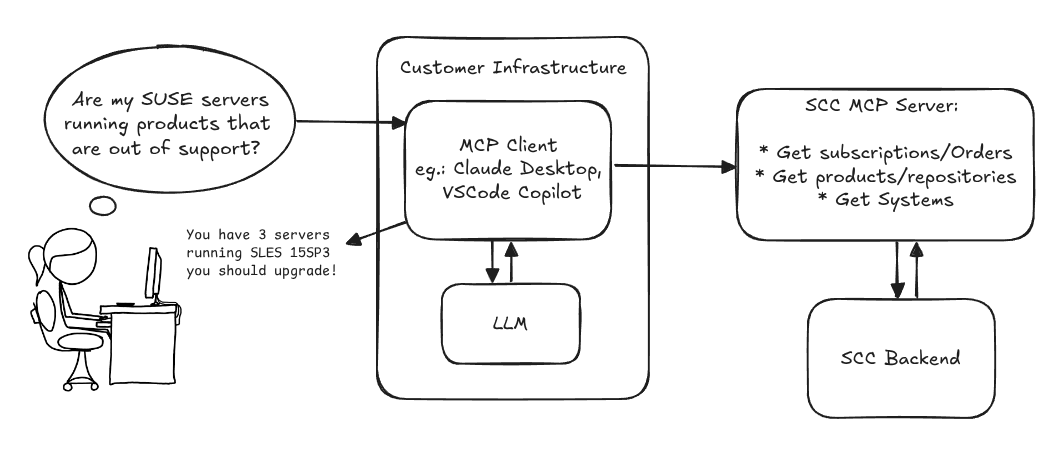
Provide an MCP Server implementation for customers to access data on scc.suse.com via MCP protocol. The core benefit of this MCP interface is that it has direct (read) access to customer data in SCC, so the AI agent gets enhanced knowledge about individual customer data, like subscriptions, orders and registered systems.
Architecture
Goals
We want to demonstrate a proof of concept to connect to the SCC MCP server with any AI agent, for example gemini-cli or codex. Enabling the user to ask questions regarding their SCC inventory.
For this Hackweek, we target that users get proper responses to these example questions:
- Which of my currently active systems are running products that are out of support?
- Do I have ready to use registration codes for SLES?
- What are the latest 5 released patches for SLES 15 SP6? Output as a list with release date, patch name, affected package names and fixed CVEs.
- Which versions of kernel-default are available on SLES 15 SP6?
Technical Notes
Similar to the organization APIs, this can expose to customers data about their subscriptions, orders, systems and products. Authentication should be done by organization credentials, similar to what needs to be provided to RMT/MLM. Customers can connect to the SCC MCP server from their own MCP-compatible client and Large Language Model (LLM), so no third party is involved.
Milestones
[x] Basic MCP API setup
  MCP endpoints
  [x] Products / Repositories
  [x] Subscriptions / Orders
  [x] Systems
  [x] Packages
[x] Document usage with Gemini CLI, Codex
Resources
Gemini CLI setup:
~/.gemini/settings.json:
GenAI-Powered Systemic Bug Evaluation and Management Assistant by rtsvetkov
Motivation
What is the decision critical question which one can ask on a bug? How this question affects the decision on a bug and why?
Let's make GenAI look on the bug from the systemic point and evaluate what we don't know. Which piece of information is missing to take a decision?
Description
To build a tool that takes a raw bug report (including error messages and context) and uses a large language model (LLM) to generate a series of structured, Socratic-style or Systemic questions designed to guide a the integration and development toward the root cause, rather than just providing a direct, potentially incorrect fix.
Goals
Set up a Python environment
Set the environment and get a Gemini API key. 2. Collect 5-10 realistic bug reports (from open-source projects, personal projects, or public forums like Stack Overflow—include the error message and the initial context).
Build the Dialogue Loop
- Write a basic Python script using the Gemini API.
- Implement a simple conversational loop: User Input (Bug) -> AI Output (Question) -> User Input (Answer to AI's question) -> AI Output (Next Question). Code Implementation
Socratic/Systemic Strategy Implementation
- Refine the logic to ensure the questions follow a Socratic and Systemic path (e.g., from symptom-> context -> assumptions -> -> critical parts -> ).
- Implement Function Calling (an advanced feature of the Gemini API) to suggest specific actions to the user, like "Run a ping test" or "Check the database logs."
- Implement Bugzillla call to collect the
- Implement Questioning Framework as LLVM pre-conditioning
- Define set of instructions
- Assemble the Tool
Resources
What are Systemic Questions?
Systemic questions explore the relationships, patterns, and interactions within a system rather than focusing on isolated elements.
In IT, they help uncover hidden dependencies, feedback loops, assumptions, and side-effects during debugging or architecture analysis.
Gitlab Project
gitlab.suse.de/sle-prjmgr/BugDecisionCritical_Question
Minimal neovim LSP setup, without any external plugin. by wqu_suse
Description
Neovim is getting more and more built-in features, from LSP client, snippet to auto-completion.
Now it's possible to built a neovim IDE environment, with built-in lsp, snippet and auto-completion, without any external plugin.
Goals
Use a minimal init.lua only, without any nvim package manager nor external plugin, to build an IDE environment, which can:
- Use LSP to do context aware context lookup
- Auto-complete function name, parameter list etc
- Support multiple LSP servers for different languages
Linux kernel and btrfs-progs will be used as the example projects.
Resources
https://github.com/adam900710/nvimsimpleconfig