
Description
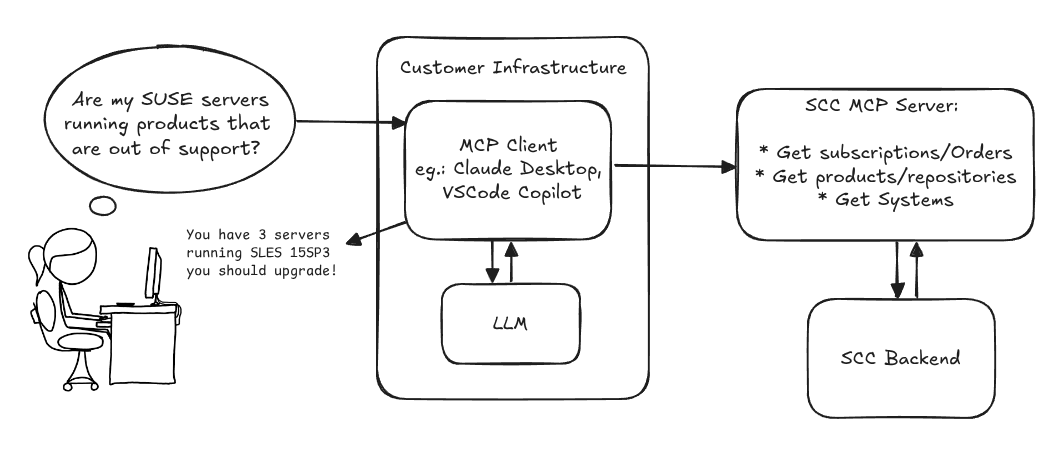
Provide an MCP Server implementation for customers to access data on scc.suse.com via MCP protocol. The core benefit of this MCP interface is that it has direct (read) access to customer data in SCC, so the AI agent gets enhanced knowledge about individual customer data, like subscriptions, orders and registered systems.
Architecture
Goals
We want to demonstrate a proof of concept to connect to the SCC MCP server with any AI agent, for example gemini-cli or codex. Enabling the user to ask questions regarding their SCC inventory.
For this Hackweek, we target that users get proper responses to these example questions:
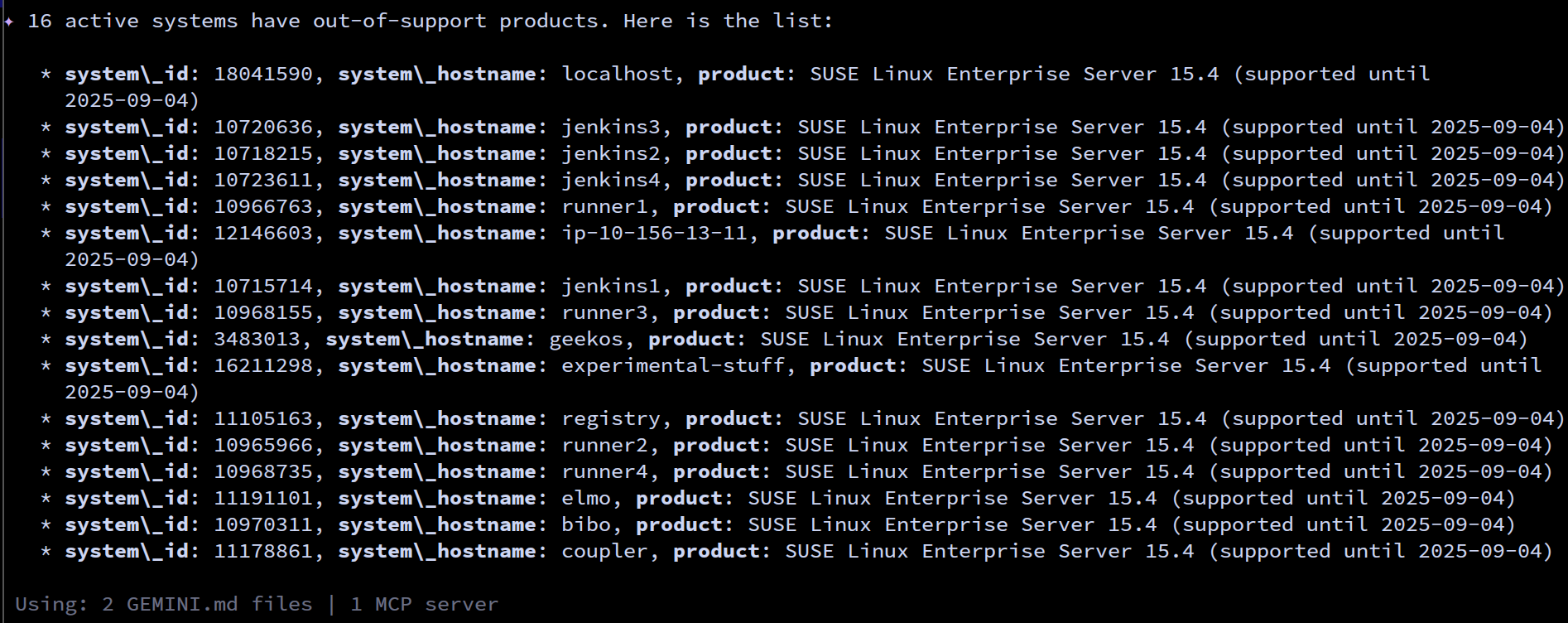
- Which of my currently active systems are running products that are out of support?
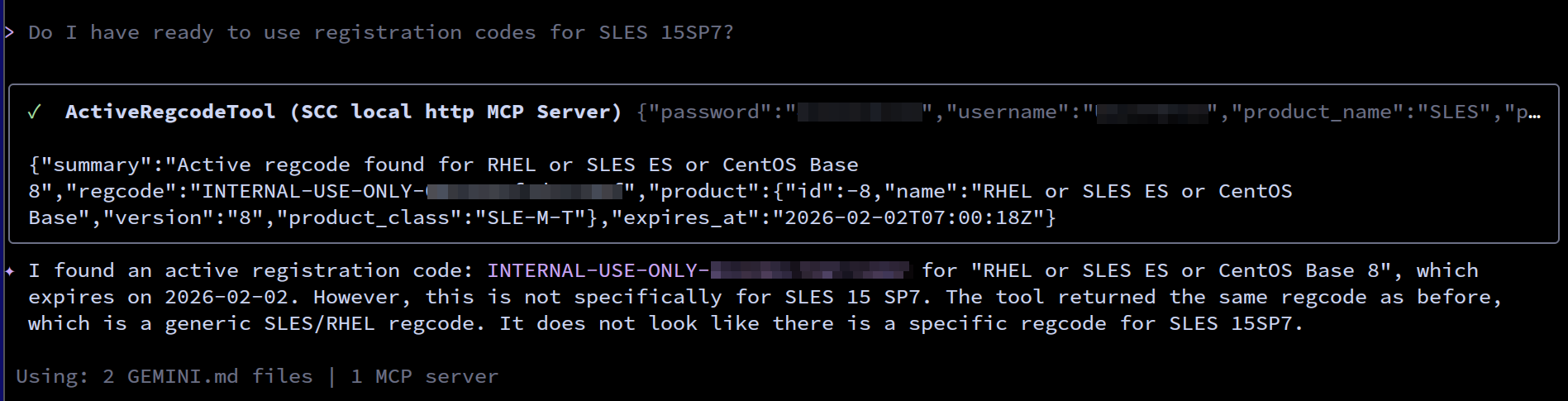
- Do I have ready to use registration codes for SLES?
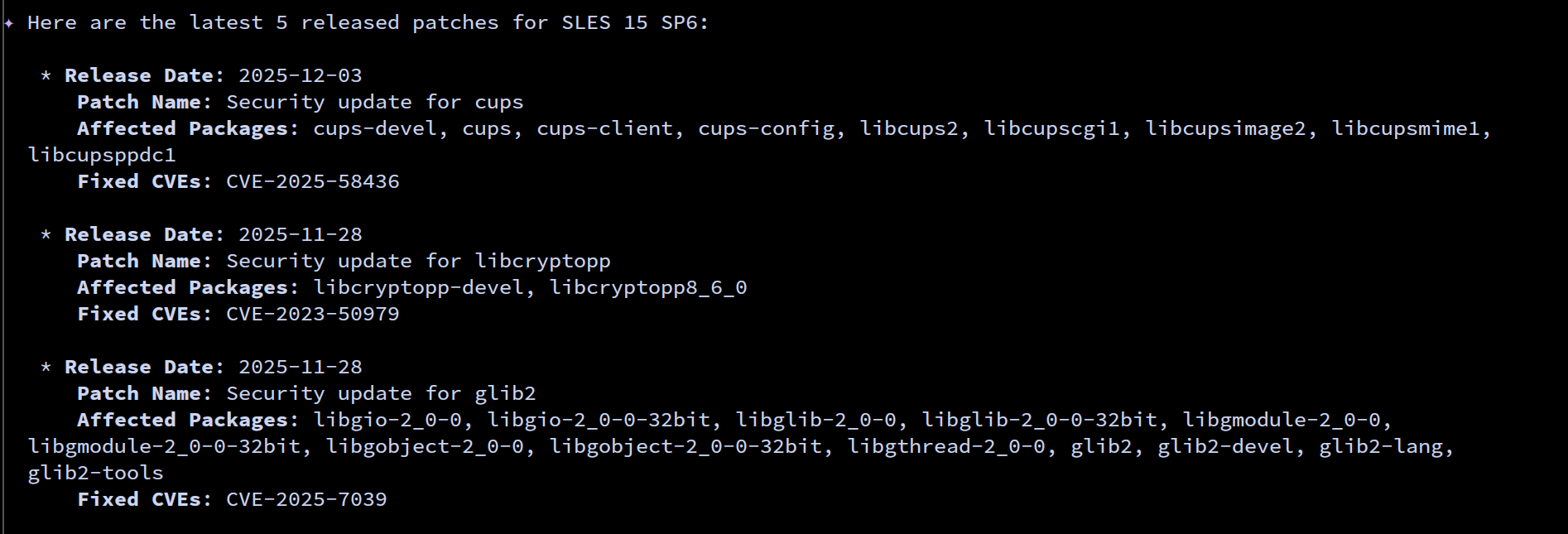
- What are the latest 5 released patches for SLES 15 SP6? Output as a list with release date, patch name, affected package names and fixed CVEs.
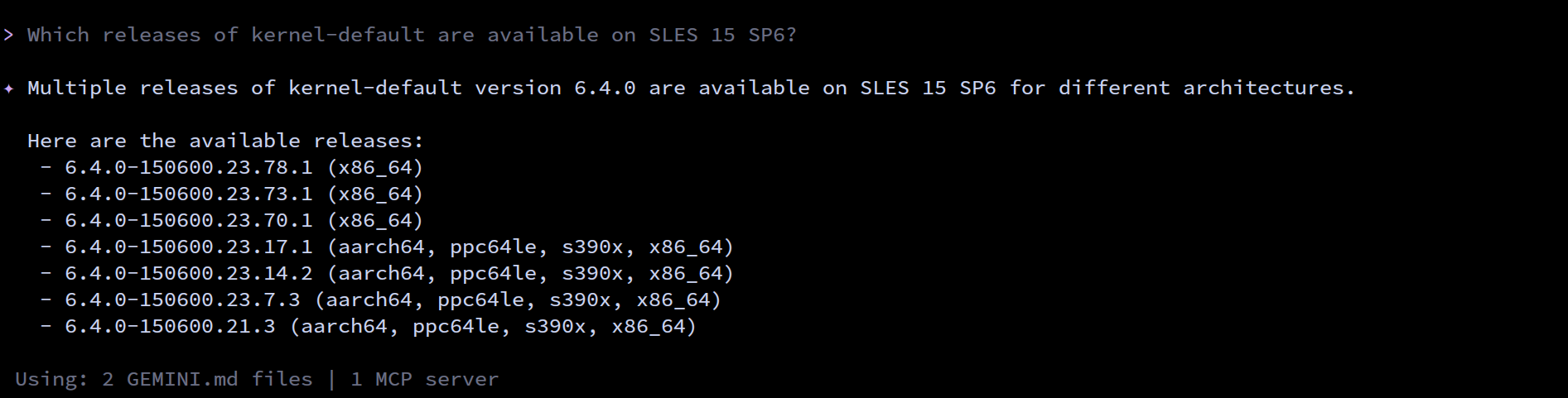
- Which versions of kernel-default are available on SLES 15 SP6?
Technical Notes
Similar to the organization APIs, this can expose to customers data about their subscriptions, orders, systems and products. Authentication should be done by organization credentials, similar to what needs to be provided to RMT/MLM. Customers can connect to the SCC MCP server from their own MCP-compatible client and Large Language Model (LLM), so no third party is involved.
Milestones
[x] Basic MCP API setup
  MCP endpoints
  [x] Products / Repositories
  [x] Subscriptions / Orders
  [x] Systems
  [x] Packages
[x] Document usage with Gemini CLI, Codex
Resources
Gemini CLI setup:
~/.gemini/settings.json:
{
 "mcpServers": {
   "SCC local http": {
     "httpUrl": "http://localhost:3000/mcp",
     "note": "MCP server for SUSE Customer Center"
   }
 }
}
Results
After 5 days of hackweek, we have good results for the 4 example questions from above:




This project is part of:
Hack Week 25
Activity
Comments

Similar Projects
GenAI-Powered Systemic Bug Evaluation and Management Assistant by rtsvetkov
Motivation
What is the decision critical question which one can ask on a bug? How this question affects the decision on a bug and why?
Let's make GenAI look on the bug from the systemic point and evaluate what we don't know. Which piece of information is missing to take a decision?
Description
To build a tool that takes a raw bug report (including error messages and context) and uses a large language model (LLM) to generate a series of structured, Socratic-style or Systemic questions designed to guide a the integration and development toward the root cause, rather than just providing a direct, potentially incorrect fix.
Goals
Set up a Python environment
Set the environment and get a Gemini API key. 2. Collect 5-10 realistic bug reports (from open-source projects, personal projects, or public forums like Stack Overflow—include the error message and the initial context).
Build the Dialogue Loop
- Write a basic Python script using the Gemini API.
- Implement a simple conversational loop: User Input (Bug) -> AI Output (Question) -> User Input (Answer to AI's question) -> AI Output (Next Question). Code Implementation
Socratic/Systemic Strategy Implementation
- Refine the logic to ensure the questions follow a Socratic and Systemic path (e.g., from symptom-> context -> assumptions -> -> critical parts -> ).
- Implement Function Calling (an advanced feature of the Gemini API) to suggest specific actions to the user, like "Run a ping test" or "Check the database logs."
- Implement Bugzillla call to collect the
- Implement Questioning Framework as LLVM pre-conditioning
- Define set of instructions
- Assemble the Tool
Resources
What are Systemic Questions?
Systemic questions explore the relationships, patterns, and interactions within a system rather than focusing on isolated elements.
In IT, they help uncover hidden dependencies, feedback loops, assumptions, and side-effects during debugging or architecture analysis.
Gitlab Project
gitlab.suse.de/sle-prjmgr/BugDecisionCritical_Question
Liz - Prompt autocomplete by ftorchia
Description
Liz is the Rancher AI assistant for cluster operations.
Goals
We want to help users when sending new messages to Liz, by adding an autocomplete feature to complete their requests based on the context.
Example:
- User prompt: "Can you show me the list of p"
- Autocomplete suggestion: "Can you show me the list of p...od in local cluster?"
Example:
- User prompt: "Show me the logs of #rancher-"
- Chat console: It shows a drop-down widget, next to the # character, with the list of available pod names starting with "rancher-".
Technical Overview
- The AI agent should expose a new ws/autocomplete endpoint to proxy autocomplete messages to the LLM.
- The UI extension should be able to display prompt suggestions and allow users to apply the autocomplete to the Prompt via keyboard shortcuts.
Resources
Background Coding Agent by mmanno
Description
I had only bad experiences with AI one-shots. However, monitoring agent work closely and interfering often did result in productivity gains.
Now, other companies are using agents in pipelines. That makes sense to me, just like CI, we want to offload work to pipelines: Our engineering teams are consistently slowed down by "toil": low-impact, repetitive maintenance tasks. A simple linter rule change, a dependency bump, rebasing patch-sets on top of newer releases or API deprecation requires dozens of manual PRs, draining time from feature development.
So far we have been writing deterministic, script-based automation for these tasks. And it turns out to be a common trap. These scripts are brittle, complex, and become a massive maintenance burden themselves.
Can we make prompts and workflows smart enough to succeed at background coding?
Goals
We will build a platform that allows engineers to execute complex code transformations using prompts.
By automating this toil, we accelerate large-scale migrations and allow teams to focus on high-value work.
Our platform will consist of three main components:
- "Change" Definition: Engineers will define a transformation as a simple, declarative manifest:
- The target repositories.
- A wrapper to run a "coding agent", e.g., "gemini-cli".
- The task as a natural language prompt.
- The target repositories.
- "Change" Management Service: A central service that orchestrates the jobs. It will receive Change definitions and be responsible for the job lifecycle.
- Execution Runners: We could use existing sandboxed CI runners (like GitHub/GitLab runners) to execute each job or spawn a container.
MVP
- Define the Change manifest format.
- Build the core Management Service that can accept and queue a Change.
- Connect management service and runners, dynamically dispatch jobs to runners.
- Create a basic runner script that can run a hard-coded prompt against a test repo and open a PR.
Stretch Goals:
- Multi-layered approach, Workflow Agents trigger Coding Agents:
- Workflow Agent: Gather information about the task interactively from the user.
- Coding Agent: Once the interactive agent has refined the task into a clear prompt, it hands this prompt off to the "coding agent." This background agent is responsible for executing the task and producing the actual pull request.
- Workflow Agent: Gather information about the task interactively from the user.
- Use MCP:
- Workflow Agent gathers context information from Slack, Github, etc.
- Workflow Agent triggers a Coding Agent.
- Workflow Agent gathers context information from Slack, Github, etc.
- Create a "Standard Task" library with reliable prompts.
- Rebasing rancher-monitoring to a new version of kube-prom-stack
- Update charts to use new images
- Apply changes to comply with a new linter
- Bump complex Go dependencies, like k8s modules
- Backport pull requests to other branches
- Rebasing rancher-monitoring to a new version of kube-prom-stack
- Add “review agents” that review the generated PR.
See also
Exploring Modern AI Trends and Kubernetes-Based AI Infrastructure by jluo
Description
Build a solid understanding of the current landscape of Artificial Intelligence and how modern cloud-native technologies—especially Kubernetes—support AI workloads.
Goals
Use Gemini Learning Mode to guide the exploration, surface relevant concepts, and structure the learning journey:
- Gain insight into the latest AI trends, tools, and architectural concepts.
- Understand how Kubernetes and related cloud-native technologies are used in the AI ecosystem (model training, deployment, orchestration, MLOps).
Resources
Red Hat AI Topic Articles
- https://www.redhat.com/en/topics/ai
Kubeflow Documentation
- https://www.kubeflow.org/docs/
Q4 2025 CNCF Technology Landscape Radar report:
- https://www.cncf.io/announcements/2025/11/11/cncf-and-slashdata-report-finds-leading-ai-tools-gaining-adoption-in-cloud-native-ecosystems/
- https://www.cncf.io/wp-content/uploads/2025/11/cncfreporttechradar_111025a.pdf
Agent-to-Agent (A2A) Protocol
- https://developers.googleblog.com/en/a2a-a-new-era-of-agent-interoperability/
Self-Scaling LLM Infrastructure Powered by Rancher by ademicev0
Self-Scaling LLM Infrastructure Powered by Rancher

Description
The Problem
Running LLMs can get expensive and complex pretty quickly.
Today there are typically two choices:
- Use cloud APIs like OpenAI or Anthropic. Easy to start with, but costs add up at scale.
- Self-host everything - set up Kubernetes, figure out GPU scheduling, handle scaling, manage model serving... it's a lot of work.
What if there was a middle ground?
What if infrastructure scaled itself instead of making you scale it?
Can we use existing Rancher capabilities like CAPI, autoscaling, and GitOps to make this simpler instead of building everything from scratch?
Project Repository: github.com/alexander-demicev/llmserverless
What This Project Does
A key feature is hybrid deployment: requests can be routed based on complexity or privacy needs. Simple or low-sensitivity queries can use public APIs (like OpenAI), while complex or private requests are handled in-house on local infrastructure. This flexibility allows balancing cost, privacy, and performance - using cloud for routine tasks and on-premises resources for sensitive or demanding workloads.
A complete, self-scaling LLM infrastructure that:
- Scales to zero when idle (no idle costs)
- Scales up automatically when requests come in
- Adds more nodes when needed, removes them when demand drops
- Runs on any infrastructure - laptop, bare metal, or cloud
Think of it as "serverless for LLMs" - focus on building, the infrastructure handles itself.
How It Works
A combination of open source tools working together:
Flow:
- Users interact with OpenWebUI (chat interface)
- Requests go to LiteLLM Gateway
- LiteLLM routes requests to:
- Ollama (Knative) for local model inference (auto-scales pods)
- Or cloud APIs for fallback
Enable more features in mcp-server-uyuni by j_renner
Description
I would like to contribute to mcp-server-uyuni, the MCP server for Uyuni / Multi-Linux Manager) exposing additional features as tools. There is lots of relevant features to be found throughout the API, for example:
- System operations and infos
- System groups
- Maintenance windows
- Ansible
- Reporting
- ...
At the end of the week I managed to enable basic system group operations:
- List all system groups visible to the user
- Create new system groups
- List systems assigned to a group
- Add and remove systems from groups
Goals
- Set up test environment locally with the MCP server and client + a recent MLM server [DONE]
- Identify features and use cases offering a benefit with limited effort required for enablement [DONE]
- Create a PR to the repo [DONE]
Resources
SUSE Edge Image Builder MCP by eminguez
Description
Based on my other hackweek project, SUSE Edge Image Builder's Json Schema I would like to build also a MCP to be able to generate EIB config files the AI way.
Realistically I don't think I'll be able to have something consumable at the end of this hackweek but at least I would like to start exploring MCPs, the difference between an API and MCP, etc.
Goals
- Familiarize myself with MCPs
- Unrealistic: Have an MCP that can generate an EIB config file
Resources
Result
https://github.com/e-minguez/eib-mcp
I've extensively used antigravity and its agent mode to code this. This heavily uses https://hackweek.opensuse.org/25/projects/suse-edge-image-builder-json-schema for the MCP to be built.
I've ended up learning a lot of things about "prompting", json schemas in general, some golang, MCPs and AI in general :)
Example:
Generate an Edge Image Builder configuration for an ISO image based on slmicro-6.2.iso, targeting x86_64 architecture. The output name should be 'my-edge-image' and it should install to /dev/sda. It should deploy
    a 3 nodes kubernetes cluster with nodes names "node1", "node2" and "node3" as:
    * hostname: node1, IP: 1.1.1.1, role: initializer
    * hostname: node2, IP: 1.1.1.2, role: agent
    * hostname: node3, IP: 1.1.1.3, role: agent
    The kubernetes version should be k3s 1.33.4-k3s1 and it should deploy a cert-manager helm chart (the latest one available according to https://cert-manager.io/docs/installation/helm/). It should create a user
    called "suse" with password "suse" and set ntp to "foo.ntp.org". The VIP address for the API should be 1.2.3.4
Generates:
``` apiVersion: "1.0" image: arch: x86_64 baseImage: slmicro-6.2.iso imageType: iso outputImageName: my-edge-image kubernetes: helm: charts: - name: cert-manager repositoryName: jetstack
SUSE Observability MCP server by drutigliano
Description
The idea is to implement the SUSE Observability Model Context Protocol (MCP) Server as a specialized, middle-tier API designed to translate the complex, high-cardinality observability data from StackState (topology, metrics, and events) into highly structured, contextually rich, and LLM-ready snippets.
This MCP Server abstract the StackState APIs. Its primary function is to serve as a Tool/Function Calling target for AI agents. When an AI receives an alert or a user query (e.g., "What caused the outage?"), the AI calls an MCP Server endpoint. The server then fetches the relevant operational facts, summarizes them, normalizes technical identifiers (like URNs and raw metric names) into natural language concepts, and returns a concise JSON or YAML payload. This payload is then injected directly into the LLM's prompt, ensuring the final diagnosis or action is grounded in real-time, accurate SUSE Observability data, effectively minimizing hallucinations.
Goals
- Grounding AI Responses: Ensure that all AI diagnoses, root cause analyses, and action recommendations are strictly based on verifiable, real-time data retrieved from the SUSE Observability StackState platform.
- Simplifying Data Access: Abstract the complexity of StackState's native APIs (e.g., Time Travel, 4T Data Model) into simple, semantic functions that can be easily invoked by LLM tool-calling mechanisms.
- Data Normalization: Convert complex, technical identifiers (like component URNs, raw metric names, and proprietary health states) into standardized, natural language terms that an LLM can easily reason over.
- Enabling Automated Remediation: Define clear, action-oriented MCP endpoints (e.g., execute_runbook) that allow the AI agent to initiate automated operational workflows (e.g., restarts, scaling) after a diagnosis, closing the loop on observability.
Hackweek STEP
- Create a functional MCP endpoint exposing one (or more) tool(s) to answer queries like "What is the health of service X?") by fetching, normalizing, and returning live StackState data in an LLM-ready format.
Scope
- Implement read-only MCP server that can:
- Connect to a live SUSE Observability instance and authenticate (with API token)
- Use tools to fetch data for a specific component URN (e.g., current health state, metrics, possibly topology neighbors, ...).
- Normalize response fields (e.g., URN to "Service Name," health state DEVIATING to "Unhealthy", raw metrics).
- Return the data as a structured JSON payload compliant with the MCP specification.
Deliverables
- MCP Server v0.1 A running Golang MCP server with at least one tool.
- A README.md and a test script (e.g., curl commands or a simple notebook) showing how an AI agent would call the endpoint and the resulting JSON payload.
Outcome A functional and testable API endpoint that proves the core concept: translating complex StackState data into a simple, LLM-ready format. This provides the foundation for developing AI-driven diagnostics and automated remediation.
Resources
- https://www.honeycomb.io/blog/its-the-end-of-observability-as-we-know-it-and-i-feel-fine
- https://www.datadoghq.com/blog/datadog-remote-mcp-server
- https://modelcontextprotocol.io/specification/2025-06-18/index
- https://modelcontextprotocol.io/docs/develop/build-server
Basic implementation
- https://github.com/drutigliano19/suse-observability-mcp-server
Results
Successfully developed and delivered a fully functional SUSE Observability MCP Server that bridges language models with SUSE Observability's operational data. This project demonstrates how AI agents can perform intelligent troubleshooting and root cause analysis using structured access to real-time infrastructure data.
Example execution
Intelligent Vulnerability Detection for Private Registries by ibone.gonzalez
Description:
This project wants to build an MCP server that connects your LLM to your private registry. It fetches vulnerability reports, probably generated by Trivy, with all the CVEs, and uses the LLM to develop the exact terminal commands or containers updates needed to resolve them.
Goals:
Our goal is to build an MCP for private registries that:
Detects Vulnerabilities: Proactively finds risks in your packages.
Automates Security: Keeps software secure with automated checks and updates.
Fits Your Workflow: Integrates seamlessly so you never leave your tools.
Protects Privacy: Delivers actionable insights without compromising private data.
To provide automated, privacy-first security for private packages that deliver actionable risk alerts directly within the developer’s existing workflow.
Resources:
Code:
Bugzilla goes AI - Phase 1 by nwalter
Description
This project, Bugzilla goes AI, aims to boost developer productivity by creating an autonomous AI bug agent during Hackweek. The primary goal is to reduce the time employees spend triaging bugs by integrating Ollama to summarize issues, recommend next steps, and push focused daily reports to a Web Interface.
Goals
To reduce employee time spent on Bugzilla by implementing an AI tool that triages and summarizes bug reports, providing actionable recommendations to the team via Web Interface.
Project Charter
Description
Project Achievements during Hackweek
In this file you can read about what we achieved during Hackweek.
Review SCC team internal development processes by calmeidadeoliveira
Description
Continue with the Hackweek 2024, with focus on reviewing existing processes / ways of working and creating workflows:
Goals
- Check all the processes from [1] and [3]
- move them to confluence [4], make comments, corrections, etc.
- present the result to the SCC team and ask for reviews
Resources
[1] https://github.com/SUSE/scc-docs/blob/master/team/workflow/kanban-process.md [2] https://github.com/SUSE/scc-docs/tree/master/team [3] https://github.com/SUSE/scc-docs/tree/master/team/workflow
Confluence
[4] https://confluence.suse.com/spaces/scc/pages/1537703975/Processes+and+ways+of+working