
Description
Liz is the Rancher AI assistant for cluster operations.
Goals
We want to help users when sending new messages to Liz, by adding an autocomplete feature to complete their requests based on the context.
Example:
- User prompt: "Can you show me the list of p"
- Autocomplete suggestion: "Can you show me the list of p...od in local cluster?"
Example:
- User prompt: "Show me the logs of #rancher-"
- Chat console: It shows a drop-down widget, next to the # character, with the list of available pod names starting with "rancher-".
Technical Overview
- The AI agent should expose a new ws/autocomplete endpoint to proxy autocomplete messages to the LLM.
- The UI extension should be able to display prompt suggestions and allow users to apply the autocomplete to the Prompt via keyboard shortcuts.
Resources


This project is part of:
Hack Week 25
Activity

Similar Projects
MCP Trace Suite by r1chard-lyu
Description
This project plans to create an MCP Trace Suite, a system that consolidates commonly used Linux debugging tools such as bpftrace, perf, and ftrace.
The suite is implemented as an MCP Server. This architecture allows an AI agent to leverage the server to diagnose Linux issues and perform targeted system debugging by remotely executing and retrieving tracing data from these powerful tools.
- Repo: https://github.com/r1chard-lyu/systracesuite
- Demo: Slides
Goals
Build an MCP Server that can integrate various Linux debugging and tracing tools, including bpftrace, perf, ftrace, strace, and others, with support for future expansion of additional tools.
Perform testing by intentionally creating bugs or issues that impact system performance, allowing an AI agent to analyze the root cause and identify the underlying problem.
Resources
- Gemini CLI: https://geminicli.com/
- eBPF: https://ebpf.io/
- bpftrace: https://github.com/bpftrace/bpftrace/
- perf: https://perfwiki.github.io/main/
- ftrace: https://github.com/r1chard-lyu/tracium/
SUSE Edge Image Builder MCP by eminguez
Description
Based on my other hackweek project, SUSE Edge Image Builder's Json Schema I would like to build also a MCP to be able to generate EIB config files the AI way.
Realistically I don't think I'll be able to have something consumable at the end of this hackweek but at least I would like to start exploring MCPs, the difference between an API and MCP, etc.
Goals
- Familiarize myself with MCPs
- Unrealistic: Have an MCP that can generate an EIB config file
Resources
Result
https://github.com/e-minguez/eib-mcp
I've extensively used antigravity and its agent mode to code this. This heavily uses https://hackweek.opensuse.org/25/projects/suse-edge-image-builder-json-schema for the MCP to be built.
I've ended up learning a lot of things about "prompting", json schemas in general, some golang, MCPs and AI in general :)
Example:
Generate an Edge Image Builder configuration for an ISO image based on slmicro-6.2.iso, targeting x86_64 architecture. The output name should be 'my-edge-image' and it should install to /dev/sda. It should deploy
    a 3 nodes kubernetes cluster with nodes names "node1", "node2" and "node3" as:
    * hostname: node1, IP: 1.1.1.1, role: initializer
    * hostname: node2, IP: 1.1.1.2, role: agent
    * hostname: node3, IP: 1.1.1.3, role: agent
    The kubernetes version should be k3s 1.33.4-k3s1 and it should deploy a cert-manager helm chart (the latest one available according to https://cert-manager.io/docs/installation/helm/). It should create a user
    called "suse" with password "suse" and set ntp to "foo.ntp.org". The VIP address for the API should be 1.2.3.4
Generates:
``` apiVersion: "1.0" image: arch: x86_64 baseImage: slmicro-6.2.iso imageType: iso outputImageName: my-edge-image kubernetes: helm: charts: - name: cert-manager repositoryName: jetstack
AI-Powered Unit Test Automation for Agama by joseivanlopez
The Agama project is a multi-language Linux installer that leverages the distinct strengths of several key technologies:
- Rust: Used for the back-end services and the core HTTP API, providing performance and safety.
- TypeScript (React/PatternFly): Powers the modern web user interface (UI), ensuring a consistent and responsive user experience.
- Ruby: Integrates existing, robust YaST libraries (e.g.,
yast-storage-ng) to reuse established functionality.
The Problem: Testing Overhead
Developing and maintaining code across these three languages requires a significant, tedious effort in writing, reviewing, and updating unit tests for each component. This high cost of testing is a drain on developer resources and can slow down the project's evolution.
The Solution: AI-Driven Automation
This project aims to eliminate the manual overhead of unit testing by exploring and integrating AI-driven code generation tools. We will investigate how AI can:
- Automatically generate new unit tests as code is developed.
- Intelligently correct and update existing unit tests when the application code changes.
By automating this crucial but monotonous task, we can free developers to focus on feature implementation and significantly improve the speed and maintainability of the Agama codebase.
Goals
- Proof of Concept: Successfully integrate and demonstrate an authorized AI tool (e.g.,
gemini-cli) to automatically generate unit tests. - Workflow Integration: Define and document a new unit test automation workflow that seamlessly integrates the selected AI tool into the existing Agama development pipeline.
- Knowledge Sharing: Establish a set of best practices for using AI in code generation, sharing the learned expertise with the broader team.
Contribution & Resources
We are seeking contributors interested in AI-powered development and improving developer efficiency. Whether you have previous experience with code generation tools or are eager to learn, your participation is highly valuable.
If you want to dive deep into AI for software quality, please reach out and join the effort!
- Authorized AI Tools: Tools supported by SUSE (e.g.,
gemini-cli) - Focus Areas: Rust, TypeScript, and Ruby components within the Agama project.
Interesting Links
MCP Server for SCC by digitaltomm
Description
Provide an MCP Server implementation for customers to access data on scc.suse.com via MCP protocol. The core benefit of this MCP interface is that it has direct (read) access to customer data in SCC, so the AI agent gets enhanced knowledge about individual customer data, like subscriptions, orders and registered systems.
Architecture
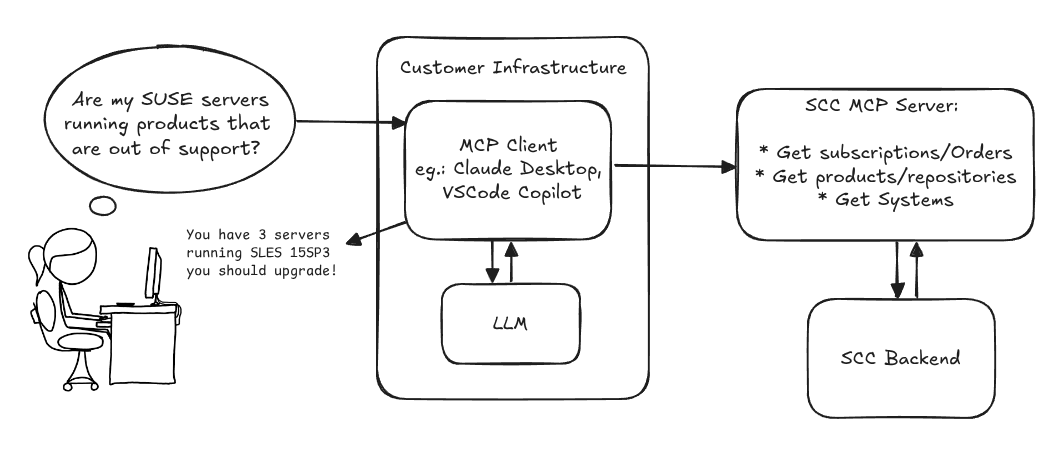
Goals
We want to demonstrate a proof of concept to connect to the SCC MCP server with any AI agent, for example gemini-cli or codex. Enabling the user to ask questions regarding their SCC inventory.
For this Hackweek, we target that users get proper responses to these example questions:
- Which of my currently active systems are running products that are out of support?
- Do I have ready to use registration codes for SLES?
- What are the latest 5 released patches for SLES 15 SP6? Output as a list with release date, patch name, affected package names and fixed CVEs.
- Which versions of kernel-default are available on SLES 15 SP6?
Technical Notes
Similar to the organization APIs, this can expose to customers data about their subscriptions, orders, systems and products. Authentication should be done by organization credentials, similar to what needs to be provided to RMT/MLM. Customers can connect to the SCC MCP server from their own MCP-compatible client and Large Language Model (LLM), so no third party is involved.
Milestones
[x] Basic MCP API setup
  MCP endpoints
  [x] Products / Repositories
  [x] Subscriptions / Orders
  [x] Systems
  [x] Packages
[x] Document usage with Gemini CLI, Codex
Resources
Gemini CLI setup:
~/.gemini/settings.json:
Update M2Crypto by mcepl
There are couple of projects I work on, which need my attention and putting them to shape:
Goal for this Hackweek
- Put M2Crypto into better shape (most issues closed, all pull requests processed)
- More fun to learn jujutsu
- Play more with Gemini, how much it help (or not).
- Perhaps, also (just slightly related), help to fix vis to work with LuaJIT, particularly to make vis-lspc working.
SUSE Virtualization (Harvester): VM Import UI flow by wombelix
Description
SUSE Virtualization (Harvester) has a vm-import-controller that allows migrating VMs from VMware and OpenStack, but users need to write manifest files and apply them with kubectl to use it. This project is about adding the missing UI pieces to the harvester-ui-extension, making VM Imports accessible without requiring Kubernetes and YAML knowledge.
VMware and OpenStack admins aren't automatically familiar with Kubernetes and YAML. Implementing the UI part for the VM Import feature makes it easier to use and more accessible. The Harvester Enhancement Proposal (HEP) VM Migration controller included a UI flow implementation in its scope. Issue #2274 received multiple comments that an UI integration would be a nice addition, and issue #4663 was created to request the implementation but eventually stalled.
Right now users need to manually create either VmwareSource or OpenstackSource resources, then write VirtualMachineImport manifests with network mappings and all the other configuration options. Users should be able to do that and track import status through the UI without writing YAML.
Work during the Hack Week will be done in this fork in a branch called suse-hack-week-25, making progress publicly visible and open for contributions. When everything works out and the branch is in good shape, it will be submitted as a pull request to harvester-ui-extension to get it included in the next Harvester release.
Testing will focus on VMware since that's what is available in the lab environment (SUSE Virtualization 1.6 single-node cluster, ESXi 8.0 standalone host). Given that this is about UI and surfacing what the vm-import-controller handles, the implementation should work for OpenStack imports as well.
This project is also a personal challenge to learn vue.js and get familiar with Rancher Extensions development, since harvester-ui-extension is built on that framework.
Goals
- Learn Vue.js and Rancher Extensions fundamentals required to finish the project
- Read and learn from other Rancher UI Extensions code, especially understanding the
harvester-ui-extensioncode base - Understand what the
vm-import-controllerand its CRDs require, identify ready to use components in the Rancher UI Extension API that can be leveraged - Implement UI logic for creating and managing
VmwareSource/OpenstackSourceandVirtualMachineImportresources with all relevant configuration options and credentials - Implemnt UI elements to display
VirtualMachineImportstatus and errors
Resources
HEP and related discussion
- https://github.com/harvester/harvester/blob/master/enhancements/20220726-vm-migration.md
- https://github.com/harvester/harvester/issues/2274
- https://github.com/harvester/harvester/issues/4663
SUSE Virtualization VM Import Documentation
Rancher Extensions Documentation
Rancher UI Plugin Examples
Vue Router Essentials
Vue Router API
Vuex Documentation
Update M2Crypto by mcepl
There are couple of projects I work on, which need my attention and putting them to shape:
Goal for this Hackweek
- Put M2Crypto into better shape (most issues closed, all pull requests processed)
- More fun to learn jujutsu
- Play more with Gemini, how much it help (or not).
- Perhaps, also (just slightly related), help to fix vis to work with LuaJIT, particularly to make vis-lspc working.
Help Create A Chat Control Resistant Turnkey Chatmail/Deltachat Relay Stack - Rootless Podman Compose, OpenSUSE BCI, Hardened, & SELinux by 3nd5h1771fy
Description
The Mission: Decentralized & Sovereign Messaging
FYI: If you have never heard of "Chatmail", you can visit their site here, but simply put it can be thought of as the underlying protocol/platform decentralized messengers like DeltaChat use for their communications. Do not confuse it with the honeypot looking non-opensource paid for prodect with better seo that directs you to chatmailsecure(dot)com
In an era of increasing centralized surveillance by unaccountable bad actors (aka BigTech), "Chat Control," and the erosion of digital privacy, the need for sovereign communication infrastructure is critical. Chatmail is a pioneering initiative that bridges the gap between classic email and modern instant messaging, offering metadata-minimized, end-to-end encrypted (E2EE) communication that is interoperable and open.
However, unless you are a seasoned sysadmin, the current recommended deployment method of a Chatmail relay is rigid, fragile, difficult to properly secure, and effectively takes over the entire host the "relay" is deployed on.
Why This Matters
A simple, host agnostic, reproducible deployment lowers the entry cost for anyone wanting to run a privacy‑preserving, decentralized messaging relay. In an era of perpetually resurrected chat‑control legislation threats, EU digital‑sovereignty drives, and many dangers of using big‑tech messaging platforms (Apple iMessage, WhatsApp, FB Messenger, Instagram, SMS, Google Messages, etc...) for any type of communication, providing an easy‑to‑use alternative empowers:
- Censorship resistance - No single entity controls the relay; operators can spin up new nodes quickly.
- Surveillance mitigation - End‑to‑end OpenPGP encryption ensures relay operators never see plaintext.
- Digital sovereignty - Communities can host their own infrastructure under local jurisdiction, aligning with national data‑policy goals.
By turning the Chatmail relay into a plug‑and‑play container stack, we enable broader adoption, foster a resilient messaging fabric, and give developers, activists, and hobbyists a concrete tool to defend privacy online.
Goals
As I indicated earlier, this project aims to drastically simplify the deployment of Chatmail relay. By converting this architecture into a portable, containerized stack using Podman and OpenSUSE base container images, we can allow anyone to deploy their own censorship-resistant, privacy-preserving communications node in minutes.
Our goal for Hack Week: package every component into containers built on openSUSE/MicroOS base images, initially orchestrated with a single container-compose.yml (podman-compose compatible). The stack will:
- Run on any host that supports Podman (including optimizations and enhancements for SELinux‑enabled systems).
- Allow network decoupling by refactoring configurations to move from file-system constrained Unix sockets to internal TCP networking, allowing containers achieve stricter isolation.
- Utilize Enhanced Security with SELinux by using purpose built utilities such as udica we can quickly generate custom SELinux policies for the container stack, ensuring strict confinement superior to standard/typical Docker deployments.
- Allow the use of bind or remote mounted volumes for shared data (
/var/vmail, DKIM keys, TLS certs, etc.). - Replace the local DNS server requirement with a remote DNS‑provider API for DKIM/TXT record publishing.
By delivering a turnkey, host agnostic, reproducible deployment, we lower the barrier for individuals and small communities to launch their own chatmail relays, fostering a decentralized, censorship‑resistant messaging ecosystem that can serve DeltaChat users and/or future services adopting this protocol
Resources
- The links included above
- https://chatmail.at/doc/relay/
- https://delta.chat/en/help
- Project repo -> https://codeberg.org/EndShittification/containerized-chatmail-relay
Testing and adding GNU/Linux distributions on Uyuni by juliogonzalezgil
Join the Gitter channel! https://gitter.im/uyuni-project/hackweek
Uyuni is a configuration and infrastructure management tool that saves you time and headaches when you have to manage and update tens, hundreds or even thousands of machines. It also manages configuration, can run audits, build image containers, monitor and much more!
Currently there are a few distributions that are completely untested on Uyuni or SUSE Manager (AFAIK) or just not tested since a long time, and could be interesting knowing how hard would be working with them and, if possible, fix whatever is broken.
For newcomers, the easiest distributions are those based on DEB or RPM packages. Distributions with other package formats are doable, but will require adapting the Python and Java code to be able to sync and analyze such packages (and if salt does not support those packages, it will need changes as well). So if you want a distribution with other packages, make sure you are comfortable handling such changes.
No developer experience? No worries! We had non-developers contributors in the past, and we are ready to help as long as you are willing to learn. If you don't want to code at all, you can also help us preparing the documentation after someone else has the initial code ready, or you could also help with testing :-)
The idea is testing Salt (including bootstrapping with bootstrap script) and Salt-ssh clients
To consider that a distribution has basic support, we should cover at least (points 3-6 are to be tested for both salt minions and salt ssh minions):
- Reposync (this will require using spacewalk-common-channels and adding channels to the .ini file)
- Onboarding (salt minion from UI, salt minion from bootstrap scritp, and salt-ssh minion) (this will probably require adding OS to the bootstrap repository creator)
- Package management (install, remove, update...)
- Patching
- Applying any basic salt state (including a formula)
- Salt remote commands
- Bonus point: Java part for product identification, and monitoring enablement
- Bonus point: sumaform enablement (https://github.com/uyuni-project/sumaform)
- Bonus point: Documentation (https://github.com/uyuni-project/uyuni-docs)
- Bonus point: testsuite enablement (https://github.com/uyuni-project/uyuni/tree/master/testsuite)
If something is breaking: we can try to fix it, but the main idea is research how supported it is right now. Beyond that it's up to each project member how much to hack :-)
- If you don't have knowledge about some of the steps: ask the team
- If you still don't know what to do: switch to another distribution and keep testing.
This card is for EVERYONE, not just developers. Seriously! We had people from other teams helping that were not developers, and added support for Debian and new SUSE Linux Enterprise and openSUSE Leap versions :-)
In progress/done for Hack Week 25
Guide
We started writin a Guide: Adding a new client GNU Linux distribution to Uyuni at https://github.com/uyuni-project/uyuni/wiki/Guide:-Adding-a-new-client-GNU-Linux-distribution-to-Uyuni, to make things easier for everyone, specially those not too familiar wht Uyuni or not technical.
openSUSE Leap 16.0
The distribution will all love!
https://en.opensuse.org/openSUSE:Roadmap#DRAFTScheduleforLeap16.0
Curent Status We started last year, it's complete now for Hack Week 25! :-D
[W]Reposync (this will require using spacewalk-common-channels and adding channels to the .ini file) NOTE: Done, client tools for SLMicro6 are using as those for SLE16.0/openSUSE Leap 16.0 are not available yet[W]Onboarding (salt minion from UI, salt minion from bootstrap scritp, and salt-ssh minion) (this will probably require adding OS to the bootstrap repository creator)[W]Package management (install, remove, update...). Works, even reboot requirement detection
Improve chore and screen time doc generator script `wochenplaner` by gniebler
Description
I wrote a little Python script to generate PDF docs, which can be used to track daily chore completion and screen time usage for several people, with one page per person/week.
I named this script wochenplaner and have been using it for a few months now.
It needs some improvements and adjustments in how the screen time should be tracked and how chores are displayed.
Goals
- Fix chore field separation lines
- Change screen time tracking logic from "global" (week-long) to daily subtraction and weekly addition of remainders (more intuitive than current "weekly time budget method)
- Add logic to fill in chore fields/lines, ideally with pictures, falling back to text.
Resources
tbd (Gitlab repo)
Collection and organisation of information about Bulgarian schools by iivanov
Description
To achieve this it will be necessary:
- Collect/download raw data from various government and non-governmental organizations
- Clean up raw data and organise it in some kind database.
- Create tool to make queries easy.
- Or perhaps dump all data into AI and ask questions in natural language.
Goals
By selecting particular school information like this will be provided:
- School scores on national exams.
- School scores from the external evaluations exams.
- School town, municipality and region.
- Employment rate in a town or municipality.
- Average health of the population in the region.
Resources
Some of these are available only in bulgarian.
- https://danybon.com/klasazia
- https://nvoresults.com/index.html
- https://ri.mon.bg/active-institutions
- https://www.nsi.bg/nrnm/ekatte/archive
Results
- Information about all Bulgarian schools with their scores during recent years cleaned and organised into SQL tables
- Information about all Bulgarian villages, cities, municipalities and districts cleaned and organised into SQL tables
- Information about all Bulgarian villages and cities census since beginning of this century cleaned and organised into SQL tables.
- Information about all Bulgarian municipalities about religion, ethnicity cleaned and organised into SQL tables.
- Data successfully loaded to locally running Ollama with help to Vanna.AI
- Seems to be usable.
TODO
- Add more statistical information about municipalities and ....
Code and data
SUSE Virtualization (Harvester): VM Import UI flow by wombelix
Description
SUSE Virtualization (Harvester) has a vm-import-controller that allows migrating VMs from VMware and OpenStack, but users need to write manifest files and apply them with kubectl to use it. This project is about adding the missing UI pieces to the harvester-ui-extension, making VM Imports accessible without requiring Kubernetes and YAML knowledge.
VMware and OpenStack admins aren't automatically familiar with Kubernetes and YAML. Implementing the UI part for the VM Import feature makes it easier to use and more accessible. The Harvester Enhancement Proposal (HEP) VM Migration controller included a UI flow implementation in its scope. Issue #2274 received multiple comments that an UI integration would be a nice addition, and issue #4663 was created to request the implementation but eventually stalled.
Right now users need to manually create either VmwareSource or OpenstackSource resources, then write VirtualMachineImport manifests with network mappings and all the other configuration options. Users should be able to do that and track import status through the UI without writing YAML.
Work during the Hack Week will be done in this fork in a branch called suse-hack-week-25, making progress publicly visible and open for contributions. When everything works out and the branch is in good shape, it will be submitted as a pull request to harvester-ui-extension to get it included in the next Harvester release.
Testing will focus on VMware since that's what is available in the lab environment (SUSE Virtualization 1.6 single-node cluster, ESXi 8.0 standalone host). Given that this is about UI and surfacing what the vm-import-controller handles, the implementation should work for OpenStack imports as well.
This project is also a personal challenge to learn vue.js and get familiar with Rancher Extensions development, since harvester-ui-extension is built on that framework.
Goals
- Learn Vue.js and Rancher Extensions fundamentals required to finish the project
- Read and learn from other Rancher UI Extensions code, especially understanding the
harvester-ui-extensioncode base - Understand what the
vm-import-controllerand its CRDs require, identify ready to use components in the Rancher UI Extension API that can be leveraged - Implement UI logic for creating and managing
VmwareSource/OpenstackSourceandVirtualMachineImportresources with all relevant configuration options and credentials - Implemnt UI elements to display
VirtualMachineImportstatus and errors
Resources
HEP and related discussion
- https://github.com/harvester/harvester/blob/master/enhancements/20220726-vm-migration.md
- https://github.com/harvester/harvester/issues/2274
- https://github.com/harvester/harvester/issues/4663
SUSE Virtualization VM Import Documentation
Rancher Extensions Documentation
Rancher UI Plugin Examples
Vue Router Essentials
Vue Router API
Vuex Documentation
Self-Scaling LLM Infrastructure Powered by Rancher by ademicev0
Self-Scaling LLM Infrastructure Powered by Rancher

Description
The Problem
Running LLMs can get expensive and complex pretty quickly.
Today there are typically two choices:
- Use cloud APIs like OpenAI or Anthropic. Easy to start with, but costs add up at scale.
- Self-host everything - set up Kubernetes, figure out GPU scheduling, handle scaling, manage model serving... it's a lot of work.
What if there was a middle ground?
What if infrastructure scaled itself instead of making you scale it?
Can we use existing Rancher capabilities like CAPI, autoscaling, and GitOps to make this simpler instead of building everything from scratch?
Project Repository: github.com/alexander-demicev/llmserverless
What This Project Does
A key feature is hybrid deployment: requests can be routed based on complexity or privacy needs. Simple or low-sensitivity queries can use public APIs (like OpenAI), while complex or private requests are handled in-house on local infrastructure. This flexibility allows balancing cost, privacy, and performance - using cloud for routine tasks and on-premises resources for sensitive or demanding workloads.
A complete, self-scaling LLM infrastructure that:
- Scales to zero when idle (no idle costs)
- Scales up automatically when requests come in
- Adds more nodes when needed, removes them when demand drops
- Runs on any infrastructure - laptop, bare metal, or cloud
Think of it as "serverless for LLMs" - focus on building, the infrastructure handles itself.
How It Works
A combination of open source tools working together:
Flow:
- Users interact with OpenWebUI (chat interface)
- Requests go to LiteLLM Gateway
- LiteLLM routes requests to:
- Ollama (Knative) for local model inference (auto-scales pods)
- Or cloud APIs for fallback
A CLI for Harvester by mohamed.belgaied
Harvester does not officially come with a CLI tool, the user is supposed to interact with Harvester mostly through the UI. Though it is theoretically possible to use kubectl to interact with Harvester, the manipulation of Kubevirt YAML objects is absolutely not user friendly. Inspired by tools like multipass from Canonical to easily and rapidly create one of multiple VMs, I began the development of Harvester CLI. Currently, it works but Harvester CLI needs some love to be up-to-date with Harvester v1.0.2 and needs some bug fixes and improvements as well.
Project Description
Harvester CLI is a command line interface tool written in Go, designed to simplify interfacing with a Harvester cluster as a user. It is especially useful for testing purposes as you can easily and rapidly create VMs in Harvester by providing a simple command such as:
harvester vm create my-vm --count 5
to create 5 VMs named my-vm-01 to my-vm-05.

Harvester CLI is functional but needs a number of improvements: up-to-date functionality with Harvester v1.0.2 (some minor issues right now), modifying the default behaviour to create an opensuse VM instead of an ubuntu VM, solve some bugs, etc.
Github Repo for Harvester CLI: https://github.com/belgaied2/harvester-cli
Done in previous Hackweeks
- Create a Github actions pipeline to automatically integrate Harvester CLI to Homebrew repositories: DONE
- Automatically package Harvester CLI for OpenSUSE / Redhat RPMs or DEBs: DONE
Goal for this Hackweek
The goal for this Hackweek is to bring Harvester CLI up-to-speed with latest Harvester versions (v1.3.X and v1.4.X), and improve the code quality as well as implement some simple features and bug fixes.
Some nice additions might be: * Improve handling of namespaced objects * Add features, such as network management or Load Balancer creation ? * Add more unit tests and, why not, e2e tests * Improve CI * Improve the overall code quality * Test the program and create issues for it
Issue list is here: https://github.com/belgaied2/harvester-cli/issues
Resources
The project is written in Go, and using client-go the Kubernetes Go Client libraries to communicate with the Harvester API (which is Kubernetes in fact).
Welcome contributions are:
- Testing it and creating issues
- Documentation
- Go code improvement
What you might learn
Harvester CLI might be interesting to you if you want to learn more about:
- GitHub Actions
- Harvester as a SUSE Product
- Go programming language
- Kubernetes API
- Kubevirt API objects (Manipulating VMs and VM Configuration in Kubernetes using Kubevirt)
Rancher Cluster Lifecycle Visualizer by jferraz
Description
Rancher’s v2 provisioning system represents each downstream cluster with several Kubernetes custom resources across multiple API groups, such as clusters.provisioning.cattle.io and clusters.management.cattle.io. Understanding why a cluster is stuck in states like "Provisioning", "Updating", or "Unavailable" often requires jumping between these resources, reading conditions, and correlating them with agent connectivity and known failure modes.
This project will build a Cluster Lifecycle Visualizer: a small, read-only controller that runs in the Rancher management cluster and generates a single, human-friendly view per cluster. It will watch Rancher cluster CRDs, derive a simplified lifecycle phase, keep a history of phase transitions from installation time onward, and attach a short, actionable recommendation string that hints at what the operator should check or do next.
Goals
- Provide a compact lifecycle summary for each Rancher-managed cluster (e.g.
Provisioning,WaitingForClusterAgent,Active,Updating,Error) derived fromprovisioning.cattle.io/v1 Clusterandmanagement.cattle.io/v3 Clusterstatus and conditions. - Maintain a phase history for each cluster, allowing operators to see how its state evolved over time since the visualizer was installed.
- Attach a recommended action to the current phase using a small ruleset based on common Rancher failure modes (for example, cluster agent not connected, cluster still stabilizing after an upgrade, or generic error states), to improve the day-to-day debugging experience.
- Deliver an easy-to-install, read-only component (single YAML or small Helm chart) that Rancher users can deploy to their management cluster and inspect via
kubectl get/describe, without UI changes or direct access to downstream clusters. - Use idiomatic Go, wrangler, and Rancher APIs.
Resources
- Rancher Manager documentation on RKE2 and K3s cluster configuration and provisioning flows.
- Rancher API Go types for
provisioning.cattle.io/v1andmanagement.cattle.io/v3(from therancher/rancherrepository or published Go packages). - Existing Rancher architecture docs and internal notes about cluster provisioning, cluster agents, and node agents.
- A local Rancher management cluster (k3s or RKE2) with a few test downstream clusters to validate phase detection, history tracking, and recommendations.
Cluster API Provider for Harvester by rcase
Project Description
The Cluster API "infrastructure provider" for Harvester, also named CAPHV, makes it possible to use Harvester with Cluster API. This enables people and organisations to create Kubernetes clusters running on VMs created by Harvester using a declarative spec.
The project has been bootstrapped in HackWeek 23, and its code is available here.
Work done in HackWeek 2023
- Have a early working version of the provider available on Rancher Sandbox : *DONE *
- Demonstrated the created cluster can be imported using Rancher Turtles: DONE
- Stretch goal - demonstrate using the new provider with CAPRKE2: DONE and the templates are available on the repo
DONE in HackWeek 24:
- Add more Unit Tests
- Improve Status Conditions for some phases
- Add cloud provider config generation
- Testing with Harvester v1.3.2
- Template improvements
- Issues creation
DONE in 2025 (out of Hackweek)
- Support of ClusterClass
- Add to
clusterctlcommunity providers, you can add it directly withclusterctl - Testing on newer versions of Harvester v1.4.X and v1.5.X
- Support for
clusterctl generate cluster ... - Improve Status Conditions to reflect current state of Infrastructure
- Improve CI (some bugs for release creation)
Goals for HackWeek 2025
- FIRST and FOREMOST, any topic is important to you
- Add e2e testing
- Certify the provider for Rancher Turtles
- Add Machine pool labeling
- Add PCI-e passthrough capabilities.
- Other improvement suggestions are welcome!
Thanks to @isim and Dominic Giebert for their contributions!
Resources
Looking for help from anyone interested in Cluster API (CAPI) or who wants to learn more about Harvester.
This will be an infrastructure provider for Cluster API. Some background reading for the CAPI aspect: