
 GenAI-Powered Systemic Bug Evaluation and Management Assistant
Motivation
What is the decision critical question which one can ask on a bug? How this question affects the decision on a bug and why?
Let's make GenAI look on the bug from the systemic point and evaluate what we don't know. Which piece of information is missing to take a decision?
Description
To build a tool that takes a raw bug report (including error messages and context) and uses a large language model (LLM) to generate a series of structured, Socratic-style or Systemic questions designed to guide a the integration and development toward the root cause, rather than just providing a direct, potentially incorrect fix.
Goals
Set up a Python environment
Set the environment and get a Gemini API key. 2. Collect 5-10 realistic bug reports (from open-source projects, personal projects, or public forums like Stack Overflow—include the error message and the initial context).
Build the Dialogue Loop
- Write a basic Python script using the Gemini API.
- Implement a simple conversational loop: User Input (Bug) -> AI Output (Question) -> User Input (Answer to AI's question) -> AI Output (Next Question). Code Implementation
Socratic/Systemic Strategy Implementation
- Refine the logic to ensure the questions follow a Socratic and Systemic path (e.g., from symptom-> context -> assumptions -> -> critical parts -> ).
- Implement Function Calling (an advanced feature of the Gemini API) to suggest specific actions to the user, like "Run a ping test" or "Check the database logs."
- Implement Bugzillla call to collect the
- Implement Questioning Framework as LLVM pre-conditioning
- Define set of instructions
- Assemble the Tool
Resources
What are Systemic Questions?
Systemic questions explore the relationships, patterns, and interactions within a system rather than focusing on isolated elements.
In IT, they help uncover hidden dependencies, feedback loops, assumptions, and side-effects during debugging or architecture analysis.
Gitlab Project

This project is part of:
Hack Week 25
Activity
Comments
-

2 months ago by rtsvetkov | Reply
=== 1 Circular Questions Focus on feedback loops and mutual influence. Example debugging prompts: - "What components influence this module, and what does this module influence in return?" - "If Service A slows down, how does Service B respond?"
=== 2 Difference Questions Explore variations, exceptions, or changes over time. Example debugging prompts: - "When does the bug not occur? What is different then?" - "What changed in the system right before the issue appeared?"
=== 3 Scaling Questions Quantify experience, severity, or uncertainty. Example debugging prompts: - "On a scale from 1–10, how reproducible is this issue?" - "How much worse does the system behave under peak load versus normal load?"
=== 4 Hypothetical (‘If…Then’) Questions Explore consequences, alternative actions, or simulated scenarios. Example debugging prompts: - "If we disable caching, what do we expect to happen?" - "If the input doubles, which component fails first?" - "If had a unlimited time to prevent this exact bug from ever happening again, where in our development cycle (e.g., design, code review, testing) would we invest the most effort?" - "If we had to ship the next feature without fixing this bug, what workarounds or manual steps would we need to put in place?"
=== 5 Resource / Strength Questions Identify what works well and what can be reused. Example debugging prompts: - "Which environments run without this problem and why?" - "What parts of the system are stable and can guide the fix?"
=== 6 Perspective-Shifting Questions Examine the situation through different roles or components. Example debugging prompts: - "If you were the database, what would you ‘say’ is overwhelming you?" - "How would a network engineer interpret these logs differently from a backend developer?"
== 2. Example Debugging Process Using Systemic Questions
=== Step 1: Clarify the Pattern - "When exactly does the API fail, and when does it succeed?"
=== Step 2: Identify Boundaries - "Which systems are definitely not involved?"
=== Step 3: Explore Changes - "What recent deployments or config changes might correlate?"
=== Step 4: Map Influences - "How does the latency of Service X influence the behaviour of Service Y?"
=== Step 5: Hypothesis Testing - "If we simulate traffic spikes, does the behaviour match production incidents?"
=== Step 6: Leverage What Works - "Why does staging not show the issue? What can this teach us about production?"
== 3. Key Benefits for IT and Systems Theory * Makes hidden dependencies visible
* Avoids tunnel vision in debugging
* Encourages team alignment through shared system understanding
* Supports root-cause analysis rather than symptom chasing -
2 months ago by rtsvetkov | Reply
Example manual research session: https://docs.google.com/document/d/1kgM0lBVavBnN0VeP1OgssWVjwIdE2hGf3jHmi2rxc/edit?usp=sharing
as also the additional transaction on https://bugzilla.suse.com/show_bug.cgi?id=1245907
the session https://gemini.google.com/app/dd379133b4af2ec8?utmsource=applauncher&utmmedium=owned&utmcampaign=base_all
-
-
-
-
-
Reply to rtsvetkov
Adding a port for DeepSeek 
# A First Level Header ## A Second Level Header Use one asterisk to *emphasize* Use two asterisks for **strong emphasis** - Use hyphens - for unordereed - lists This is an [link to example.com](http://example.com/) This is an image  This is a user link @hans This is a project link hw#some-cool-title
Similar Projects
Try out Neovim Plugins supporting AI Providers by enavarro_suse
Description
Experiment with several Neovim plugins that integrate AI model providers such as Gemini and Ollama.
Goals
Evaluate how these plugins enhance the development workflow, how they differ in capabilities, and how smoothly they integrate into Neovim for day-to-day coding tasks.
Resources
- Neovim 0.11.5
- AI-enabled Neovim plugins:
- avante.nvim: https://github.com/yetone/avante.nvim
- Gp.nvim: https://github.com/Robitx/gp.nvim
- parrot.nvim: https://github.com/frankroeder/parrot.nvim
- gemini.nvim: https://dotfyle.com/plugins/kiddos/gemini.nvim
- ...
- Accounts or API keys for AI model providers.
- Local model serving setup (e.g., Ollama)
- Test projects or codebases for practical evaluation:
- OBS: https://build.opensuse.org/
- OBS blog and landing page: https://openbuildservice.org/
- ...
MCP Server for SCC by digitaltomm
Description
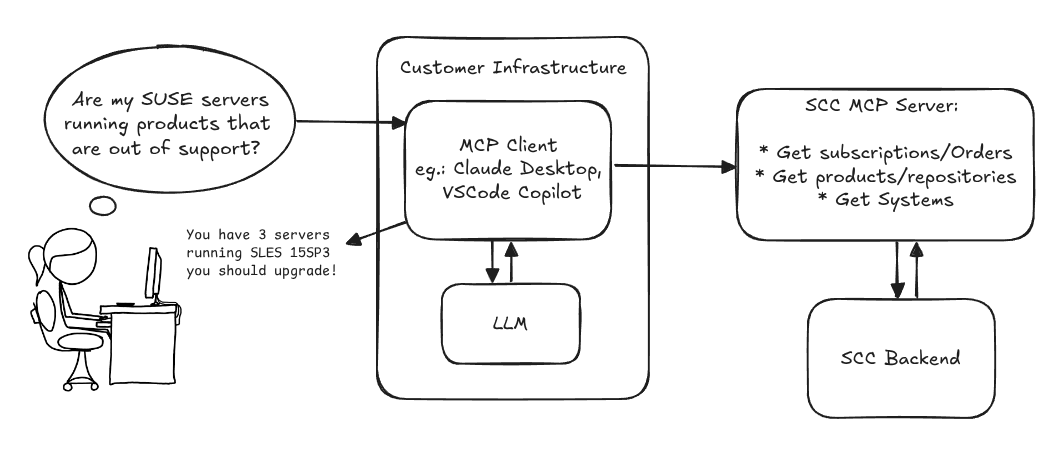
Provide an MCP Server implementation for customers to access data on scc.suse.com via MCP protocol. The core benefit of this MCP interface is that it has direct (read) access to customer data in SCC, so the AI agent gets enhanced knowledge about individual customer data, like subscriptions, orders and registered systems.
Architecture
Goals
We want to demonstrate a proof of concept to connect to the SCC MCP server with any AI agent, for example gemini-cli or codex. Enabling the user to ask questions regarding their SCC inventory.
For this Hackweek, we target that users get proper responses to these example questions:
- Which of my currently active systems are running products that are out of support?
- Do I have ready to use registration codes for SLES?
- What are the latest 5 released patches for SLES 15 SP6? Output as a list with release date, patch name, affected package names and fixed CVEs.
- Which versions of kernel-default are available on SLES 15 SP6?
Technical Notes
Similar to the organization APIs, this can expose to customers data about their subscriptions, orders, systems and products. Authentication should be done by organization credentials, similar to what needs to be provided to RMT/MLM. Customers can connect to the SCC MCP server from their own MCP-compatible client and Large Language Model (LLM), so no third party is involved.
Milestones
[x] Basic MCP API setup
  MCP endpoints
  [x] Products / Repositories
  [x] Subscriptions / Orders
  [x] Systems
  [x] Packages
[x] Document usage with Gemini CLI, Codex
Resources
Gemini CLI setup:
~/.gemini/settings.json:
SUSE Observability MCP server by drutigliano
Description
The idea is to implement the SUSE Observability Model Context Protocol (MCP) Server as a specialized, middle-tier API designed to translate the complex, high-cardinality observability data from StackState (topology, metrics, and events) into highly structured, contextually rich, and LLM-ready snippets.
This MCP Server abstract the StackState APIs. Its primary function is to serve as a Tool/Function Calling target for AI agents. When an AI receives an alert or a user query (e.g., "What caused the outage?"), the AI calls an MCP Server endpoint. The server then fetches the relevant operational facts, summarizes them, normalizes technical identifiers (like URNs and raw metric names) into natural language concepts, and returns a concise JSON or YAML payload. This payload is then injected directly into the LLM's prompt, ensuring the final diagnosis or action is grounded in real-time, accurate SUSE Observability data, effectively minimizing hallucinations.
Goals
- Grounding AI Responses: Ensure that all AI diagnoses, root cause analyses, and action recommendations are strictly based on verifiable, real-time data retrieved from the SUSE Observability StackState platform.
- Simplifying Data Access: Abstract the complexity of StackState's native APIs (e.g., Time Travel, 4T Data Model) into simple, semantic functions that can be easily invoked by LLM tool-calling mechanisms.
- Data Normalization: Convert complex, technical identifiers (like component URNs, raw metric names, and proprietary health states) into standardized, natural language terms that an LLM can easily reason over.
- Enabling Automated Remediation: Define clear, action-oriented MCP endpoints (e.g., execute_runbook) that allow the AI agent to initiate automated operational workflows (e.g., restarts, scaling) after a diagnosis, closing the loop on observability.
Hackweek STEP
- Create a functional MCP endpoint exposing one (or more) tool(s) to answer queries like "What is the health of service X?") by fetching, normalizing, and returning live StackState data in an LLM-ready format.
Scope
- Implement read-only MCP server that can:
- Connect to a live SUSE Observability instance and authenticate (with API token)
- Use tools to fetch data for a specific component URN (e.g., current health state, metrics, possibly topology neighbors, ...).
- Normalize response fields (e.g., URN to "Service Name," health state DEVIATING to "Unhealthy", raw metrics).
- Return the data as a structured JSON payload compliant with the MCP specification.
Deliverables
- MCP Server v0.1 A running Golang MCP server with at least one tool.
- A README.md and a test script (e.g., curl commands or a simple notebook) showing how an AI agent would call the endpoint and the resulting JSON payload.
Outcome A functional and testable API endpoint that proves the core concept: translating complex StackState data into a simple, LLM-ready format. This provides the foundation for developing AI-driven diagnostics and automated remediation.
Resources
- https://www.honeycomb.io/blog/its-the-end-of-observability-as-we-know-it-and-i-feel-fine
- https://www.datadoghq.com/blog/datadog-remote-mcp-server
- https://modelcontextprotocol.io/specification/2025-06-18/index
- https://modelcontextprotocol.io/docs/develop/build-server
Basic implementation
- https://github.com/drutigliano19/suse-observability-mcp-server
Results
Successfully developed and delivered a fully functional SUSE Observability MCP Server that bridges language models with SUSE Observability's operational data. This project demonstrates how AI agents can perform intelligent troubleshooting and root cause analysis using structured access to real-time infrastructure data.
Example execution
Uyuni Health-check Grafana AI Troubleshooter by ygutierrez
Description
This project explores the feasibility of using the open-source Grafana LLM plugin to enhance the Uyuni Health-check tool with LLM capabilities. The idea is to integrate a chat-based "AI Troubleshooter" directly into existing dashboards, allowing users to ask natural-language questions about errors, anomalies, or performance issues.
Goals
- Investigate if and how the
grafana-llm-appplug-in can be used within the Uyuni Health-check tool. - Investigate if this plug-in can be used to query LLMs for troubleshooting scenarios.
- Evaluate support for local LLMs and external APIs through the plugin.
- Evaluate if and how the Uyuni MCP server could be integrated as another source of information.
Resources
AI-Powered Unit Test Automation for Agama by joseivanlopez
The Agama project is a multi-language Linux installer that leverages the distinct strengths of several key technologies:
- Rust: Used for the back-end services and the core HTTP API, providing performance and safety.
- TypeScript (React/PatternFly): Powers the modern web user interface (UI), ensuring a consistent and responsive user experience.
- Ruby: Integrates existing, robust YaST libraries (e.g.,
yast-storage-ng) to reuse established functionality.
The Problem: Testing Overhead
Developing and maintaining code across these three languages requires a significant, tedious effort in writing, reviewing, and updating unit tests for each component. This high cost of testing is a drain on developer resources and can slow down the project's evolution.
The Solution: AI-Driven Automation
This project aims to eliminate the manual overhead of unit testing by exploring and integrating AI-driven code generation tools. We will investigate how AI can:
- Automatically generate new unit tests as code is developed.
- Intelligently correct and update existing unit tests when the application code changes.
By automating this crucial but monotonous task, we can free developers to focus on feature implementation and significantly improve the speed and maintainability of the Agama codebase.
Goals
- Proof of Concept: Successfully integrate and demonstrate an authorized AI tool (e.g.,
gemini-cli) to automatically generate unit tests. - Workflow Integration: Define and document a new unit test automation workflow that seamlessly integrates the selected AI tool into the existing Agama development pipeline.
- Knowledge Sharing: Establish a set of best practices for using AI in code generation, sharing the learned expertise with the broader team.
Contribution & Resources
We are seeking contributors interested in AI-powered development and improving developer efficiency. Whether you have previous experience with code generation tools or are eager to learn, your participation is highly valuable.
If you want to dive deep into AI for software quality, please reach out and join the effort!
- Authorized AI Tools: Tools supported by SUSE (e.g.,
gemini-cli) - Focus Areas: Rust, TypeScript, and Ruby components within the Agama project.
Interesting Links
Try out Neovim Plugins supporting AI Providers by enavarro_suse
Description
Experiment with several Neovim plugins that integrate AI model providers such as Gemini and Ollama.
Goals
Evaluate how these plugins enhance the development workflow, how they differ in capabilities, and how smoothly they integrate into Neovim for day-to-day coding tasks.
Resources
- Neovim 0.11.5
- AI-enabled Neovim plugins:
- avante.nvim: https://github.com/yetone/avante.nvim
- Gp.nvim: https://github.com/Robitx/gp.nvim
- parrot.nvim: https://github.com/frankroeder/parrot.nvim
- gemini.nvim: https://dotfyle.com/plugins/kiddos/gemini.nvim
- ...
- Accounts or API keys for AI model providers.
- Local model serving setup (e.g., Ollama)
- Test projects or codebases for practical evaluation:
- OBS: https://build.opensuse.org/
- OBS blog and landing page: https://openbuildservice.org/
- ...
Bugzilla goes AI - Phase 1 by nwalter
Description
This project, Bugzilla goes AI, aims to boost developer productivity by creating an autonomous AI bug agent during Hackweek. The primary goal is to reduce the time employees spend triaging bugs by integrating Ollama to summarize issues, recommend next steps, and push focused daily reports to a Web Interface.
Goals
To reduce employee time spent on Bugzilla by implementing an AI tool that triages and summarizes bug reports, providing actionable recommendations to the team via Web Interface.
Project Charter
Description
Project Achievements during Hackweek
In this file you can read about what we achieved during Hackweek.
issuefs: FUSE filesystem representing issues (e.g. JIRA) for the use with AI agents code-assistants by llansky3
Description
Creating a FUSE filesystem (issuefs) that mounts issues from various ticketing systems (Github, Jira, Bugzilla, Redmine) as files to your local file system.
And why this is good idea?
- User can use favorite command line tools to view and search the tickets from various sources
- User can use AI agents capabilities from your favorite IDE or cli to ask question about the issues, project or functionality while providing relevant tickets as context without extra work.
- User can use it during development of the new features when you let the AI agent to jump start the solution. The issuefs will give the AI agent the context (AI agents just read few more files) about the bug or requested features. No need for copying and pasting issues to user prompt or by using extra MCP tools to access the issues. These you can still do but this approach is on purpose different.

Goals
- Add Github issue support
- Proof the concept/approach by apply the approach on itself using Github issues for tracking and development of new features
- Add support for Bugzilla and Redmine using this approach in the process of doing it. Record a video of it.
- Clean-up and test the implementation and create some documentation
- Create a blog post about this approach
Resources
There is a prototype implementation here. This currently sort of works with JIRA only.