
Project Description
At SCC, we have a rotating task of COOTW (Commanding Office of the Week). This task involves responding to customer requests from jira and slack help channels, monitoring production systems and doing small chores. Usually, we have documentation to help the COOTW answer questions and quickly find fixes. Most of these are distributed across github, trello and SUSE Support documentation. The aim of this project is to explore the magic of LLMs and create a conversational bot.
Goal for this Hackweek
- Build data ingestion
Data source:
- SUSE KB docs
- scc github docs
- scc trello knowledge board
Test out new RAG architecture
https://gitlab.suse.de/ngetahun/cootwbot

This project is part of:
Hack Week 23 Hack Week 24
Activity
Comments
Be the first to comment!
Similar Projects
Song Search with CLAP by gcolangiuli
Description
Contrastive Language-Audio Pretraining (CLAP) is an open-source library that enables the training of a neural network on both Audio and Text descriptions, making it possible to search for Audio using a Text input. Several pre-trained models for song search are already available on huggingface

Goals
Evaluate how CLAP can be used for song searching and determine which types of queries yield the best results by developing a Minimum Viable Product (MVP) in Python. Based on the results of this MVP, future steps could include:
- Music Tagging;
- Free text search;
- Integration with an LLM (for example, with MCP or the OpenAI API) for music suggestions based on your own library.
The code for this project will be entirely written using AI to better explore and demonstrate AI capabilities.
Result
In this MVP we implemented:
- Async Song Analysis with Clap model
- Free Text Search of the songs
- Similar song search based on vector representation
- Containerised version with web interface
We also documented what went well and what can be improved in the use of AI.
You can have a look at the result here:
Future implementation can be related to performance improvement and stability of the analysis.
References
- CLAP: The main model being researched;
- huggingface: Pre-trained models for CLAP;
- Free Music Archive: Creative Commons songs that can be used for testing;
MCP Server for SCC by digitaltomm
Description
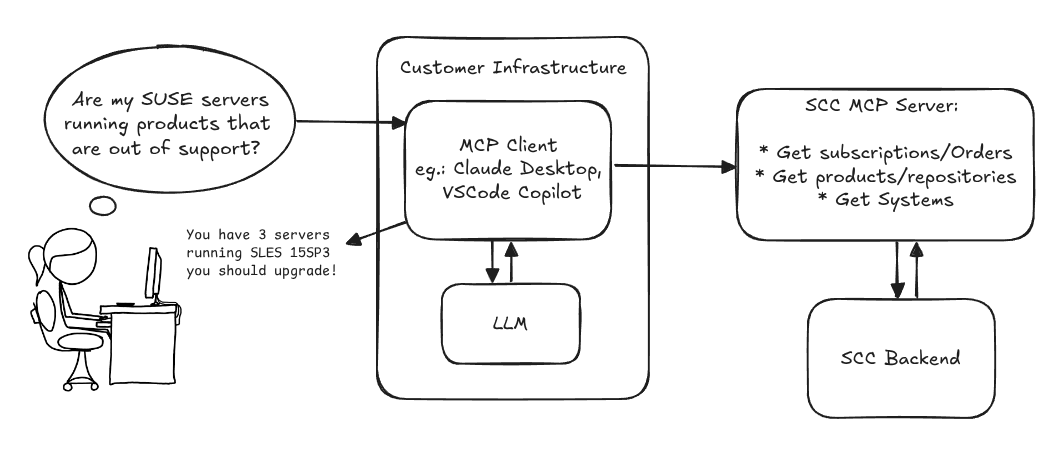
Provide an MCP Server implementation for customers to access data on scc.suse.com via MCP protocol. The core benefit of this MCP interface is that it has direct (read) access to customer data in SCC, so the AI agent gets enhanced knowledge about individual customer data, like subscriptions, orders and registered systems.
Architecture
Goals
We want to demonstrate a proof of concept to connect to the SCC MCP server with any AI agent, for example gemini-cli or codex. Enabling the user to ask questions regarding their SCC inventory.
For this Hackweek, we target that users get proper responses to these example questions:
- Which of my currently active systems are running products that are out of support?
- Do I have ready to use registration codes for SLES?
- What are the latest 5 released patches for SLES 15 SP6? Output as a list with release date, patch name, affected package names and fixed CVEs.
- Which versions of kernel-default are available on SLES 15 SP6?
Technical Notes
Similar to the organization APIs, this can expose to customers data about their subscriptions, orders, systems and products. Authentication should be done by organization credentials, similar to what needs to be provided to RMT/MLM. Customers can connect to the SCC MCP server from their own MCP-compatible client and Large Language Model (LLM), so no third party is involved.
Milestones
[x] Basic MCP API setup
  MCP endpoints
  [x] Products / Repositories
  [x] Subscriptions / Orders
  [x] Systems
  [x] Packages
[x] Document usage with Gemini CLI, Codex
Resources
Gemini CLI setup:
~/.gemini/settings.json:
Flaky Tests AI Finder for Uyuni and MLM Test Suites by oscar-barrios
Description
Our current Grafana dashboards provide a great overview of test suite health, including a panel for "Top failed tests." However, identifying which of these failures are due to legitimate bugs versus intermittent "flaky tests" is a manual, time-consuming process. These flaky tests erode trust in our test suites and slow down development.
This project aims to build a simple but powerful Python script that automates flaky test detection. The script will directly query our Prometheus instance for the historical data of each failed test, using the jenkins_build_test_case_failure_age metric. It will then format this data and send it to the Gemini API with a carefully crafted prompt, asking it to identify which tests show a flaky pattern.
The final output will be a clean JSON list of the most probable flaky tests, which can then be used to populate a new "Top Flaky Tests" panel in our existing Grafana test suite dashboard.
Goals
By the end of Hack Week, we aim to have a single, working Python script that:
- Connects to Prometheus and executes a query to fetch detailed test failure history.
- Processes the raw data into a format suitable for the Gemini API.
- Successfully calls the Gemini API with the data and a clear prompt.
- Parses the AI's response to extract a simple list of flaky tests.
- Saves the list to a JSON file that can be displayed in Grafana.
- New panel in our Dashboard listing the Flaky tests
Resources
- Jenkins Prometheus Exporter: https://github.com/uyuni-project/jenkins-exporter/
- Data Source: Our internal Prometheus server.
- Key Metric:
jenkins_build_test_case_failure_age{jobname, buildid, suite, case, status, failedsince}. - Existing Query for Reference:
count by (suite) (max_over_time(jenkins_build_test_case_failure_age{status=~"FAILED|REGRESSION", jobname="$jobname"}[$__range])). - AI Model: The Google Gemini API.
- Example about how to interact with Gemini API: https://github.com/srbarrios/FailTale/
- Visualization: Our internal Grafana Dashboard.
- Internal IaC: https://gitlab.suse.de/galaxy/infrastructure/-/tree/master/srv/salt/monitoring
Outcome
- Jenkins Flaky Test Detector: https://github.com/srbarrios/jenkins-flaky-tests-detector and its container
- IaC on MLM Team: https://gitlab.suse.de/galaxy/infrastructure/-/tree/master/srv/salt/monitoring/jenkinsflakytestsdetector?reftype=heads, https://gitlab.suse.de/galaxy/infrastructure/-/blob/master/srv/salt/monitoring/grafana/dashboards/flaky-tests.json?ref_type=heads, and others.
- Grafana Dashboard: https://grafana.mgr.suse.de/d/flaky-tests/flaky-tests-detection @ @ text
Try out Neovim Plugins supporting AI Providers by enavarro_suse
Description
Experiment with several Neovim plugins that integrate AI model providers such as Gemini and Ollama.
Goals
Evaluate how these plugins enhance the development workflow, how they differ in capabilities, and how smoothly they integrate into Neovim for day-to-day coding tasks.
Resources
- Neovim 0.11.5
- AI-enabled Neovim plugins:
- avante.nvim: https://github.com/yetone/avante.nvim
- Gp.nvim: https://github.com/Robitx/gp.nvim
- parrot.nvim: https://github.com/frankroeder/parrot.nvim
- gemini.nvim: https://dotfyle.com/plugins/kiddos/gemini.nvim
- ...
- Accounts or API keys for AI model providers.
- Local model serving setup (e.g., Ollama)
- Test projects or codebases for practical evaluation:
- OBS: https://build.opensuse.org/
- OBS blog and landing page: https://openbuildservice.org/
- ...
Docs Navigator MCP: SUSE Edition by mackenzie.techdocs

Description
Docs Navigator MCP: SUSE Edition is an AI-powered documentation navigator that makes finding information across SUSE, Rancher, K3s, and RKE2 documentation effortless. Built as a Model Context Protocol (MCP) server, it enables semantic search, intelligent Q&A, and documentation summarization using 100% open-source AI models (no API keys required!). The project also allows you to bring your own keys from Anthropic and Open AI for parallel processing.
Goals
- [ X ] Build functional MCP server with documentation tools
- [ X ] Implement semantic search with vector embeddings
- [ X ] Create user-friendly web interface
- [ X ] Optimize indexing performance (parallel processing)
- [ X ] Add SUSE branding and polish UX
- [ X ] Stretch Goal: Add more documentation sources
- [ X ] Stretch Goal: Implement document change detection for auto-updates
Coming Soon!
- Community Feedback: Test with real users and gather improvement suggestions
Resources
- Repository: Docs Navigator MCP: SUSE Edition GitHub
- UI Demo: Live UI Demo of Docs Navigator MCP: SUSE Edition
Explore LLM evaluation metrics by thbertoldi
Description
Learn the best practices for evaluating LLM performance with an open-source framework such as DeepEval.
Goals
Curate the knowledge learned during practice and present it to colleagues.
-> Maybe publish a blog post on SUSE's blog?
Resources
https://deepeval.com
https://docs.pactflow.io/docs/bi-directional-contract-testing
Bugzilla goes AI - Phase 1 by nwalter
Description
This project, Bugzilla goes AI, aims to boost developer productivity by creating an autonomous AI bug agent during Hackweek. The primary goal is to reduce the time employees spend triaging bugs by integrating Ollama to summarize issues, recommend next steps, and push focused daily reports to a Web Interface.
Goals
To reduce employee time spent on Bugzilla by implementing an AI tool that triages and summarizes bug reports, providing actionable recommendations to the team via Web Interface.
Project Charter
Description
Project Achievements during Hackweek
In this file you can read about what we achieved during Hackweek.
issuefs: FUSE filesystem representing issues (e.g. JIRA) for the use with AI agents code-assistants by llansky3
Description
Creating a FUSE filesystem (issuefs) that mounts issues from various ticketing systems (Github, Jira, Bugzilla, Redmine) as files to your local file system.
And why this is good idea?
- User can use favorite command line tools to view and search the tickets from various sources
- User can use AI agents capabilities from your favorite IDE or cli to ask question about the issues, project or functionality while providing relevant tickets as context without extra work.
- User can use it during development of the new features when you let the AI agent to jump start the solution. The issuefs will give the AI agent the context (AI agents just read few more files) about the bug or requested features. No need for copying and pasting issues to user prompt or by using extra MCP tools to access the issues. These you can still do but this approach is on purpose different.

Goals
- Add Github issue support
- Proof the concept/approach by apply the approach on itself using Github issues for tracking and development of new features
- Add support for Bugzilla and Redmine using this approach in the process of doing it. Record a video of it.
- Clean-up and test the implementation and create some documentation
- Create a blog post about this approach
Resources
There is a prototype implementation here. This currently sort of works with JIRA only.
Extended private brain - RAG my own scripts and data into offline LLM AI by tjyrinki_suse
Description
For purely studying purposes, I'd like to find out if I could teach an LLM some of my own accumulated knowledge, to use it as a sort of extended brain.
I might use qwen3-coder or something similar as a starting point.
Everything would be done 100% offline without network available to the container, since I prefer to see when network is needed, and make it so it's never needed (other than initial downloads).
Goals
- Learn something about RAG, LLM, AI.
- Find out if everything works offline as intended.
- As an end result have a new way to access my own existing know-how, but so that I can query the wisdom in them.
- Be flexible to pivot in any direction, as long as there are new things learned.
Resources
To be found on the fly.
Timeline
Day 1 (of 4)
- Tried out a RAG demo, expanded on feeding it my own data
- Experimented with qwen3-coder to add a persistent chat functionality, and keeping vectors in a pickle file
- Optimizations to keep everything within context window
- Learn and add a bit of PyTest
Day 2
- More experimenting and more data
- Study ChromaDB
- Add a Web UI that works from another computer even though the container sees network is down
Day 3
- The above RAG is working well enough for demonstration purposes.
- Pivot to trying out OpenCode, configuring local Ollama qwen3-coder there, to analyze the RAG demo.
- Figured out how to configure Ollama template to be usable under OpenCode. OpenCode locally is super slow to just running qwen3-coder alone.
Day 4 (final day)
- Battle with OpenCode that was both slow and kept on piling up broken things.
- Call it success as after all the agentic AI was working locally.
- Clean up the mess left behind a bit.
Blog Post
Summarized the findings at blog post.
Backporting patches using LLM by jankara
Description
Backporting Linux kernel fixes (either for CVE issues or as part of general git-fixes workflow) is boring and mostly mechanical work (dealing with changes in context, renamed variables, new helper functions etc.). The idea of this project is to explore usage of LLM for backporting Linux kernel commits to SUSE kernels using LLM.
Goals
- Create safe environment allowing LLM to run and backport patches without exposing the whole filesystem to it (for privacy and security reasons).
- Write prompt that will guide LLM through the backporting process. Fine tune it based on experimental results.
- Explore success rate of LLMs when backporting various patches.
Resources
- Docker
- Gemini CLI
Repository
Current version of the container with some instructions for use are at: https://gitlab.suse.de/jankara/gemini-cli-backporter
Kubernetes-Based ML Lifecycle Automation by lmiranda
Description
This project aims to build a complete end-to-end Machine Learning pipeline running entirely on Kubernetes, using Go, and containerized ML components.
The pipeline will automate the lifecycle of a machine learning model, including:
- Data ingestion/collection
- Model training as a Kubernetes Job
- Model artifact storage in an S3-compatible registry (e.g. Minio)
- A Go-based deployment controller that automatically deploys new model versions to Kubernetes using Rancher
- A lightweight inference service that loads and serves the latest model
- Monitoring of model performance and service health through Prometheus/Grafana
The outcome is a working prototype of an MLOps workflow that demonstrates how AI workloads can be trained, versioned, deployed, and monitored using the Kubernetes ecosystem.
Goals
By the end of Hack Week, the project should:
Produce a fully functional ML pipeline running on Kubernetes with:
- Data collection job
- Training job container
- Storage and versioning of trained models
- Automated deployment of new model versions
- Model inference API service
- Basic monitoring dashboards
Showcase a Go-based deployment automation component, which scans the model registry and automatically generates & applies Kubernetes manifests for new model versions.
Enable continuous improvement by making the system modular and extensible (e.g., additional models, metrics, autoscaling, or drift detection can be added later).
Prepare a short demo explaining the end-to-end process and how new models flow through the system.
Resources
Updates
- Training pipeline and datasets
- Inference Service py
MCP Server for SCC by digitaltomm
Description
Provide an MCP Server implementation for customers to access data on scc.suse.com via MCP protocol. The core benefit of this MCP interface is that it has direct (read) access to customer data in SCC, so the AI agent gets enhanced knowledge about individual customer data, like subscriptions, orders and registered systems.
Architecture
Goals
We want to demonstrate a proof of concept to connect to the SCC MCP server with any AI agent, for example gemini-cli or codex. Enabling the user to ask questions regarding their SCC inventory.
For this Hackweek, we target that users get proper responses to these example questions:
- Which of my currently active systems are running products that are out of support?
- Do I have ready to use registration codes for SLES?
- What are the latest 5 released patches for SLES 15 SP6? Output as a list with release date, patch name, affected package names and fixed CVEs.
- Which versions of kernel-default are available on SLES 15 SP6?
Technical Notes
Similar to the organization APIs, this can expose to customers data about their subscriptions, orders, systems and products. Authentication should be done by organization credentials, similar to what needs to be provided to RMT/MLM. Customers can connect to the SCC MCP server from their own MCP-compatible client and Large Language Model (LLM), so no third party is involved.
Milestones
[x] Basic MCP API setup
  MCP endpoints
  [x] Products / Repositories
  [x] Subscriptions / Orders
  [x] Systems
  [x] Packages
[x] Document usage with Gemini CLI, Codex
Resources
Gemini CLI setup:
~/.gemini/settings.json: