
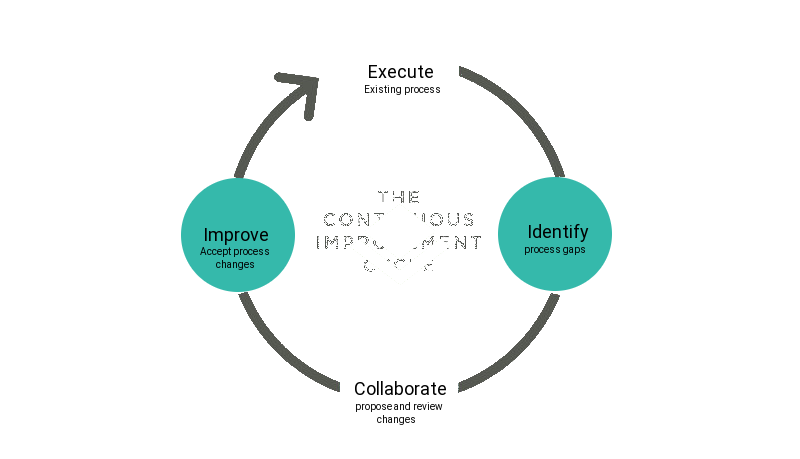
 openSUSE Leap release process improvements
Goal:
I'd like to have the release process defined in markdown/git and use it as a source for process creation in redmine.
openSUSE Leap Release process definition currently lives inside redmine, from where we copy it from release to release via the integrated copy/clone functionality.
The plan is to create it directly from Git and benefit from issues/pull request for the coordinated process improvements. The Tool which SLE uses to create Jira from Markdown is here https://github.com/opensuse/md2workflow, so we essentially need to add just the redmine support.
Reasoning I have really good experience with co-operating within larger team on the process improvement via gitlab/issues and I believe that opensuse would benefit from it as well. We'd set some standards such as "Definition of Done" for the task (when the task can be resolved). I also believe that this would bring more transparency in between community and Release Management.
The benefits were clear, process is more and more follow-able by everyone within the team and task instructions. Set and enforce some process standards via git hooks/github ci, e.g. every task needs to self-contain definition of done. And it could be easy to unify some process steps between leap and SLE.
Useful links:
Current improvement backlog for the SLE process. https://gitlab.suse.de/sle-prjmgr/release-management-checklist/issues
SLE-12-SP5 process overview in JIRA https://jira.suse.com/secure/RapidBoard.jspa?rapidView=1441&useStoredSettings=true
Release Management Checklist documentation https://confluence.suse.com/display/projectmanagement/Release+Management+Checklist
openSUSE Leap process overview in Redmine https://progress.opensuse.org/projects/leap_152/issues/gantt
Tool which is intended to create both JIRA and newly redmine process (this would be part of the hackweek excercise): https://github.com/opensuse/md2workflow
*How can you participate? * Feel free to check available tasks with hackweek19 label: https://github.com/openSUSE/md2workflow/issues https://github.com/openSUSE/openSUSE-release-process/issues


This project is part of:
Hack Week 19
Activity
Comments
-

almost 6 years ago by lkocman | Reply
Just a brainstorm github.com/opensuse/how-to-release sounds more sexy than /opensuse-release-process which is otherwise more accourate
-

almost 6 years ago by gameboy974 | Reply
I disagree : ) opensuse-release-process is simpler and more accurate therefore more sexy ; )
-
-
-
-
almost 6 years ago by lkocman | Reply
I've just created https://github.com/openSUSE/md2workflow/tree/hackweek19
People who want to help can check https://github.com/openSUSE/md2workflow/issues/11 which is a task to support redmine. We essentially want to replicate md2workflow/backend/jirabackend.py but for redmine (including task depedencies and so on). I could use a help on this one as long as people are willing to write some basic tests as well.
-
-
-
almost 6 years ago by lkocman | Reply
https://github.com/openSUSE/md2workflow/issues/16 Was resolved. This unblocks bunch of other tasks. You can now export redmine to markdown (example is the attached single-dump.txt to the Issue 16).
First task for myself is to replace initial tree with the output from lkocman@deadrat:~/Workspace/md2workflow> bin/redmine2md ~/Workspace/opensuse/openSUSE-release-process/redmine-export-openSUSE-Leap-15.220200205.csv
Fortunately we can use --target-version to e.g. Chose only tasks for Alpha and dump them to the file and so on. I expect also a lot of issues without Target version set, so these will require manual placement to e.g. unsorted.md This will unblock more tasks in openSUSE-release-process
What I'd really appreciate as a help is to create a simple ical integration. https://github.com/openSUSE/md2workflow/issues/17 This might be as easy as adding markdown variables (Start date: YYYY-MMDD, Due Date: YYYY-MMDD and Schedule item: MATCHING NAME from .ical) and simply be able to pair these with values from .ical file which could be passed as an argument to bin/md2worflow --env local (--ical-file FILE) example/my_project.conf
-
almost 6 years ago by lkocman | Reply
Initial import is done! This unblocks whole bunch of tasks for
Just out of curiousity I did try to import openSUSE Leap 15.2 instructions to JIRA to see how it would look like. Fortunately there were no issues/errors raised during creation.
Stdout from md2workflow with jira backend: http://pastebin.suse.de/25600 Backlog: https://jira-devel.suse.de/secure/RapidBoard.jspa?rapidView=1492&view=planning&selectedIssue=RMC-2258 Kanban board: https://jira-devel.suse.de/secure/RapidBoard.jspa?rapidView=1492&view=detail&selectedIssue=RMC-2229
(tasks states are random, data might be trashed in about a week or so, as this is a devel instance of jira)
-
-
-
almost 6 years ago by lkocman | Reply
Just a tip for testing api by using a ad-hoc container running redmine instance https://hub.docker.com/_/redmine ` sudo docker pull redmine sudo docker run --name hackweek19-redmine redmine sudo docker inspect hackweek19-redmine | grep '"IPAddress":' "IPAddress": "172.17.0.2",
grep redmine /etc/hosts 172.17.0.2 redmine-local `
-
-
-
-
almost 6 years ago by lkocman | Reply
So I have the local redmine creation done. However I figured out that you can't create the entire stack of layers by yourself as redmine api does not support adding Tracker. It supports only .get() for this Resource.
Therefore I can create project -> subproject -> targetversion -> (NOT tracker) -> task -> subtask Reansonable sounds to have setup of Project and Subproject in advance together with tracker. While targetversion, task subtask gets created by the tool. https://python-redmine.com/resources/tracker.html
-
-
almost 6 years ago by lkocman | Reply
I think I'm 80 percent done with coding part. Just small correction in issue relations and schedule integration. That would be topic for tomorrow.
Last code is available here https://github.com/openSUSE/md2workflow/pull/22 and https://github.com/openSUSE/openSUSE-release-process/tree/hackweek19
-
-
-
-

Reply to lkocman
Marking project as finished! Ufff... 
# A First Level Header ## A Second Level Header Use one asterisk to *emphasize* Use two asterisks for **strong emphasis** - Use hyphens - for unordereed - lists This is an [link to example.com](http://example.com/) This is an image  This is a user link @hans This is a project link hw#some-cool-title
Similar Projects
Create openSUSE images for Arm and RISC-V boards by avicenzi
Project Description
Create openSUSE images (or test generic EFI images) for Arm and RISC-V boards that are not yet supported.
Goal for Hackweek
Create bootable images of Tumbleweed for SBCs that currently have no images available or are untested.
Consider generic EFI images where possible, as some boards can hold a bootloader.
Document in the openSUSE Wiki how to flash and use the image for a given board.
Hack Week 25
Hack Week 24
Hack Week 23
Hack Week 22
Hack Week 21
Resources
OpenRC in openSUSE by jimedrand
Description
I have been using openSUSE for 3 years and I am just seen the systemd as init system. Actually, I want to make openSUSE with supports to another init such as OpenRC init that I'm always using it in another distros, and I was think, "what about if I'm including OpenRC init in openSUSE and give anyone as second way for them who don't want to use systemd?", and I'm curious about that. That's why I'm opening these.
Goals
Giving OpenRC support for Tumbleweed first, then going in Leap in future if possible.
Bring to Cockpit + System Roles capabilities from YAST by miguelpc
Bring to Cockpit + System Roles features from YAST
Cockpit and System Roles have been added to SLES 16 There are several capabilities in YAST that are not yet present in Cockpit and System Roles We will follow the principle of "automate first, UI later" being System Roles the automation component and Cockpit the UI one.
Goals
The idea is to implement service configuration in System Roles and then add an UI to manage these in Cockpit. For some capabilities it will be required to have an specific Cockpit Module as they will interact with a reasource already configured.
Resources
A plan on capabilities missing and suggested implementation is available here: https://docs.google.com/spreadsheets/d/1ZhX-Ip9MKJNeKSYV3bSZG4Qc5giuY7XSV0U61Ecu9lo/edit
Linux System Roles:
- https://linux-system-roles.github.io/
- https://build.opensuse.org/package/show/openSUSE:Factory/ansible-linux-system-roles Package on sle16 ansible-linux-system-roles
First meeting Hackweek catchup
- Monday, December 1 · 11:00 – 12:00
- Time zone: Europe/Madrid
- Google Meet link: https://meet.google.com/rrc-kqch-hca
Help Create A Chat Control Resistant Turnkey Chatmail/Deltachat Relay Stack - Rootless Podman Compose, OpenSUSE BCI, Hardened, & SELinux by 3nd5h1771fy
Description
The Mission: Decentralized & Sovereign Messaging
FYI: If you have never heard of "Chatmail", you can visit their site here, but simply put it can be thought of as the underlying protocol/platform decentralized messengers like DeltaChat use for their communications. Do not confuse it with the honeypot looking non-opensource paid for prodect with better seo that directs you to chatmailsecure(dot)com
In an era of increasing centralized surveillance by unaccountable bad actors (aka BigTech), "Chat Control," and the erosion of digital privacy, the need for sovereign communication infrastructure is critical. Chatmail is a pioneering initiative that bridges the gap between classic email and modern instant messaging, offering metadata-minimized, end-to-end encrypted (E2EE) communication that is interoperable and open.
However, unless you are a seasoned sysadmin, the current recommended deployment method of a Chatmail relay is rigid, fragile, difficult to properly secure, and effectively takes over the entire host the "relay" is deployed on.
Why This Matters
A simple, host agnostic, reproducible deployment lowers the entry cost for anyone wanting to run a privacy‑preserving, decentralized messaging relay. In an era of perpetually resurrected chat‑control legislation threats, EU digital‑sovereignty drives, and many dangers of using big‑tech messaging platforms (Apple iMessage, WhatsApp, FB Messenger, Instagram, SMS, Google Messages, etc...) for any type of communication, providing an easy‑to‑use alternative empowers:
- Censorship resistance - No single entity controls the relay; operators can spin up new nodes quickly.
- Surveillance mitigation - End‑to‑end OpenPGP encryption ensures relay operators never see plaintext.
- Digital sovereignty - Communities can host their own infrastructure under local jurisdiction, aligning with national data‑policy goals.
By turning the Chatmail relay into a plug‑and‑play container stack, we enable broader adoption, foster a resilient messaging fabric, and give developers, activists, and hobbyists a concrete tool to defend privacy online.
Goals
As I indicated earlier, this project aims to drastically simplify the deployment of Chatmail relay. By converting this architecture into a portable, containerized stack using Podman and OpenSUSE base container images, we can allow anyone to deploy their own censorship-resistant, privacy-preserving communications node in minutes.
Our goal for Hack Week: package every component into containers built on openSUSE/MicroOS base images, initially orchestrated with a single container-compose.yml (podman-compose compatible). The stack will:
- Run on any host that supports Podman (including optimizations and enhancements for SELinux‑enabled systems).
- Allow network decoupling by refactoring configurations to move from file-system constrained Unix sockets to internal TCP networking, allowing containers achieve stricter isolation.
- Utilize Enhanced Security with SELinux by using purpose built utilities such as udica we can quickly generate custom SELinux policies for the container stack, ensuring strict confinement superior to standard/typical Docker deployments.
- Allow the use of bind or remote mounted volumes for shared data (
/var/vmail, DKIM keys, TLS certs, etc.). - Replace the local DNS server requirement with a remote DNS‑provider API for DKIM/TXT record publishing.
By delivering a turnkey, host agnostic, reproducible deployment, we lower the barrier for individuals and small communities to launch their own chatmail relays, fostering a decentralized, censorship‑resistant messaging ecosystem that can serve DeltaChat users and/or future services adopting this protocol
Resources
- The links included above
- https://chatmail.at/doc/relay/
- https://delta.chat/en/help
- Project repo -> https://codeberg.org/EndShittification/containerized-chatmail-relay
Improvements to osc (especially with regards to the Git workflow) by mcepl
Description
There is plenty of hacking on osc, where we could spent some fun time. I would like to see a solution for https://github.com/openSUSE/osc/issues/2006 (which is sufficiently non-serious, that it could be part of HackWeek project).
Enhance git-sha-verify: A tool to checkout validated git hashes by gpathak
Description
git-sha-verify is a simple shell utility to verify and checkout trusted git commits signed using GPG key. This tool helps ensure that only authorized or validated commit hashes are checked out from a git repository, supporting better code integrity and security within the workflow.
Supports:
- Verifying commit authenticity signed using gpg key
- Checking out trusted commits
Ideal for teams and projects where the integrity of git history is crucial.
Goals
A minimal python code of the shell script exists as a pull request.
The goal of this hackweek is to:
- DONE: Add more unit tests
- New and more tests can be added later
- New and more tests can be added later
- Partially DONE: Make the python code modular
- DONE: Add code coverage if possible
Resources
- Link to GitHub Repository: https://github.com/openSUSE/git-sha-verify
Improve/rework household chore tracker `chorazon` by gniebler
Description
I wrote a household chore tracker named chorazon, which is meant to be deployed as a web application in the household's local network.
It features the ability to set up different (so far only weekly) schedules per task and per person, where tasks may span several days.
There are "tokens", which can be collected by users. Tasks can (and usually will) have rewards configured where they yield a certain amount of tokens. The idea is that they can later be redeemed for (surprise) gifts, but this is not implemented yet. (So right now one needs to edit the DB manually to subtract tokens when they're redeemed.)
Days are not rolled over automatically, to allow for task completion control.
We used it in my household for several months, with mixed success. There are many limitations in the system that would warrant a revisit.
It's written using the Pyramid Python framework with URL traversal, ZODB as the data store and Web Components for the frontend.
Goals
- Add admin screens for users, tasks and schedules
- Add models, pages etc. to allow redeeming tokens for gifts/surprises
- …?
Resources
tbd (Gitlab repo)
The Agentic Rancher Experiment: Do Androids Dream of Electric Cattle? by moio
Rancher is a beast of a codebase. Let's investigate if the new 2025 generation of GitHub Autonomous Coding Agents and Copilot Workspaces can actually tame it. 
The Plan
Create a sandbox GitHub Organization, clone in key Rancher repositories, and let the AI loose to see if it can handle real-world enterprise OSS maintenance - or if it just hallucinates new breeds of Kubernetes resources!
Specifically, throw "Agentic Coders" some typical tasks in a complex, long-lived open-source project, such as:
❥ The Grunt Work: generate missing GoDocs, unit tests, and refactorings. Rebase PRs.
❥ The Complex Stuff: fix actual (historical) bugs and feature requests to see if they can traverse the complexity without (too much) human hand-holding.
❥ Hunting Down Gaps: find areas lacking in docs, areas of improvement in code, dependency bumps, and so on.
If time allows, also experiment with Model Context Protocol (MCP) to give agents context on our specific build pipelines and CI/CD logs.
Why?
We know AI can write "Hello World." and also moderately complex programs from a green field. But can it rebase a 3-month-old PR with conflicts in rancher/rancher? I want to find the breaking point of current AI agents to determine if and how they can help us to reduce our technical debt, work faster and better. At the same time, find out about pitfalls and shortcomings.
The CONCLUSION!!!
A  State of the Union document was compiled to summarize lessons learned this week. For more gory details, just read on the diary below!
issuefs: FUSE filesystem representing issues (e.g. JIRA) for the use with AI agents code-assistants by llansky3
Description
Creating a FUSE filesystem (issuefs) that mounts issues from various ticketing systems (Github, Jira, Bugzilla, Redmine) as files to your local file system.
And why this is good idea?
- User can use favorite command line tools to view and search the tickets from various sources
- User can use AI agents capabilities from your favorite IDE or cli to ask question about the issues, project or functionality while providing relevant tickets as context without extra work.
- User can use it during development of the new features when you let the AI agent to jump start the solution. The issuefs will give the AI agent the context (AI agents just read few more files) about the bug or requested features. No need for copying and pasting issues to user prompt or by using extra MCP tools to access the issues. These you can still do but this approach is on purpose different.

Goals
- Add Github issue support
- Proof the concept/approach by apply the approach on itself using Github issues for tracking and development of new features
- Add support for Bugzilla and Redmine using this approach in the process of doing it. Record a video of it.
- Clean-up and test the implementation and create some documentation
- Create a blog post about this approach
Resources
There is a prototype implementation here. This currently sort of works with JIRA only.
Is SUSE Trending? Popularity and Developer Sentiment Insight Using Native AI Capabilities by terezacerna
Description
This project aims to explore the popularity and developer sentiment around SUSE and its technologies compared to Red Hat and their technologies. Using publicly available data sources, I will analyze search trends, developer preferences, repository activity, and media presence. The final outcome will be an interactive Power BI dashboard that provides insights into how SUSE is perceived and discussed across the web and among developers.
Goals
- Assess the popularity of SUSE products and brand compared to Red Hat using Google Trends.
- Analyze developer satisfaction and usage trends from the Stack Overflow Developer Survey.
- Use the GitHub API to compare SUSE and Red Hat repositories in terms of stars, forks, contributors, and issue activity.
- Perform sentiment analysis on GitHub issue comments to measure community tone and engagement using built-in Copilot capabilities.
- Perform sentiment analysis on Reddit comments related to SUSE technologies using built-in Copilot capabilities.
- Use Gnews.io to track and compare the volume of news articles mentioning SUSE and Red Hat technologies.
- Test the integration of Copilot (AI) within Power BI for enhanced data analysis and visualization.
- Deliver a comprehensive Power BI report summarizing findings and insights.
- Test the full potential of Power BI, including its AI features and native language Q&A.
Resources
- Google Trends: Web scraping for search popularity data
- Stack Overflow Developer Survey: For technology popularity and satisfaction comparison
- GitHub API: For repository data (stars, forks, contributors, issues, comments).
- Gnews.io API: For article volume and mentions analysis.
- Reddit: SUSE related topics with comments.
Review SCC team internal development processes by calmeidadeoliveira
Description
Continue with the Hackweek 2024, with focus on reviewing existing processes / ways of working and creating workflows:
Goals
- Check all the processes from [1] and [3]
- move them to confluence [4], make comments, corrections, etc.
- present the result to the SCC team and ask for reviews
Resources
[1] https://github.com/SUSE/scc-docs/blob/master/team/workflow/kanban-process.md [2] https://github.com/SUSE/scc-docs/tree/master/team [3] https://github.com/SUSE/scc-docs/tree/master/team/workflow
Confluence
[4] https://confluence.suse.com/spaces/scc/pages/1537703975/Processes+and+ways+of+working
HTTP API for nftables by crameleon
Background
The idea originated in https://progress.opensuse.org/issues/164060 and is about building RESTful API which translates authorized HTTP requests to operations in nftables, possibly utilizing libnftables-json(5).
Originally, I started developing such an interface in Go, utilizing https://github.com/google/nftables. The conversion of string networks to nftables set elements was problematic (unfortunately no record of details), and I started a second attempt in Python, which made interaction much simpler thanks to native nftables Python bindings.
Goals
- Find and track the issue with google/nftables
- Revisit and polish the Go or Python code (prefer Go, but possibly depends on implementing missing functionality), primarily the server component
- Finish functionality to interact with nftables sets (retrieving and updating elements), which are of interest for the originating issue
- Align test suite
- Packaging
Resources
- https://git.netfilter.org/nftables/tree/py/src/nftables.py
- https://git.com.de/Georg/nftables-http-api (to be moved to GitHub)
- https://build.opensuse.org/package/show/home:crameleon:containers/pytest-nftables-container
Results
- Started new https://github.com/tacerus/nftables-http-api.
- First Go nftables issue was related to set elements needing to be added with different start and end addresses - coincidentally, this was recently discovered by someone else, who added a useful helper function for this: https://github.com/google/nftables/pull/342.
- Further improvements submitted: https://github.com/google/nftables/pull/347.
Side results
Upon starting to unify the structure and implementing more functionality, missing JSON output support was noticed for some subcommands in libnftables. Submitted patches here as well:
- https://lore.kernel.org/netfilter-devel/20251203131736.4036382-2-georg@syscid.com/T/#u