
.jpg) YaST module for (SUSE Manager) salt parametrizable formulas
YaST module for (SUSE Manager) salt parametrizable formulas
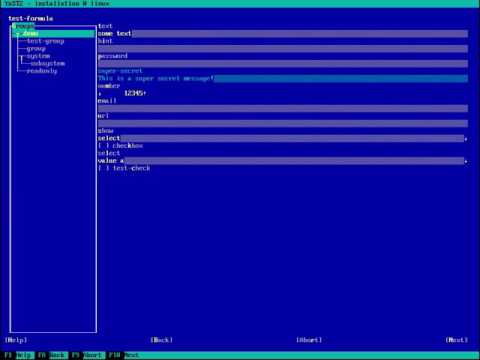
Parametrizable formulas is a normal salt module plus some metadata in order to interactively parametrize them. The metadata is used to automatically generate forms that are then injected as pillar data.
See original Hackweek project, SUSE Manager support for formulas blog article and its (internal for now) docs.

This project could be the next step/evolution of Imobach project and I may take this as the initial code.
The idea is to then create the formula for new employee machines as a Salt formula with a parametrizable form (login, password, Leap or Tumbleweed, laptop or workstation) and use it with AutoYaST bootable USB but keep it reusable for mass deployment with SUSE Manager.
The YaST module should allow to either select a formula from the installed ones, displaying the associated forms dynamically, or be called via AutoYAST with a predefined set of formulas, collect the data, and pass it to salt-call as pillar data.
Status
See a live video demo here.


Looking for hackers with the skills:
This project is part of:
Hack Week 15
Activity
Comments
-

almost 9 years ago by joachimwerner | Reply
With graphical YaST it may be possible to re-use the existing ReactJS implementation in a web widget. Or some YAML to libui conversion of course ...
-

-

almost 9 years ago by IGonzalezSosa | Reply
I've uploaded an screenshot showing the yast2-cm module in action using Salt formulas to get information from user: https://youtu.be/2em_R84XVYg
-
-
almost 9 years ago by IGonzalezSosa | Reply
I've written a summary about the project in my blog: https://imobachgs.github.io/yast/2017/03/01/yast2-cm-gets-support-for-salt-parametrizable-formulas.html
-

Similar Projects
openSUSE on ZoL from OpenZFS project by jkohoutek
Idea is to have SUSE system with OpenZFS as root FS.
Why ZFS
Ways in which ZFS is better than BTRFS
Main goal
Have OpenZFS as install option in the installer and utilize zedenv Boot Environment Manager for SUSE updates install
Goals
- synergy of ZFS with dracut, so snapshots are correctly added to the grub
- synergy of zedenv with zypper
- before every update snapshot is created
- when new kernel or other package which requires reboot is about to be installed, the update will be processed to the new boot environment snapshot and grub configuration changed to boot to this new one
- integrate Root on ZFS as install option to the YaST
- configure Kiwi for the ZFS install images
Completed goals
- prepare ZFS pool compatible with openSUSE installation ✓
- install openSUSE with root on ZFS ✓
- boot to the prepared and installed system ✓
Resources:
Testing and adding GNU/Linux distributions on Uyuni by juliogonzalezgil
Join the Gitter channel! https://gitter.im/uyuni-project/hackweek
Uyuni is a configuration and infrastructure management tool that saves you time and headaches when you have to manage and update tens, hundreds or even thousands of machines. It also manages configuration, can run audits, build image containers, monitor and much more!
Currently there are a few distributions that are completely untested on Uyuni or SUSE Manager (AFAIK) or just not tested since a long time, and could be interesting knowing how hard would be working with them and, if possible, fix whatever is broken.
For newcomers, the easiest distributions are those based on DEB or RPM packages. Distributions with other package formats are doable, but will require adapting the Python and Java code to be able to sync and analyze such packages (and if salt does not support those packages, it will need changes as well). So if you want a distribution with other packages, make sure you are comfortable handling such changes.
No developer experience? No worries! We had non-developers contributors in the past, and we are ready to help as long as you are willing to learn. If you don't want to code at all, you can also help us preparing the documentation after someone else has the initial code ready, or you could also help with testing :-)
The idea is testing Salt (including bootstrapping with bootstrap script) and Salt-ssh clients
To consider that a distribution has basic support, we should cover at least (points 3-6 are to be tested for both salt minions and salt ssh minions):
- Reposync (this will require using spacewalk-common-channels and adding channels to the .ini file)
- Onboarding (salt minion from UI, salt minion from bootstrap scritp, and salt-ssh minion) (this will probably require adding OS to the bootstrap repository creator)
- Package management (install, remove, update...)
- Patching
- Applying any basic salt state (including a formula)
- Salt remote commands
- Bonus point: Java part for product identification, and monitoring enablement
- Bonus point: sumaform enablement (https://github.com/uyuni-project/sumaform)
- Bonus point: Documentation (https://github.com/uyuni-project/uyuni-docs)
- Bonus point: testsuite enablement (https://github.com/uyuni-project/uyuni/tree/master/testsuite)
If something is breaking: we can try to fix it, but the main idea is research how supported it is right now. Beyond that it's up to each project member how much to hack :-)
- If you don't have knowledge about some of the steps: ask the team
- If you still don't know what to do: switch to another distribution and keep testing.
This card is for EVERYONE, not just developers. Seriously! We had people from other teams helping that were not developers, and added support for Debian and new SUSE Linux Enterprise and openSUSE Leap versions :-)
In progress/done for Hack Week 25
Guide
We started writin a Guide: Adding a new client GNU Linux distribution to Uyuni at https://github.com/uyuni-project/uyuni/wiki/Guide:-Adding-a-new-client-GNU-Linux-distribution-to-Uyuni, to make things easier for everyone, specially those not too familiar wht Uyuni or not technical.
openSUSE Leap 16.0
The distribution will all love!
https://en.opensuse.org/openSUSE:Roadmap#DRAFTScheduleforLeap16.0
Curent Status We started last year, it's complete now for Hack Week 25! :-D
[W]Reposync (this will require using spacewalk-common-channels and adding channels to the .ini file) NOTE: Done, client tools for SLMicro6 are using as those for SLE16.0/openSUSE Leap 16.0 are not available yet[W]Onboarding (salt minion from UI, salt minion from bootstrap scritp, and salt-ssh minion) (this will probably require adding OS to the bootstrap repository creator)[W]Package management (install, remove, update...). Works, even reboot requirement detection
Ansible to Salt integration by vizhestkov
Description
We already have initial integration of Ansible in Salt with the possibility to run playbooks from the salt-master on the salt-minion used as an Ansible Control node.
In this project I want to check if it possible to make Ansible working on the transport of Salt. Basically run playbooks with Ansible through existing established Salt (ZeroMQ) transport and not using ssh at all.
It could be a good solution for the end users to reuse Ansible playbooks or run Ansible modules they got used to with no effort of complex configuration with existing Salt (or Uyuni/SUSE Multi Linux Manager) infrastructure.
Goals
- [v] Prepare the testing environment with Salt and Ansible installed
- [v] Discover Ansible codebase to figure out possible ways of integration
- [v] Create Salt/Uyuni inventory module
- [v] Make basic modules to work with no using separate ssh connection, but reusing existing Salt connection
- [v] Test some most basic playbooks
Resources
Enhance setup wizard for Uyuni by PSuarezHernandez
Description
This project wants to enhance the intial setup on Uyuni after its installation, so it's easier for a user to start using with it.
Uyuni currently uses "uyuni-tools" (mgradm) as the installation entrypoint, to trigger the installation of Uyuni in the given host, but does not really perform an initial setup, for instance:
- user creation
- adding products / channels
- generating bootstrap repos
- create activation keys
- ...
Goals
- Provide initial setup wizard as part of mgradm uyuni installation
Resources
Ansible to Salt integration by vizhestkov
Description
We already have initial integration of Ansible in Salt with the possibility to run playbooks from the salt-master on the salt-minion used as an Ansible Control node.
In this project I want to check if it possible to make Ansible working on the transport of Salt. Basically run playbooks with Ansible through existing established Salt (ZeroMQ) transport and not using ssh at all.
It could be a good solution for the end users to reuse Ansible playbooks or run Ansible modules they got used to with no effort of complex configuration with existing Salt (or Uyuni/SUSE Multi Linux Manager) infrastructure.
Goals
- [v] Prepare the testing environment with Salt and Ansible installed
- [v] Discover Ansible codebase to figure out possible ways of integration
- [v] Create Salt/Uyuni inventory module
- [v] Make basic modules to work with no using separate ssh connection, but reusing existing Salt connection
- [v] Test some most basic playbooks
Resources
Enhance setup wizard for Uyuni by PSuarezHernandez
Description
This project wants to enhance the intial setup on Uyuni after its installation, so it's easier for a user to start using with it.
Uyuni currently uses "uyuni-tools" (mgradm) as the installation entrypoint, to trigger the installation of Uyuni in the given host, but does not really perform an initial setup, for instance:
- user creation
- adding products / channels
- generating bootstrap repos
- create activation keys
- ...
Goals
- Provide initial setup wizard as part of mgradm uyuni installation
Resources
Set Uyuni to manage edge clusters at scale by RDiasMateus
Description
Prepare a Poc on how to use MLM to manage edge clusters. Those cluster are normally equal across each location, and we have a large number of them.
The goal is to produce a set of sets/best practices/scripts to help users manage this kind of setup.
Goals
step 1: Manual set-up
Goal: Have a running application in k3s and be able to update it using System Update Controler (SUC)
- Deploy Micro 6.2 machine
Deploy k3s - single node
- https://docs.k3s.io/quick-start
Build/find a simple web application (static page)
- Build/find a helmchart to deploy the application
Deploy the application on the k3s cluster
Install App updates through helm update
Install OS updates using MLM
step 2: Automate day 1
Goal: Trigger the application deployment and update from MLM
- Salt states For application (with static data)
- Deploy the application helmchart, if not present
- install app updates through helmchart parameters
- Link it to GIT
- Define how to link the state to the machines (based in some pillar data? Using configuration channels by importing the state? Naming convention?)
- Use git update to trigger helmchart app update
- Recurrent state applying configuration channel?
step 3: Multi-node cluster
Goal: Use SUC to update a multi-node cluster.
- Create a multi-node cluster
- Deploy application
- call the helm update/install only on control plane?
- Install App updates through helm update
- Prepare a SUC for OS update (k3s also? How?)
- https://github.com/rancher/system-upgrade-controller
- https://documentation.suse.com/cloudnative/k3s/latest/en/upgrades/automated.html
- Update/deploy the SUC?
- Update/deploy the SUC CRD with the update procedure
Testing and adding GNU/Linux distributions on Uyuni by juliogonzalezgil
Join the Gitter channel! https://gitter.im/uyuni-project/hackweek
Uyuni is a configuration and infrastructure management tool that saves you time and headaches when you have to manage and update tens, hundreds or even thousands of machines. It also manages configuration, can run audits, build image containers, monitor and much more!
Currently there are a few distributions that are completely untested on Uyuni or SUSE Manager (AFAIK) or just not tested since a long time, and could be interesting knowing how hard would be working with them and, if possible, fix whatever is broken.
For newcomers, the easiest distributions are those based on DEB or RPM packages. Distributions with other package formats are doable, but will require adapting the Python and Java code to be able to sync and analyze such packages (and if salt does not support those packages, it will need changes as well). So if you want a distribution with other packages, make sure you are comfortable handling such changes.
No developer experience? No worries! We had non-developers contributors in the past, and we are ready to help as long as you are willing to learn. If you don't want to code at all, you can also help us preparing the documentation after someone else has the initial code ready, or you could also help with testing :-)
The idea is testing Salt (including bootstrapping with bootstrap script) and Salt-ssh clients
To consider that a distribution has basic support, we should cover at least (points 3-6 are to be tested for both salt minions and salt ssh minions):
- Reposync (this will require using spacewalk-common-channels and adding channels to the .ini file)
- Onboarding (salt minion from UI, salt minion from bootstrap scritp, and salt-ssh minion) (this will probably require adding OS to the bootstrap repository creator)
- Package management (install, remove, update...)
- Patching
- Applying any basic salt state (including a formula)
- Salt remote commands
- Bonus point: Java part for product identification, and monitoring enablement
- Bonus point: sumaform enablement (https://github.com/uyuni-project/sumaform)
- Bonus point: Documentation (https://github.com/uyuni-project/uyuni-docs)
- Bonus point: testsuite enablement (https://github.com/uyuni-project/uyuni/tree/master/testsuite)
If something is breaking: we can try to fix it, but the main idea is research how supported it is right now. Beyond that it's up to each project member how much to hack :-)
- If you don't have knowledge about some of the steps: ask the team
- If you still don't know what to do: switch to another distribution and keep testing.
This card is for EVERYONE, not just developers. Seriously! We had people from other teams helping that were not developers, and added support for Debian and new SUSE Linux Enterprise and openSUSE Leap versions :-)
In progress/done for Hack Week 25
Guide
We started writin a Guide: Adding a new client GNU Linux distribution to Uyuni at https://github.com/uyuni-project/uyuni/wiki/Guide:-Adding-a-new-client-GNU-Linux-distribution-to-Uyuni, to make things easier for everyone, specially those not too familiar wht Uyuni or not technical.
openSUSE Leap 16.0
The distribution will all love!
https://en.opensuse.org/openSUSE:Roadmap#DRAFTScheduleforLeap16.0
Curent Status We started last year, it's complete now for Hack Week 25! :-D
[W]Reposync (this will require using spacewalk-common-channels and adding channels to the .ini file) NOTE: Done, client tools for SLMicro6 are using as those for SLE16.0/openSUSE Leap 16.0 are not available yet[W]Onboarding (salt minion from UI, salt minion from bootstrap scritp, and salt-ssh minion) (this will probably require adding OS to the bootstrap repository creator)[W]Package management (install, remove, update...). Works, even reboot requirement detection