
Description
Use AI tools to convert legacy perl scripts to bash
Goals
Uyuni project contains legacy perl scripts used for setup. The perl dependency could be removed, to reduce the container size. The goal of this project is to research use of AI tools for this task.
Resources
Results:
Aider is not the right tool for this. It works ok for small changes, but not for complete rewrite from one language to another.
I got better results with direct API use from script.
No Hackers yet
Looking for hackers with the skills:
This project is part of:
Hack Week 24
Comments
Be the first to comment!
Similar Projects
Multi-agent AI assistant for Linux troubleshooting by doreilly
Description
Explore multi-agent architecture as a way to avoid MCP context rot.
Having one agent with many tools bloats the context with low-level details about tool descriptions, parameter schemas etc which hurts LLM performance. Instead have many specialised agents, each with just the tools it needs for its role. A top level supervisor agent takes the user prompt and delegates to appropriate sub-agents.
Goals
Create an AI assistant with some sub-agents that are specialists at troubleshooting Linux subsystems, e.g. systemd, selinux, firewalld etc. The agents can get information from the system by implementing their own tools with simple function calls, or use tools from MCP servers, e.g. a systemd-agent can use tools from systemd-mcp.
Example prompts/responses:
user$ the system seems slow
assistant$ process foo with pid 12345 is using 1000% cpu ...

user$ I can't connect to the apache webserver
assistant$ the firewall is blocking http ... you can open the port with firewall-cmd --add-port ...
Resources
Language Python. The Python ADK is more mature than Golang.
https://google.github.io/adk-docs/
https://github.com/djoreilly/linux-helper
MCP Server for SCC by digitaltomm
Description
Provide an MCP Server implementation for customers to access data on scc.suse.com via MCP protocol. The core benefit of this MCP interface is that it has direct (read) access to customer data in SCC, so the AI agent gets enhanced knowledge about individual customer data, like subscriptions, orders and registered systems.
Architecture
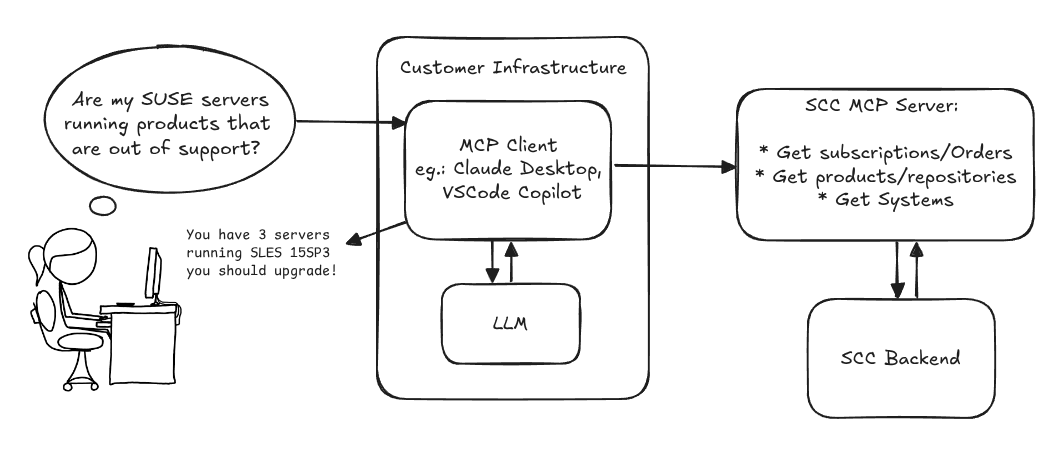
Goals
We want to demonstrate a proof of concept to connect to the SCC MCP server with any AI agent, for example gemini-cli or codex. Enabling the user to ask questions regarding their SCC inventory.
For this Hackweek, we target that users get proper responses to these example questions:
- Which of my currently active systems are running products that are out of support?
- Do I have ready to use registration codes for SLES?
- What are the latest 5 released patches for SLES 15 SP6? Output as a list with release date, patch name, affected package names and fixed CVEs.
- Which versions of kernel-default are available on SLES 15 SP6?
Technical Notes
Similar to the organization APIs, this can expose to customers data about their subscriptions, orders, systems and products. Authentication should be done by organization credentials, similar to what needs to be provided to RMT/MLM. Customers can connect to the SCC MCP server from their own MCP-compatible client and Large Language Model (LLM), so no third party is involved.
Milestones
[x] Basic MCP API setup
  MCP endpoints
  [x] Products / Repositories
  [x] Subscriptions / Orders
  [x] Systems
  [x] Packages
[x] Document usage with Gemini CLI, Codex
Resources
Gemini CLI setup:
~/.gemini/settings.json:
Self-Scaling LLM Infrastructure Powered by Rancher by ademicev0
Self-Scaling LLM Infrastructure Powered by Rancher

Description
The Problem
Running LLMs can get expensive and complex pretty quickly.
Today there are typically two choices:
- Use cloud APIs like OpenAI or Anthropic. Easy to start with, but costs add up at scale.
- Self-host everything - set up Kubernetes, figure out GPU scheduling, handle scaling, manage model serving... it's a lot of work.
What if there was a middle ground?
What if infrastructure scaled itself instead of making you scale it?
Can we use existing Rancher capabilities like CAPI, autoscaling, and GitOps to make this simpler instead of building everything from scratch?
Project Repository: github.com/alexander-demicev/llmserverless
What This Project Does
A key feature is hybrid deployment: requests can be routed based on complexity or privacy needs. Simple or low-sensitivity queries can use public APIs (like OpenAI), while complex or private requests are handled in-house on local infrastructure. This flexibility allows balancing cost, privacy, and performance - using cloud for routine tasks and on-premises resources for sensitive or demanding workloads.
A complete, self-scaling LLM infrastructure that:
- Scales to zero when idle (no idle costs)
- Scales up automatically when requests come in
- Adds more nodes when needed, removes them when demand drops
- Runs on any infrastructure - laptop, bare metal, or cloud
Think of it as "serverless for LLMs" - focus on building, the infrastructure handles itself.
How It Works
A combination of open source tools working together:
Flow:
- Users interact with OpenWebUI (chat interface)
- Requests go to LiteLLM Gateway
- LiteLLM routes requests to:
- Ollama (Knative) for local model inference (auto-scales pods)
- Or cloud APIs for fallback
Backporting patches using LLM by jankara
Description
Backporting Linux kernel fixes (either for CVE issues or as part of general git-fixes workflow) is boring and mostly mechanical work (dealing with changes in context, renamed variables, new helper functions etc.). The idea of this project is to explore usage of LLM for backporting Linux kernel commits to SUSE kernels using LLM.
Goals
- Create safe environment allowing LLM to run and backport patches without exposing the whole filesystem to it (for privacy and security reasons).
- Write prompt that will guide LLM through the backporting process. Fine tune it based on experimental results.
- Explore success rate of LLMs when backporting various patches.
Resources
- Docker
- Gemini CLI
Repository
Current version of the container with some instructions for use are at: https://gitlab.suse.de/jankara/gemini-cli-backporter
Local AI assistant with optional integrations and mobile companion by livdywan
Description
Setup a local AI assistant for research, brainstorming and proof reading. Look into SurfSense, Open WebUI and possibly alternatives. Explore integration with services like openQA. There should be no cloud dependencies. Mobile phone support or an additional companion app would be a bonus. The goal is not to develop everything from scratch.
User Story
- Allison Average wants a one-click local AI assistent on their openSUSE laptop.
- Ash Awesome wants AI on their phone without an expensive subscription.
Goals
- Evaluate a local SurfSense setup for day to day productivity
- Test opencode for vibe coding and tool calling
Timeline
Day 1
- Took a look at SurfSense and started setting up a local instance.
- Unfortunately the container setup did not work well. Tho this was a great opportunity to learn some new podman commands and refresh my memory on how to recover a corrupted btrfs filesystem.
Day 2
- Due to its sheer size and complexity SurfSense seems to have triggered btrfs fragmentation. Naturally this was not visible in any podman-related errors or in the journal. So this took up much of my second day.
Day 3
- Trying out opencode with Qwen3-Coder and Qwen2.5-Coder.
Day 4
- Context size is a thing, and models are not equally usable for vibe coding.
- Through arduous browsing for ollama models I did find some like
myaniu/qwen2.5-1m:7bwith 1m but even then it is not obvious if they are meant for tool calls.
Day 5
- Whilst trying to make opencode usable I discovered ramalama which worked instantly and very well.
Outcomes
surfsense
I could not easily set this up completely. Maybe in part due to my filesystem issues. Was expecting this to be less of an effort.
opencode
Installing opencode and ollama in my distrobox container along with the following configs worked for me.
When preparing a new project from scratch it is a good idea to start out with a template.
opencode.json
``` {