
Project Description
This project will create a simple chat-bot for tutoring children for school. Lessons will be pre-configured by feeding in a document and requesting the material be taught to a child in consideration of the child's age, etc.
Goal for this Hackweek
Create an interface to have student/teacher logins, where a teacher can configure a lesson for the day. A configured lesson is simply providing initial prompts to the chat-bot.
Resources
https://github.com/dmulder/TinyTutor

This project is part of:
Hack Week 23
Activity
Comments

Similar Projects
Kubernetes-Based ML Lifecycle Automation by lmiranda
Description
This project aims to build a complete end-to-end Machine Learning pipeline running entirely on Kubernetes, using Go, and containerized ML components.
The pipeline will automate the lifecycle of a machine learning model, including:
- Data ingestion/collection
- Model training as a Kubernetes Job
- Model artifact storage in an S3-compatible registry (e.g. Minio)
- A Go-based deployment controller that automatically deploys new model versions to Kubernetes using Rancher
- A lightweight inference service that loads and serves the latest model
- Monitoring of model performance and service health through Prometheus/Grafana
The outcome is a working prototype of an MLOps workflow that demonstrates how AI workloads can be trained, versioned, deployed, and monitored using the Kubernetes ecosystem.
Goals
By the end of Hack Week, the project should:
Produce a fully functional ML pipeline running on Kubernetes with:
- Data collection job
- Training job container
- Storage and versioning of trained models
- Automated deployment of new model versions
- Model inference API service
- Basic monitoring dashboards
Showcase a Go-based deployment automation component, which scans the model registry and automatically generates & applies Kubernetes manifests for new model versions.
Enable continuous improvement by making the system modular and extensible (e.g., additional models, metrics, autoscaling, or drift detection can be added later).
Prepare a short demo explaining the end-to-end process and how new models flow through the system.
Resources
Updates
- Training pipeline and datasets
- Inference Service py
Try out Neovim Plugins supporting AI Providers by enavarro_suse
Description
Experiment with several Neovim plugins that integrate AI model providers such as Gemini and Ollama.
Goals
Evaluate how these plugins enhance the development workflow, how they differ in capabilities, and how smoothly they integrate into Neovim for day-to-day coding tasks.
Resources
- Neovim 0.11.5
- AI-enabled Neovim plugins:
- avante.nvim: https://github.com/yetone/avante.nvim
- Gp.nvim: https://github.com/Robitx/gp.nvim
- parrot.nvim: https://github.com/frankroeder/parrot.nvim
- gemini.nvim: https://dotfyle.com/plugins/kiddos/gemini.nvim
- ...
- Accounts or API keys for AI model providers.
- Local model serving setup (e.g., Ollama)
- Test projects or codebases for practical evaluation:
- OBS: https://build.opensuse.org/
- OBS blog and landing page: https://openbuildservice.org/
- ...
Background Coding Agent by mmanno
Description
I had only bad experiences with AI one-shots. However, monitoring agent work closely and interfering often did result in productivity gains.
Now, other companies are using agents in pipelines. That makes sense to me, just like CI, we want to offload work to pipelines: Our engineering teams are consistently slowed down by "toil": low-impact, repetitive maintenance tasks. A simple linter rule change, a dependency bump, rebasing patch-sets on top of newer releases or API deprecation requires dozens of manual PRs, draining time from feature development.
So far we have been writing deterministic, script-based automation for these tasks. And it turns out to be a common trap. These scripts are brittle, complex, and become a massive maintenance burden themselves.
Can we make prompts and workflows smart enough to succeed at background coding?
Goals
We will build a platform that allows engineers to execute complex code transformations using prompts.
By automating this toil, we accelerate large-scale migrations and allow teams to focus on high-value work.
Our platform will consist of three main components:
- "Change" Definition: Engineers will define a transformation as a simple, declarative manifest:
- The target repositories.
- A wrapper to run a "coding agent", e.g., "gemini-cli".
- The task as a natural language prompt.
- The target repositories.
- "Change" Management Service: A central service that orchestrates the jobs. It will receive Change definitions and be responsible for the job lifecycle.
- Execution Runners: We could use existing sandboxed CI runners (like GitHub/GitLab runners) to execute each job or spawn a container.
MVP
- Define the Change manifest format.
- Build the core Management Service that can accept and queue a Change.
- Connect management service and runners, dynamically dispatch jobs to runners.
- Create a basic runner script that can run a hard-coded prompt against a test repo and open a PR.
Stretch Goals:
- Multi-layered approach, Workflow Agents trigger Coding Agents:
- Workflow Agent: Gather information about the task interactively from the user.
- Coding Agent: Once the interactive agent has refined the task into a clear prompt, it hands this prompt off to the "coding agent." This background agent is responsible for executing the task and producing the actual pull request.
- Workflow Agent: Gather information about the task interactively from the user.
- Use MCP:
- Workflow Agent gathers context information from Slack, Github, etc.
- Workflow Agent triggers a Coding Agent.
- Workflow Agent gathers context information from Slack, Github, etc.
- Create a "Standard Task" library with reliable prompts.
- Rebasing rancher-monitoring to a new version of kube-prom-stack
- Update charts to use new images
- Apply changes to comply with a new linter
- Bump complex Go dependencies, like k8s modules
- Backport pull requests to other branches
- Rebasing rancher-monitoring to a new version of kube-prom-stack
- Add “review agents” that review the generated PR.
See also
MCP Trace Suite by r1chard-lyu
Description
This project plans to create an MCP Trace Suite, a system that consolidates commonly used Linux debugging tools such as bpftrace, perf, and ftrace.
The suite is implemented as an MCP Server. This architecture allows an AI agent to leverage the server to diagnose Linux issues and perform targeted system debugging by remotely executing and retrieving tracing data from these powerful tools.
- Repo: https://github.com/r1chard-lyu/systracesuite
- Demo: Slides
Goals
Build an MCP Server that can integrate various Linux debugging and tracing tools, including bpftrace, perf, ftrace, strace, and others, with support for future expansion of additional tools.
Perform testing by intentionally creating bugs or issues that impact system performance, allowing an AI agent to analyze the root cause and identify the underlying problem.
Resources
- Gemini CLI: https://geminicli.com/
- eBPF: https://ebpf.io/
- bpftrace: https://github.com/bpftrace/bpftrace/
- perf: https://perfwiki.github.io/main/
- ftrace: https://github.com/r1chard-lyu/tracium/
MCP Server for SCC by digitaltomm
Description
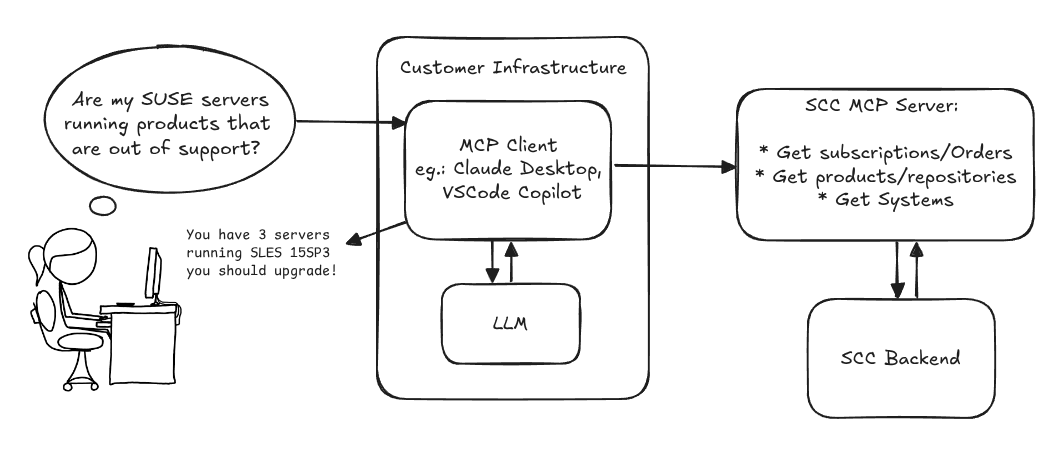
Provide an MCP Server implementation for customers to access data on scc.suse.com via MCP protocol. The core benefit of this MCP interface is that it has direct (read) access to customer data in SCC, so the AI agent gets enhanced knowledge about individual customer data, like subscriptions, orders and registered systems.
Architecture
Goals
We want to demonstrate a proof of concept to connect to the SCC MCP server with any AI agent, for example gemini-cli or codex. Enabling the user to ask questions regarding their SCC inventory.
For this Hackweek, we target that users get proper responses to these example questions:
- Which of my currently active systems are running products that are out of support?
- Do I have ready to use registration codes for SLES?
- What are the latest 5 released patches for SLES 15 SP6? Output as a list with release date, patch name, affected package names and fixed CVEs.
- Which versions of kernel-default are available on SLES 15 SP6?
Technical Notes
Similar to the organization APIs, this can expose to customers data about their subscriptions, orders, systems and products. Authentication should be done by organization credentials, similar to what needs to be provided to RMT/MLM. Customers can connect to the SCC MCP server from their own MCP-compatible client and Large Language Model (LLM), so no third party is involved.
Milestones
[x] Basic MCP API setup
  MCP endpoints
  [x] Products / Repositories
  [x] Subscriptions / Orders
  [x] Systems
  [x] Packages
[x] Document usage with Gemini CLI, Codex
Resources
Gemini CLI setup:
~/.gemini/settings.json:
mgr-ansible-ssh - Intelligent, Lightweight CLI for Distributed Remote Execution by deve5h
Description
By the end of Hack Week, the target will be to deliver a minimal functional version 1 (MVP) of a custom command-line tool named mgr-ansible-ssh (a unified wrapper for BOTH ad-hoc shell & playbooks) that allows operators to:
- Execute arbitrary shell commands on thousand of remote machines simultaneously using Ansible Runner with artifacts saved locally.
- Pass runtime options such as inventory file, remote command string/ playbook execution, parallel forks, limits, dry-run mode, or no-std-ansible-output.
- Leverage existing SSH trust relationships without additional setup.
- Provide a clean, intuitive CLI interface with --help for ease of use. It should provide consistent UX & CI-friendly interface.
- Establish a foundation that can later be extended with advanced features such as logging, grouping, interactive shell mode, safe-command checks, and parallel execution tuning.
The MVP should enable day-to-day operations to efficiently target thousands of machines with a single, consistent interface.
Goals
Primary Goals (MVP):
Build a functional CLI tool (mgr-ansible-ssh) capable of executing shell commands on multiple remote hosts using Ansible Runner. Test the tool across a large distributed environment (1000+ machines) to validate its performance and reliability.
Looking forward to significantly reducing the zypper deployment time across all 351 RMT VM servers in our MLM cluster by eliminating the dependency on the taskomatic service, bringing execution down to a fraction of the current duration. The tool should also support multiple runtime flags, such as:
mgr-ansible-ssh: Remote command execution wrapper using Ansible Runner

Usage: mgr-ansible-ssh [--help] [--version] [--inventory INVENTORY]
                   [--run RUN] [--playbook PLAYBOOK] [--limit LIMIT]
                   [--forks FORKS] [--dry-run] [--no-ansible-output]

Required Arguments
--inventory, -i      Path to Ansible inventory file to use

Any One of the Arguments Is Required
--run, -r            Execute the specified shell command on target hosts
--playbook, -p       Execute the specified Ansible playbook on target hosts

Optional Arguments
--help, -h           Show the help message and exit
--version, -v        Show the version and exit
--limit, -l          Limit execution to specific hosts or groups
--forks, -f          Number of parallel Ansible forks
--dry-run            Run in Ansible check mode (requires -p or --playbook)
--no-ansible-output  Suppress Ansible stdout output
Secondary/Stretched Goals (if time permits):
- Add pretty output formatting (success/failure summary per host).
- Implement basic logging of executed commands and results.
- Introduce safety checks for risky commands (shutdown, rm -rf, etc.).
- Package the tool so it can be installed with pip or stored internally.
Resources
Collaboration is welcome from anyone interested in CLI tooling, automation, or distributed systems. Skills that would be particularly valuable include:
- Python especially around CLI dev (argparse, click, rich)
Improve chore and screen time doc generator script `wochenplaner` by gniebler
Description
I wrote a little Python script to generate PDF docs, which can be used to track daily chore completion and screen time usage for several people, with one page per person/week.
I named this script wochenplaner and have been using it for a few months now.
It needs some improvements and adjustments in how the screen time should be tracked and how chores are displayed.
Goals
- Fix chore field separation lines
- Change screen time tracking logic from "global" (week-long) to daily subtraction and weekly addition of remainders (more intuitive than current "weekly time budget method)
- Add logic to fill in chore fields/lines, ideally with pictures, falling back to text.
Resources
tbd (Gitlab repo)
Improve/rework household chore tracker `chorazon` by gniebler
Description
I wrote a household chore tracker named chorazon, which is meant to be deployed as a web application in the household's local network.
It features the ability to set up different (so far only weekly) schedules per task and per person, where tasks may span several days.
There are "tokens", which can be collected by users. Tasks can (and usually will) have rewards configured where they yield a certain amount of tokens. The idea is that they can later be redeemed for (surprise) gifts, but this is not implemented yet. (So right now one needs to edit the DB manually to subtract tokens when they're redeemed.)
Days are not rolled over automatically, to allow for task completion control.
We used it in my household for several months, with mixed success. There are many limitations in the system that would warrant a revisit.
It's written using the Pyramid Python framework with URL traversal, ZODB as the data store and Web Components for the frontend.
Goals
- Add admin screens for users, tasks and schedules
- Add models, pages etc. to allow redeeming tokens for gifts/surprises
- …?
Resources
tbd (Gitlab repo)
openQA log viewer by mpagot
Description
*** Warning: Are You at Risk for VOMIT? ***
Do you find yourself staring at a screen, your eyes glossing over as thousands of lines of text scroll by? Do you feel a wave of text-based nausea when someone asks you to "just check the logs"?
You may be suffering from VOMIT (Verbose Output Mental Irritation Toxicity).
This dangerous, work-induced ailment is triggered by exposure to an overwhelming quantity of log data, especially from parallel systems. The human brain, not designed to mentally process 12 simultaneous autoinst-log.txt files, enters a state of toxic shock. It rejects the "Verbose Output," making it impossible to find the one critical error line buried in a 50,000-line sea of "INFO: doing a thing."
Before you're forced to rm -rf /var/log in a fit of desperation, we present the digital antacid.
No panic: we have The openQA Log Visualizer
This is the UI antidote for handling toxic log environments. It bravely dives into the chaotic, multi-machine mess of your openQA test runs, finds all the related, verbose logs, and force-feeds them into a parser.

Goals
Work on the existing POC openqa-log-visualizer about few specific tasks:
- add support for more type of logs
- extend the configuration file syntax beyond the actual one
- work on log parsing performance
Find some beta-tester and collect feedback and ideas about features
If time allow for it evaluate other UI frameworks and solutions (something more simple to distribute and run, maybe more low level to gain in performance).
Resources