
Description
For now, there is no possible HA setup for Uyuni. The idea is to explore setting up a read-only shadow instance of an Uyuni and make it as useful as possible.
Possible things to look at:
- live sync of the database, probably using the WAL. Some of the tables may have to be skipped or some features disabled on the RO instance (taskomatic, PXT sessions…)
- Can we use a load balancer that routes read-only queries to either instance and the other to the RW one? For example, packages or PXE data can be served by both, the API GET requests too. The rest would be RW.
Goals
- Prepare a document explaining how to do it.
- PR with the needed code changes to support it


Looking for hackers with the skills:
This project is part of:
Hack Week 25
Activity
Comments
-

3 months ago by epenchev | Reply
Hi, I think there are a few solutions that might help.
Since I'm dealing a lot with HA and databases, would like to share my thoughts.
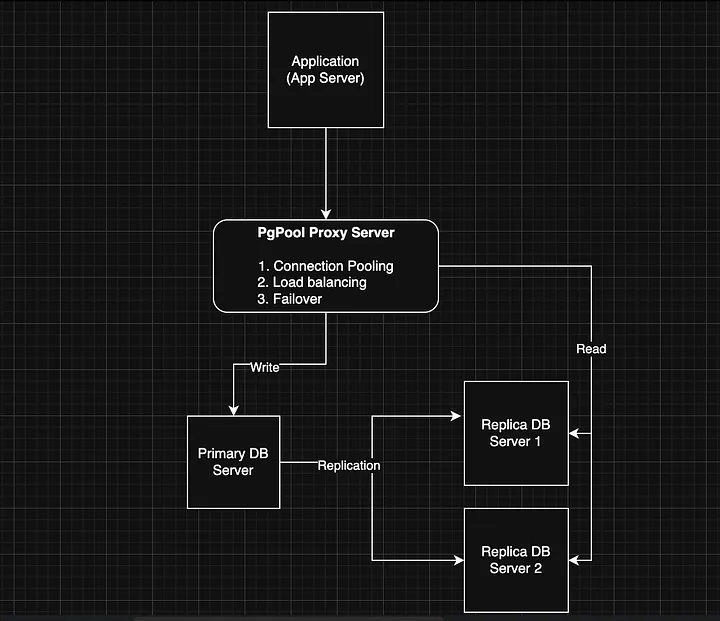
One possible solution would be to go with pgpool-II - Scaling PostgreSQL Master-Replica Load Balancing and Automatic Failover.
Such approach is described very much in details -> https://medium.com/@deysouvik700/scaling-postgresql-with-pgpool-ii-master-replica-load-balancing-and-automatic-failover-091983d4dd9a. In the example architecture the PgPool proxy itself is a single point of failure. The example setup could be extended by adding an additional proxy instance. Both proxy instances could be managed by keepalived + VirtualIP config. Of course there are other resources you can refer to as well.
Another possible solution which is kind of more automated would be to go with cnpg. This would require however to have a K8s cluster for your statefull PostgreSQL workload. So ideally you would need at least 3 Nodes HA K8s cluster. This is the minimal setup and all 3 nodes should be (control plane + worker roles) otherwise the standard setup will go up to 5 nodes (control planes and additional worker nodes.) With cnpg you can create multiple services (rw, ro, r) within you cluster and point clients to them https://cloudnative-pg.io/documentation/1.27/service_management/ and https://cloudnative-pg.io/documentation/1.27/architecture/.
Something more experimental that I'm working on recently and hoping to be way easier in operational perspective is https://github.com/kqlite/kqlite. It's a SQLite over the PostgreSQL wire protocol, with support for replication and clustering. However this limits the scope of database functionality down to SQLite only. Unfortunately using any PostgreSQL specific features and data types will not work with kqlite .
P.S. Also there is plenty of documentation on going with the standard approach patroni + HAProxy + etcd.
-

3 months ago by cbosdonnat | Reply
The first issue will be the replication of the DB itself. Since we have sequences and those are not logically replicated, we will have to check the possible options there.
-
Similar Projects
Flaky Tests AI Finder for Uyuni and MLM Test Suites by oscar-barrios
Description
Our current Grafana dashboards provide a great overview of test suite health, including a panel for "Top failed tests." However, identifying which of these failures are due to legitimate bugs versus intermittent "flaky tests" is a manual, time-consuming process. These flaky tests erode trust in our test suites and slow down development.
This project aims to build a simple but powerful Python script that automates flaky test detection. The script will directly query our Prometheus instance for the historical data of each failed test, using the jenkins_build_test_case_failure_age metric. It will then format this data and send it to the Gemini API with a carefully crafted prompt, asking it to identify which tests show a flaky pattern.
The final output will be a clean JSON list of the most probable flaky tests, which can then be used to populate a new "Top Flaky Tests" panel in our existing Grafana test suite dashboard.
Goals
By the end of Hack Week, we aim to have a single, working Python script that:
- Connects to Prometheus and executes a query to fetch detailed test failure history.
- Processes the raw data into a format suitable for the Gemini API.
- Successfully calls the Gemini API with the data and a clear prompt.
- Parses the AI's response to extract a simple list of flaky tests.
- Saves the list to a JSON file that can be displayed in Grafana.
- New panel in our Dashboard listing the Flaky tests
Resources
- Jenkins Prometheus Exporter: https://github.com/uyuni-project/jenkins-exporter/
- Data Source: Our internal Prometheus server.
- Key Metric:
jenkins_build_test_case_failure_age{jobname, buildid, suite, case, status, failedsince}. - Existing Query for Reference:
count by (suite) (max_over_time(jenkins_build_test_case_failure_age{status=~"FAILED|REGRESSION", jobname="$jobname"}[$__range])). - AI Model: The Google Gemini API.
- Example about how to interact with Gemini API: https://github.com/srbarrios/FailTale/
- Visualization: Our internal Grafana Dashboard.
- Internal IaC: https://gitlab.suse.de/galaxy/infrastructure/-/tree/master/srv/salt/monitoring
Outcome
- Jenkins Flaky Test Detector: https://github.com/srbarrios/jenkins-flaky-tests-detector and its container
- IaC on MLM Team: https://gitlab.suse.de/galaxy/infrastructure/-/tree/master/srv/salt/monitoring/jenkinsflakytestsdetector?reftype=heads, https://gitlab.suse.de/galaxy/infrastructure/-/blob/master/srv/salt/monitoring/grafana/dashboards/flaky-tests.json?ref_type=heads, and others.
- Grafana Dashboard: https://grafana.mgr.suse.de/d/flaky-tests/flaky-tests-detection @ @ text
Set Uyuni to manage edge clusters at scale by RDiasMateus
Description
Prepare a Poc on how to use MLM to manage edge clusters. Those cluster are normally equal across each location, and we have a large number of them.
The goal is to produce a set of sets/best practices/scripts to help users manage this kind of setup.
Goals
step 1: Manual set-up
Goal: Have a running application in k3s and be able to update it using System Update Controler (SUC)
- Deploy Micro 6.2 machine
Deploy k3s - single node
- https://docs.k3s.io/quick-start
Build/find a simple web application (static page)
- Build/find a helmchart to deploy the application
Deploy the application on the k3s cluster
Install App updates through helm update
Install OS updates using MLM
step 2: Automate day 1
Goal: Trigger the application deployment and update from MLM
- Salt states For application (with static data)
- Deploy the application helmchart, if not present
- install app updates through helmchart parameters
- Link it to GIT
- Define how to link the state to the machines (based in some pillar data? Using configuration channels by importing the state? Naming convention?)
- Use git update to trigger helmchart app update
- Recurrent state applying configuration channel?
step 3: Multi-node cluster
Goal: Use SUC to update a multi-node cluster.
- Create a multi-node cluster
- Deploy application
- call the helm update/install only on control plane?
- Install App updates through helm update
- Prepare a SUC for OS update (k3s also? How?)
- https://github.com/rancher/system-upgrade-controller
- https://documentation.suse.com/cloudnative/k3s/latest/en/upgrades/automated.html
- Update/deploy the SUC?
- Update/deploy the SUC CRD with the update procedure
Testing and adding GNU/Linux distributions on Uyuni by juliogonzalezgil
Join the Gitter channel! https://gitter.im/uyuni-project/hackweek
Uyuni is a configuration and infrastructure management tool that saves you time and headaches when you have to manage and update tens, hundreds or even thousands of machines. It also manages configuration, can run audits, build image containers, monitor and much more!
Currently there are a few distributions that are completely untested on Uyuni or SUSE Manager (AFAIK) or just not tested since a long time, and could be interesting knowing how hard would be working with them and, if possible, fix whatever is broken.
For newcomers, the easiest distributions are those based on DEB or RPM packages. Distributions with other package formats are doable, but will require adapting the Python and Java code to be able to sync and analyze such packages (and if salt does not support those packages, it will need changes as well). So if you want a distribution with other packages, make sure you are comfortable handling such changes.
No developer experience? No worries! We had non-developers contributors in the past, and we are ready to help as long as you are willing to learn. If you don't want to code at all, you can also help us preparing the documentation after someone else has the initial code ready, or you could also help with testing :-)
The idea is testing Salt (including bootstrapping with bootstrap script) and Salt-ssh clients
To consider that a distribution has basic support, we should cover at least (points 3-6 are to be tested for both salt minions and salt ssh minions):
- Reposync (this will require using spacewalk-common-channels and adding channels to the .ini file)
- Onboarding (salt minion from UI, salt minion from bootstrap scritp, and salt-ssh minion) (this will probably require adding OS to the bootstrap repository creator)
- Package management (install, remove, update...)
- Patching
- Applying any basic salt state (including a formula)
- Salt remote commands
- Bonus point: Java part for product identification, and monitoring enablement
- Bonus point: sumaform enablement (https://github.com/uyuni-project/sumaform)
- Bonus point: Documentation (https://github.com/uyuni-project/uyuni-docs)
- Bonus point: testsuite enablement (https://github.com/uyuni-project/uyuni/tree/master/testsuite)
If something is breaking: we can try to fix it, but the main idea is research how supported it is right now. Beyond that it's up to each project member how much to hack :-)
- If you don't have knowledge about some of the steps: ask the team
- If you still don't know what to do: switch to another distribution and keep testing.
This card is for EVERYONE, not just developers. Seriously! We had people from other teams helping that were not developers, and added support for Debian and new SUSE Linux Enterprise and openSUSE Leap versions :-)
In progress/done for Hack Week 25
Guide
We started writin a Guide: Adding a new client GNU Linux distribution to Uyuni at https://github.com/uyuni-project/uyuni/wiki/Guide:-Adding-a-new-client-GNU-Linux-distribution-to-Uyuni, to make things easier for everyone, specially those not too familiar wht Uyuni or not technical.
openSUSE Leap 16.0
The distribution will all love!
https://en.opensuse.org/openSUSE:Roadmap#DRAFTScheduleforLeap16.0
Curent Status We started last year, it's complete now for Hack Week 25! :-D
[W]Reposync (this will require using spacewalk-common-channels and adding channels to the .ini file) NOTE: Done, client tools for SLMicro6 are using as those for SLE16.0/openSUSE Leap 16.0 are not available yet[W]Onboarding (salt minion from UI, salt minion from bootstrap scritp, and salt-ssh minion) (this will probably require adding OS to the bootstrap repository creator)[W]Package management (install, remove, update...). Works, even reboot requirement detection
Set Up an Ephemeral Uyuni Instance by mbussolotto
Description
To test, check, and verify the latest changes in the master branch, we want to easily set up an ephemeral environment.
Goals
- Create an ephemeral environment manually
Create an ephemeral environment automatically
Resources
https://github.com/uyuni-project/uyuni
https://www.uyuni-project.org/uyuni-docs/en/uyuni/index.html
Move Uyuni Test Framework from Selenium to Playwright + AI by oscar-barrios
Description
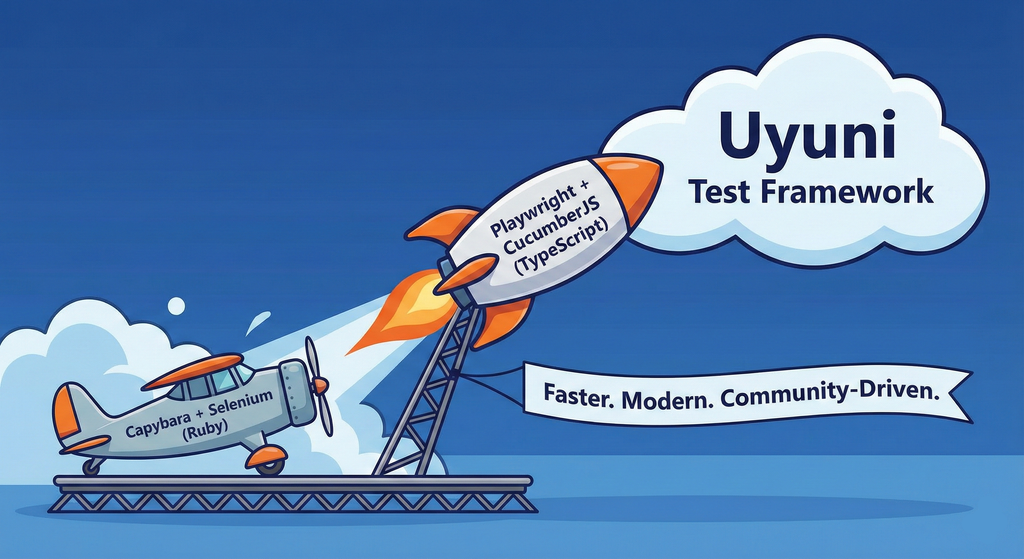
This project aims to migrate the existing Uyuni Test Framework from Selenium to Playwright. The move will improve the stability, speed, and maintainability of our end-to-end tests by leveraging Playwright's modern features. We'll be rewriting the current Selenium code in Ruby to Playwright code in TypeScript, which includes updating the test framework runner, step definitions, and configurations. This is also necessary because we're moving from Cucumber Ruby to CucumberJS.
If you're still curious about the AI in the title, it was just a way to grab your attention. Thanks for your understanding.
Nah, let's be honest  AI helped a lot to vibe code a good part of the Ruby methods of the Test framework, moving them to Typescript, along with the migration from Capybara to Playwright. I've been using "Cline" as plugin for WebStorm IDE, using Gemini API behind it.
Goals
- Migrate Core tests including Onboarding of clients
- Improve test reliabillity: Measure and confirm a significant reduction of flakiness.
- Implement a robust framework: Establish a well-structured and reusable Playwright test framework using the CucumberJS
Resources
- Existing Uyuni Test Framework (Cucumber Ruby + Capybara + Selenium)
- My Template for CucumberJS + Playwright in TypeScript
- Started Hackweek Project
GRIT: GRaphs In Time by fvanlankvelt
Description
The current implementation of the Time-Travelling Topology database, StackGraph, has served SUSE Observability well over the years. But it is dependent on a number of complex components - Zookeeper, HDFS, HBase, Tephra. These lead to a large number of failure scenarios and parameters to tweak for optimal performance.
The goal of this project is to take the high-level requirements (time-travelling topology, querying over time, transactional changes to topology, scalability) and design/prototype key components, to see where they would lead us if we were to start from scratch today.
An example would be to use RocksDB to persist topology history. Its user-defined timestamps seem to match well with time-travelling, has transaction support with fine-grained conflict detection.
Goals
Determine feasibility of implementing the model on a whole new architecture. See how to model the graph and its history such that updates and querying are performant, transactional conflicts are minimized. Build a prototype to validate the model.
Resources
Backend developers, preferably experienced in distributed systems. Programming language: scala 3 with some C++ for low-level.
Progress
The project has started at github GRaphs In Time - a C++ project that
- embeds RocksDB for persistence,
- uses (nu)Raft for replication/consensus,
- supports large transactions, with
- SNAPSHOT isolation
- time-travel
- graph operations (add/remove vertex/edge, indexes)
Collection and organisation of information about Bulgarian schools by iivanov
Description
To achieve this it will be necessary:
- Collect/download raw data from various government and non-governmental organizations
- Clean up raw data and organise it in some kind database.
- Create tool to make queries easy.
- Or perhaps dump all data into AI and ask questions in natural language.
Goals
By selecting particular school information like this will be provided:
- School scores on national exams.
- School scores from the external evaluations exams.
- School town, municipality and region.
- Employment rate in a town or municipality.
- Average health of the population in the region.
Resources
Some of these are available only in bulgarian.
- https://danybon.com/klasazia
- https://nvoresults.com/index.html
- https://ri.mon.bg/active-institutions
- https://www.nsi.bg/nrnm/ekatte/archive
Results
- Information about all Bulgarian schools with their scores during recent years cleaned and organised into SQL tables
- Information about all Bulgarian villages, cities, municipalities and districts cleaned and organised into SQL tables
- Information about all Bulgarian villages and cities census since beginning of this century cleaned and organised into SQL tables.
- Information about all Bulgarian municipalities about religion, ethnicity cleaned and organised into SQL tables.
- Data successfully loaded to locally running Ollama with help to Vanna.AI
- Seems to be usable.
TODO
- Add more statistical information about municipalities and ....
Code and data
Casky – Lightweight C Key-Value Engine with Crash Recovery by pperego
Description
Casky is a lightweight, crash-safe key-value store written in C, designed for fast storage and retrieval of data with a minimal footprint. Built using Test-Driven Development (TDD), Casky ensures reliability while keeping the codebase clean and maintainable. It is inspired by Bitcask and aims to provide a simple, embeddable storage engine that can be integrated into microservices, IoT devices, and other C-based applications.
Objectives:
- Implement a minimal key-value store with append-only file storage.
- Support crash-safe persistence and recovery.
- Expose a simple public API: store(key, value), load(key), delete(key).
- Follow TDD methodology for robust and testable code.
- Provide a foundation for future extensions, such as in-memory caching, compaction, and eventual integration with vector-based databases like PixelDB.
Why This Project is Interesting:
Casky combines low-level C programming with modern database concepts, making it an ideal playground to explore storage engines, crash safety, and performance optimization. It’s small enough to complete during Hackweek, yet it provides a solid base for future experiments and more complex projects.
Goals
- Working prototype with append-only storage and memtable.
- TDD test suite covering core functionality and recovery.
- Demonstration of basic operations: insert, load, delete.
- Optional bonus: LRU caching, file compaction, performance benchmarks.
Future Directions:
After Hackweek, Casky can evolve into a backend engine for projects like PixelDB, supporting vector storage and approximate nearest neighbor search, combining low-level performance with cutting-edge AI retrieval applications.
Resources
The Bitcask paper: https://riak.com/assets/bitcask-intro.pdf The Casky repository: https://github.com/thesp0nge/casky
Day 1
[0.10.0] - 2025-12-01
Added
- Core in-memory KeyDir and EntryNode structures
- API functions: caskyopen, caskyclose, caskyput, caskyget, casky_delete
- Hash function: caskydjb2hash_xor
- Error handling via casky_errno
- Unit tests for all APIs using standard asserts
- Test cleanup of temporary files
Changed
- None (first MVP)
Fixed
- None (first MVP)
Day 2
[0.20.0] - 2025-12-02
Work on kqlite (Lightweight remote SQLite with high availability and auto failover). by epenchev
Description
Continue the work on kqlite (Lightweight remote SQLite with high availability and auto failover).
It's a solution for applications that require High Availability but don't need all the features of a complete RDBMS and can fit SQLite in their use case.
Also kqlite can be considered to be used as a lightweight storage backend for K8s (https://docs.k3s.io/datastore) and the Edge, and allowing to have only 2 Nodes for HA.
Goals
Push kqlite to a beta version.
kqlite as library for Go programs.
Resources
https://github.com/kqlite/kqlite
Sim racing track database by avicenzi
Description
Do you wonder which tracks are available in each sim racing game? Wonder no more.
Goals
Create a simple website that includes details about sim racing games.
The website should be static and built with Alpine.JS and TailwindCSS. Data should be consumed from JSON, easily done with Alpine.JS.
The main goal is to gather track information, because tracks vary by game. Older games might have older layouts, and newer games might have up-to-date layouts. Some games include historical layouts, some are laser scanned. Many tracks are available as DLCs.
Initially include official tracks from:
- ACC
- iRacing
- PC2
- LMU
- Raceroom
- Rennsport
These games have a short list of tracks and DLCs.
Resources
The hardest part is collecting information about tracks in each game. Active games usually have information on their website or even on Steam. Older games might be on Fandom or a Wiki. Real track information can be extracted from Wikipedia or the track website.