
Project Description
Over the years, our bugzilla database has grown up in size, becoming a very valuable source of truth for most support and development cases; still searching for specific items is quite tricky and the results do not always match the expectations.
What about feeding a Maching Learning platform with the Bugzilla Database, in order to be able to query it through AI interface? Wouldn't it be nice/convenient to ask to AI: "Gimme hints about this kernel dump!" or "What is the root cause of this stack trace?"
It is the age of choice in the end, isn't it?
Goal for this Hackweek
For this Hackweek, the focus is to trigger a discussion on the following non-exhaustive list:
- What are the boundaries to be set when considering such an approach (legal, ethical, technological, whatever)
- How much of the Bugzilla DB can be used for feeding ML? ( can we use customer's data? what about partner's data?)
- Find out an open source ML solution fitting our needs;
- Find out some hardware where the solution can be eventually run on.
Anyone interested can join the discussion on the open Slack channel #discuss-bugzilla-ai
Resources
[1] https://blog.opensource.org/towards-a-definition-of-open-artificial-intelligence-first-meeting-recap/
No Hackers yet
Looking for hackers with the skills:
This project is part of:
Hack Week 23
Activity
Comments
-

about 2 years ago by paolodepa | Reply
Preliminary findings: talking to Amartya Chakraborty, who works to the Rancher AI project (https://github.com/rancher/opni), it seems that their framework can be attached to a Bugzilla instance for machine learning and pobably this will be explorated in the future
-
-
-
Similar Projects
Multi-agent AI assistant for Linux troubleshooting by doreilly
Description
Explore multi-agent architecture as a way to avoid MCP context rot.
Having one agent with many tools bloats the context with low-level details about tool descriptions, parameter schemas etc which hurts LLM performance. Instead have many specialised agents, each with just the tools it needs for its role. A top level supervisor agent takes the user prompt and delegates to appropriate sub-agents.
Goals
Create an AI assistant with some sub-agents that are specialists at troubleshooting Linux subsystems, e.g. systemd, selinux, firewalld etc. The agents can get information from the system by implementing their own tools with simple function calls, or use tools from MCP servers, e.g. a systemd-agent can use tools from systemd-mcp.
Example prompts/responses:
user$ the system seems slow
assistant$ process foo with pid 12345 is using 1000% cpu ...

user$ I can't connect to the apache webserver
assistant$ the firewall is blocking http ... you can open the port with firewall-cmd --add-port ...
Resources
Language Python. The Python ADK is more mature than Golang.
https://google.github.io/adk-docs/
https://github.com/djoreilly/linux-helper
Docs Navigator MCP: SUSE Edition by mackenzie.techdocs

Description
Docs Navigator MCP: SUSE Edition is an AI-powered documentation navigator that makes finding information across SUSE, Rancher, K3s, and RKE2 documentation effortless. Built as a Model Context Protocol (MCP) server, it enables semantic search, intelligent Q&A, and documentation summarization using 100% open-source AI models (no API keys required!). The project also allows you to bring your own keys from Anthropic and Open AI for parallel processing.
Goals
- [ X ] Build functional MCP server with documentation tools
- [ X ] Implement semantic search with vector embeddings
- [ X ] Create user-friendly web interface
- [ X ] Optimize indexing performance (parallel processing)
- [ X ] Add SUSE branding and polish UX
- [ X ] Stretch Goal: Add more documentation sources
- [ X ] Stretch Goal: Implement document change detection for auto-updates
Coming Soon!
- Community Feedback: Test with real users and gather improvement suggestions
Resources
- Repository: Docs Navigator MCP: SUSE Edition GitHub
- UI Demo: Live UI Demo of Docs Navigator MCP: SUSE Edition
issuefs: FUSE filesystem representing issues (e.g. JIRA) for the use with AI agents code-assistants by llansky3
Description
Creating a FUSE filesystem (issuefs) that mounts issues from various ticketing systems (Github, Jira, Bugzilla, Redmine) as files to your local file system.
And why this is good idea?
- User can use favorite command line tools to view and search the tickets from various sources
- User can use AI agents capabilities from your favorite IDE or cli to ask question about the issues, project or functionality while providing relevant tickets as context without extra work.
- User can use it during development of the new features when you let the AI agent to jump start the solution. The issuefs will give the AI agent the context (AI agents just read few more files) about the bug or requested features. No need for copying and pasting issues to user prompt or by using extra MCP tools to access the issues. These you can still do but this approach is on purpose different.

Goals
- Add Github issue support
- Proof the concept/approach by apply the approach on itself using Github issues for tracking and development of new features
- Add support for Bugzilla and Redmine using this approach in the process of doing it. Record a video of it.
- Clean-up and test the implementation and create some documentation
- Create a blog post about this approach
Resources
There is a prototype implementation here. This currently sort of works with JIRA only.
Exploring Modern AI Trends and Kubernetes-Based AI Infrastructure by jluo
Description
Build a solid understanding of the current landscape of Artificial Intelligence and how modern cloud-native technologies—especially Kubernetes—support AI workloads.
Goals
Use Gemini Learning Mode to guide the exploration, surface relevant concepts, and structure the learning journey:
- Gain insight into the latest AI trends, tools, and architectural concepts.
- Understand how Kubernetes and related cloud-native technologies are used in the AI ecosystem (model training, deployment, orchestration, MLOps).
Resources
Red Hat AI Topic Articles
- https://www.redhat.com/en/topics/ai
Kubeflow Documentation
- https://www.kubeflow.org/docs/
Q4 2025 CNCF Technology Landscape Radar report:
- https://www.cncf.io/announcements/2025/11/11/cncf-and-slashdata-report-finds-leading-ai-tools-gaining-adoption-in-cloud-native-ecosystems/
- https://www.cncf.io/wp-content/uploads/2025/11/cncfreporttechradar_111025a.pdf
Agent-to-Agent (A2A) Protocol
- https://developers.googleblog.com/en/a2a-a-new-era-of-agent-interoperability/
MCP Server for SCC by digitaltomm
Description
Provide an MCP Server implementation for customers to access data on scc.suse.com via MCP protocol. The core benefit of this MCP interface is that it has direct (read) access to customer data in SCC, so the AI agent gets enhanced knowledge about individual customer data, like subscriptions, orders and registered systems.
Architecture
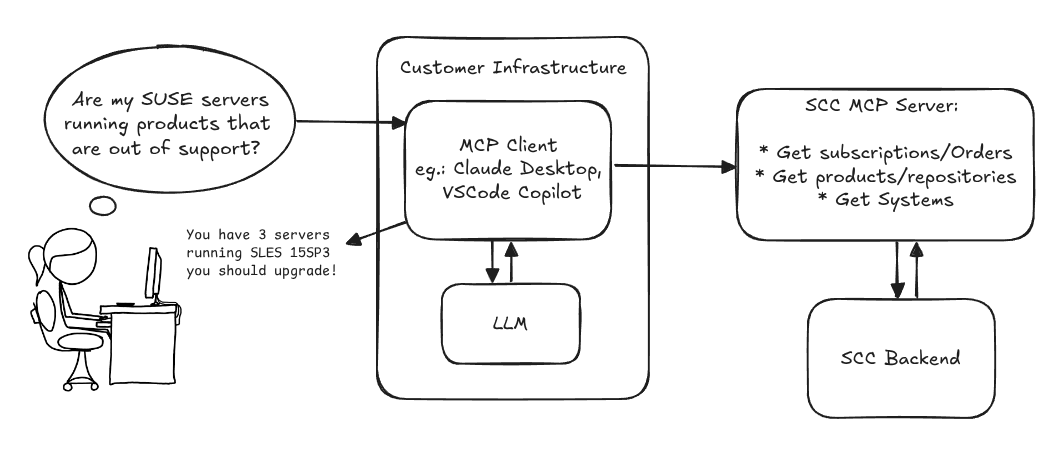
Goals
We want to demonstrate a proof of concept to connect to the SCC MCP server with any AI agent, for example gemini-cli or codex. Enabling the user to ask questions regarding their SCC inventory.
For this Hackweek, we target that users get proper responses to these example questions:
- Which of my currently active systems are running products that are out of support?
- Do I have ready to use registration codes for SLES?
- What are the latest 5 released patches for SLES 15 SP6? Output as a list with release date, patch name, affected package names and fixed CVEs.
- Which versions of kernel-default are available on SLES 15 SP6?
Technical Notes
Similar to the organization APIs, this can expose to customers data about their subscriptions, orders, systems and products. Authentication should be done by organization credentials, similar to what needs to be provided to RMT/MLM. Customers can connect to the SCC MCP server from their own MCP-compatible client and Large Language Model (LLM), so no third party is involved.
Milestones
[x] Basic MCP API setup
  MCP endpoints
  [x] Products / Repositories
  [x] Subscriptions / Orders
  [x] Systems
  [x] Packages
[x] Document usage with Gemini CLI, Codex
Resources
Gemini CLI setup:
~/.gemini/settings.json:
Song Search with CLAP by gcolangiuli
Description
Contrastive Language-Audio Pretraining (CLAP) is an open-source library that enables the training of a neural network on both Audio and Text descriptions, making it possible to search for Audio using a Text input. Several pre-trained models for song search are already available on huggingface

Goals
Evaluate how CLAP can be used for song searching and determine which types of queries yield the best results by developing a Minimum Viable Product (MVP) in Python. Based on the results of this MVP, future steps could include:
- Music Tagging;
- Free text search;
- Integration with an LLM (for example, with MCP or the OpenAI API) for music suggestions based on your own library.
The code for this project will be entirely written using AI to better explore and demonstrate AI capabilities.
Result
In this MVP we implemented:
- Async Song Analysis with Clap model
- Free Text Search of the songs
- Similar song search based on vector representation
- Containerised version with web interface
We also documented what went well and what can be improved in the use of AI.
You can have a look at the result here:
Future implementation can be related to performance improvement and stability of the analysis.
References
- CLAP: The main model being researched;
- huggingface: Pre-trained models for CLAP;
- Free Music Archive: Creative Commons songs that can be used for testing;
Song Search with CLAP by gcolangiuli
Description
Contrastive Language-Audio Pretraining (CLAP) is an open-source library that enables the training of a neural network on both Audio and Text descriptions, making it possible to search for Audio using a Text input. Several pre-trained models for song search are already available on huggingface
Goals
Evaluate how CLAP can be used for song searching and determine which types of queries yield the best results by developing a Minimum Viable Product (MVP) in Python. Based on the results of this MVP, future steps could include:
- Music Tagging;
- Free text search;
- Integration with an LLM (for example, with MCP or the OpenAI API) for music suggestions based on your own library.
The code for this project will be entirely written using AI to better explore and demonstrate AI capabilities.
Result
In this MVP we implemented:
- Async Song Analysis with Clap model
- Free Text Search of the songs
- Similar song search based on vector representation
- Containerised version with web interface
We also documented what went well and what can be improved in the use of AI.
You can have a look at the result here:
Future implementation can be related to performance improvement and stability of the analysis.
References
- CLAP: The main model being researched;
- huggingface: Pre-trained models for CLAP;
- Free Music Archive: Creative Commons songs that can be used for testing;
GenAI-Powered Systemic Bug Evaluation and Management Assistant by rtsvetkov
Motivation
What is the decision critical question which one can ask on a bug? How this question affects the decision on a bug and why?
Let's make GenAI look on the bug from the systemic point and evaluate what we don't know. Which piece of information is missing to take a decision?
Description
To build a tool that takes a raw bug report (including error messages and context) and uses a large language model (LLM) to generate a series of structured, Socratic-style or Systemic questions designed to guide a the integration and development toward the root cause, rather than just providing a direct, potentially incorrect fix.
Goals
Set up a Python environment
Set the environment and get a Gemini API key. 2. Collect 5-10 realistic bug reports (from open-source projects, personal projects, or public forums like Stack Overflow—include the error message and the initial context).
Build the Dialogue Loop
- Write a basic Python script using the Gemini API.
- Implement a simple conversational loop: User Input (Bug) -> AI Output (Question) -> User Input (Answer to AI's question) -> AI Output (Next Question). Code Implementation
Socratic/Systemic Strategy Implementation
- Refine the logic to ensure the questions follow a Socratic and Systemic path (e.g., from symptom-> context -> assumptions -> -> critical parts -> ).
- Implement Function Calling (an advanced feature of the Gemini API) to suggest specific actions to the user, like "Run a ping test" or "Check the database logs."
- Implement Bugzillla call to collect the
- Implement Questioning Framework as LLVM pre-conditioning
- Define set of instructions
- Assemble the Tool
Resources
What are Systemic Questions?
Systemic questions explore the relationships, patterns, and interactions within a system rather than focusing on isolated elements.
In IT, they help uncover hidden dependencies, feedback loops, assumptions, and side-effects during debugging or architecture analysis.
Gitlab Project
gitlab.suse.de/sle-prjmgr/BugDecisionCritical_Question
issuefs: FUSE filesystem representing issues (e.g. JIRA) for the use with AI agents code-assistants by llansky3
Description
Creating a FUSE filesystem (issuefs) that mounts issues from various ticketing systems (Github, Jira, Bugzilla, Redmine) as files to your local file system.
And why this is good idea?
- User can use favorite command line tools to view and search the tickets from various sources
- User can use AI agents capabilities from your favorite IDE or cli to ask question about the issues, project or functionality while providing relevant tickets as context without extra work.
- User can use it during development of the new features when you let the AI agent to jump start the solution. The issuefs will give the AI agent the context (AI agents just read few more files) about the bug or requested features. No need for copying and pasting issues to user prompt or by using extra MCP tools to access the issues. These you can still do but this approach is on purpose different.
Goals
- Add Github issue support
- Proof the concept/approach by apply the approach on itself using Github issues for tracking and development of new features
- Add support for Bugzilla and Redmine using this approach in the process of doing it. Record a video of it.
- Clean-up and test the implementation and create some documentation
- Create a blog post about this approach
Resources
There is a prototype implementation here. This currently sort of works with JIRA only.
Bugzilla goes AI - Phase 1 by nwalter
Description
This project, Bugzilla goes AI, aims to boost developer productivity by creating an autonomous AI bug agent during Hackweek. The primary goal is to reduce the time employees spend triaging bugs by integrating Ollama to summarize issues, recommend next steps, and push focused daily reports to a Web Interface.
Goals
To reduce employee time spent on Bugzilla by implementing an AI tool that triages and summarizes bug reports, providing actionable recommendations to the team via Web Interface.
Project Charter
Description
Project Achievements during Hackweek
In this file you can read about what we achieved during Hackweek.