
Description
For now, there is no possible HA setup for Uyuni. The idea is to explore setting up a read-only shadow instance of an Uyuni and make it as useful as possible.
Possible things to look at:
- live sync of the database, probably using the WAL. Some of the tables may have to be skipped or some features disabled on the RO instance (taskomatic, PXT sessions…)
- Can we use a load balancer that routes read-only queries to either instance and the other to the RW one? For example, packages or PXE data can be served by both, the API GET requests too. The rest would be RW.
Goals
- Prepare a document explaining how to do it.
- PR with the needed code changes to support it


Looking for hackers with the skills:
This project is part of:
Hack Week 25
Activity
Comments
-

3 months ago by epenchev | Reply
Hi, I think there are a few solutions that might help.
Since I'm dealing a lot with HA and databases, would like to share my thoughts.
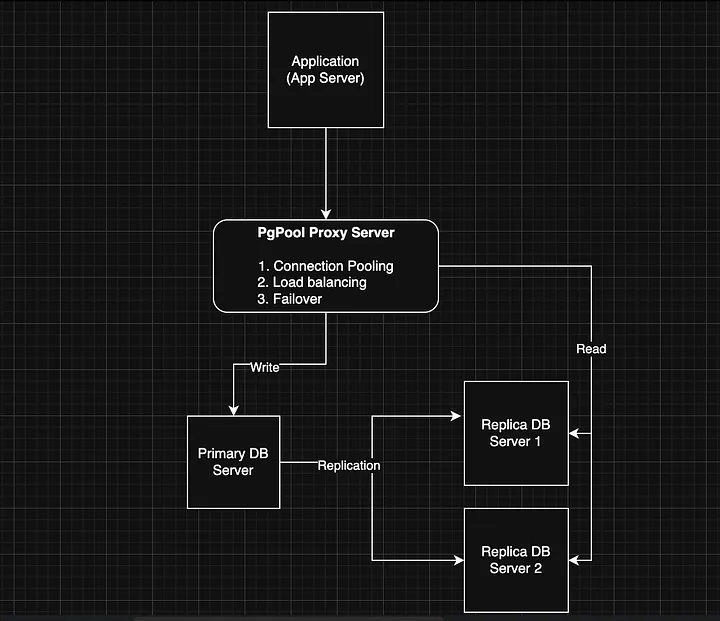
One possible solution would be to go with pgpool-II - Scaling PostgreSQL Master-Replica Load Balancing and Automatic Failover.
Such approach is described very much in details -> https://medium.com/@deysouvik700/scaling-postgresql-with-pgpool-ii-master-replica-load-balancing-and-automatic-failover-091983d4dd9a. In the example architecture the PgPool proxy itself is a single point of failure. The example setup could be extended by adding an additional proxy instance. Both proxy instances could be managed by keepalived + VirtualIP config. Of course there are other resources you can refer to as well.
Another possible solution which is kind of more automated would be to go with cnpg. This would require however to have a K8s cluster for your statefull PostgreSQL workload. So ideally you would need at least 3 Nodes HA K8s cluster. This is the minimal setup and all 3 nodes should be (control plane + worker roles) otherwise the standard setup will go up to 5 nodes (control planes and additional worker nodes.) With cnpg you can create multiple services (rw, ro, r) within you cluster and point clients to them https://cloudnative-pg.io/documentation/1.27/service_management/ and https://cloudnative-pg.io/documentation/1.27/architecture/.
Something more experimental that I'm working on recently and hoping to be way easier in operational perspective is https://github.com/kqlite/kqlite. It's a SQLite over the PostgreSQL wire protocol, with support for replication and clustering. However this limits the scope of database functionality down to SQLite only. Unfortunately using any PostgreSQL specific features and data types will not work with kqlite .
P.S. Also there is plenty of documentation on going with the standard approach patroni + HAProxy + etcd.
-

3 months ago by cbosdonnat | Reply
The first issue will be the replication of the DB itself. Since we have sequences and those are not logically replicated, we will have to check the possible options there.
-
Similar Projects
Set Up an Ephemeral Uyuni Instance by mbussolotto
Description
To test, check, and verify the latest changes in the master branch, we want to easily set up an ephemeral environment.
Goals
- Create an ephemeral environment manually
Create an ephemeral environment automatically
Resources
https://github.com/uyuni-project/uyuni
https://www.uyuni-project.org/uyuni-docs/en/uyuni/index.html
Enhance setup wizard for Uyuni by PSuarezHernandez
Description
This project wants to enhance the intial setup on Uyuni after its installation, so it's easier for a user to start using with it.
Uyuni currently uses "uyuni-tools" (mgradm) as the installation entrypoint, to trigger the installation of Uyuni in the given host, but does not really perform an initial setup, for instance:
- user creation
- adding products / channels
- generating bootstrap repos
- create activation keys
- ...
Goals
- Provide initial setup wizard as part of mgradm uyuni installation
Resources
Ansible to Salt integration by vizhestkov
Description
We already have initial integration of Ansible in Salt with the possibility to run playbooks from the salt-master on the salt-minion used as an Ansible Control node.
In this project I want to check if it possible to make Ansible working on the transport of Salt. Basically run playbooks with Ansible through existing established Salt (ZeroMQ) transport and not using ssh at all.
It could be a good solution for the end users to reuse Ansible playbooks or run Ansible modules they got used to with no effort of complex configuration with existing Salt (or Uyuni/SUSE Multi Linux Manager) infrastructure.
Goals
- [v] Prepare the testing environment with Salt and Ansible installed
- [v] Discover Ansible codebase to figure out possible ways of integration
- [v] Create Salt/Uyuni inventory module
- [v] Make basic modules to work with no using separate ssh connection, but reusing existing Salt connection
- [v] Test some most basic playbooks
Resources
Enable more features in mcp-server-uyuni by j_renner
Description
I would like to contribute to mcp-server-uyuni, the MCP server for Uyuni / Multi-Linux Manager) exposing additional features as tools. There is lots of relevant features to be found throughout the API, for example:
- System operations and infos
- System groups
- Maintenance windows
- Ansible
- Reporting
- ...
At the end of the week I managed to enable basic system group operations:
- List all system groups visible to the user
- Create new system groups
- List systems assigned to a group
- Add and remove systems from groups
Goals
- Set up test environment locally with the MCP server and client + a recent MLM server [DONE]
- Identify features and use cases offering a benefit with limited effort required for enablement [DONE]
- Create a PR to the repo [DONE]
Resources
Uyuni Health-check Grafana AI Troubleshooter by ygutierrez
Description
This project explores the feasibility of using the open-source Grafana LLM plugin to enhance the Uyuni Health-check tool with LLM capabilities. The idea is to integrate a chat-based "AI Troubleshooter" directly into existing dashboards, allowing users to ask natural-language questions about errors, anomalies, or performance issues.
Goals
- Investigate if and how the
grafana-llm-appplug-in can be used within the Uyuni Health-check tool. - Investigate if this plug-in can be used to query LLMs for troubleshooting scenarios.
- Evaluate support for local LLMs and external APIs through the plugin.
- Evaluate if and how the Uyuni MCP server could be integrated as another source of information.
Resources
Casky – Lightweight C Key-Value Engine with Crash Recovery by pperego
Description
Casky is a lightweight, crash-safe key-value store written in C, designed for fast storage and retrieval of data with a minimal footprint. Built using Test-Driven Development (TDD), Casky ensures reliability while keeping the codebase clean and maintainable. It is inspired by Bitcask and aims to provide a simple, embeddable storage engine that can be integrated into microservices, IoT devices, and other C-based applications.
Objectives:
- Implement a minimal key-value store with append-only file storage.
- Support crash-safe persistence and recovery.
- Expose a simple public API: store(key, value), load(key), delete(key).
- Follow TDD methodology for robust and testable code.
- Provide a foundation for future extensions, such as in-memory caching, compaction, and eventual integration with vector-based databases like PixelDB.
Why This Project is Interesting:
Casky combines low-level C programming with modern database concepts, making it an ideal playground to explore storage engines, crash safety, and performance optimization. It’s small enough to complete during Hackweek, yet it provides a solid base for future experiments and more complex projects.
Goals
- Working prototype with append-only storage and memtable.
- TDD test suite covering core functionality and recovery.
- Demonstration of basic operations: insert, load, delete.
- Optional bonus: LRU caching, file compaction, performance benchmarks.
Future Directions:
After Hackweek, Casky can evolve into a backend engine for projects like PixelDB, supporting vector storage and approximate nearest neighbor search, combining low-level performance with cutting-edge AI retrieval applications.
Resources
The Bitcask paper: https://riak.com/assets/bitcask-intro.pdf The Casky repository: https://github.com/thesp0nge/casky
Day 1
[0.10.0] - 2025-12-01
Added
- Core in-memory KeyDir and EntryNode structures
- API functions: caskyopen, caskyclose, caskyput, caskyget, casky_delete
- Hash function: caskydjb2hash_xor
- Error handling via casky_errno
- Unit tests for all APIs using standard asserts
- Test cleanup of temporary files
Changed
- None (first MVP)
Fixed
- None (first MVP)
Day 2
[0.20.0] - 2025-12-02
Port the classic browser game HackTheNet to PHP 8 by dgedon
Description
The classic browser game HackTheNet from 2004 still runs on PHP 4/5 and MySQL 5 and needs a port to PHP 8 and e.g. MariaDB.
Goals
- Port the game to PHP 8 and MariaDB 11
- Create a container where the game server can simply be started/stopped
Resources
- https://github.com/nodeg/hackthenet
Sim racing track database by avicenzi
Description
Do you wonder which tracks are available in each sim racing game? Wonder no more.
Goals
Create a simple website that includes details about sim racing games.
The website should be static and built with Alpine.JS and TailwindCSS. Data should be consumed from JSON, easily done with Alpine.JS.
The main goal is to gather track information, because tracks vary by game. Older games might have older layouts, and newer games might have up-to-date layouts. Some games include historical layouts, some are laser scanned. Many tracks are available as DLCs.
Initially include official tracks from:
- ACC
- iRacing
- PC2
- LMU
- Raceroom
- Rennsport
These games have a short list of tracks and DLCs.
Resources
The hardest part is collecting information about tracks in each game. Active games usually have information on their website or even on Steam. Older games might be on Fandom or a Wiki. Real track information can be extracted from Wikipedia or the track website.
Collection and organisation of information about Bulgarian schools by iivanov
Description
To achieve this it will be necessary:
- Collect/download raw data from various government and non-governmental organizations
- Clean up raw data and organise it in some kind database.
- Create tool to make queries easy.
- Or perhaps dump all data into AI and ask questions in natural language.
Goals
By selecting particular school information like this will be provided:
- School scores on national exams.
- School scores from the external evaluations exams.
- School town, municipality and region.
- Employment rate in a town or municipality.
- Average health of the population in the region.
Resources
Some of these are available only in bulgarian.
- https://danybon.com/klasazia
- https://nvoresults.com/index.html
- https://ri.mon.bg/active-institutions
- https://www.nsi.bg/nrnm/ekatte/archive
Results
- Information about all Bulgarian schools with their scores during recent years cleaned and organised into SQL tables
- Information about all Bulgarian villages, cities, municipalities and districts cleaned and organised into SQL tables
- Information about all Bulgarian villages and cities census since beginning of this century cleaned and organised into SQL tables.
- Information about all Bulgarian municipalities about religion, ethnicity cleaned and organised into SQL tables.
- Data successfully loaded to locally running Ollama with help to Vanna.AI
- Seems to be usable.
TODO
- Add more statistical information about municipalities and ....
Code and data
Work on kqlite (Lightweight remote SQLite with high availability and auto failover). by epenchev
Description
Continue the work on kqlite (Lightweight remote SQLite with high availability and auto failover).
It's a solution for applications that require High Availability but don't need all the features of a complete RDBMS and can fit SQLite in their use case.
Also kqlite can be considered to be used as a lightweight storage backend for K8s (https://docs.k3s.io/datastore) and the Edge, and allowing to have only 2 Nodes for HA.
Goals
Push kqlite to a beta version.
kqlite as library for Go programs.
Resources
https://github.com/kqlite/kqlite