
 Dudenetes

The most relaxed testing framework of Kubernetes in the world
Repo: GitHub
Dudelopers abide!
Come join the most relaxed testing framework of Kubernetes in the world – Dudenetes. If you’d like to find continuous peace on Github and enjoy bowling in production, man, we’ll help you get started. Right after a little nap.
You shouldn’t try too hard to enjoy working with Kubernetes. Enjoying working with Kubernetes is relatively easy if you just take it easy and scale with the flow. It’s not all about sprints, achievements and success. It’s about applying basic common sense, speaking English for telling stories, and not being worried about how other creeps roll at you. After all, well, it’s just their opinion, man.
The beauty of Dudenetes framework is its simplicity.
> Once you write code for testing code, it gets too complex and everything can go wrong.
The Kubernetes e2e testing framework is hard and complicated and nobody knows what to do about it. So don’t do anything about it. Just take it easy, man. Kick back with some friends and oat soda and if the goddamn control-plane crashes into the mountain, just mark it zero and don’t go over the line – that is to say, abide. And then, when nobody’s calling, let’s go find some good burgers, dude.
Take that hill and be a good fellow dudeloper! That means sharing your stories and use godog to map them with kubectl commands.
See you further on up the trail,
> There's 106 miles to Chicago, we've got a full tank of gas, half a pack of cigarettes, it's dark out, and we're wearing sunglasses. Hit it!
Thankie
What is this?
The combination of godog and kubectl. People who are using this project they are called Dudelopers
Disclaimer
Dudenetes is a testing framework for Kubernetes with the philosophy, or lifestyle inspired by "The Dude", the protagonist of the Coen Brothers' 1998 film The Big Lebowski.

This project is part of:
Hack Week 18
Activity

Similar Projects
A CLI for Harvester by mohamed.belgaied
Harvester does not officially come with a CLI tool, the user is supposed to interact with Harvester mostly through the UI. Though it is theoretically possible to use kubectl to interact with Harvester, the manipulation of Kubevirt YAML objects is absolutely not user friendly. Inspired by tools like multipass from Canonical to easily and rapidly create one of multiple VMs, I began the development of Harvester CLI. Currently, it works but Harvester CLI needs some love to be up-to-date with Harvester v1.0.2 and needs some bug fixes and improvements as well.
Project Description
Harvester CLI is a command line interface tool written in Go, designed to simplify interfacing with a Harvester cluster as a user. It is especially useful for testing purposes as you can easily and rapidly create VMs in Harvester by providing a simple command such as:
harvester vm create my-vm --count 5
to create 5 VMs named my-vm-01 to my-vm-05.

Harvester CLI is functional but needs a number of improvements: up-to-date functionality with Harvester v1.0.2 (some minor issues right now), modifying the default behaviour to create an opensuse VM instead of an ubuntu VM, solve some bugs, etc.
Github Repo for Harvester CLI: https://github.com/belgaied2/harvester-cli
Done in previous Hackweeks
- Create a Github actions pipeline to automatically integrate Harvester CLI to Homebrew repositories: DONE
- Automatically package Harvester CLI for OpenSUSE / Redhat RPMs or DEBs: DONE
Goal for this Hackweek
The goal for this Hackweek is to bring Harvester CLI up-to-speed with latest Harvester versions (v1.3.X and v1.4.X), and improve the code quality as well as implement some simple features and bug fixes.
Some nice additions might be: * Improve handling of namespaced objects * Add features, such as network management or Load Balancer creation ? * Add more unit tests and, why not, e2e tests * Improve CI * Improve the overall code quality * Test the program and create issues for it
Issue list is here: https://github.com/belgaied2/harvester-cli/issues
Resources
The project is written in Go, and using client-go the Kubernetes Go Client libraries to communicate with the Harvester API (which is Kubernetes in fact).
Welcome contributions are:
- Testing it and creating issues
- Documentation
- Go code improvement
What you might learn
Harvester CLI might be interesting to you if you want to learn more about:
- GitHub Actions
- Harvester as a SUSE Product
- Go programming language
- Kubernetes API
- Kubevirt API objects (Manipulating VMs and VM Configuration in Kubernetes using Kubevirt)
Q2Boot - A handy QEMU VM launcher by amanzini
Description
Q2Boot (Qemu Quick Boot) is a command-line tool that wraps QEMU to provide a streamlined experience for launching virtual machines. It automatically configures common settings like KVM acceleration, virtio drivers, and networking while allowing customization through both configuration files and command-line options.
The project originally was a personal utility in D, now recently rewritten in idiomatic Go. It lives at repository https://github.com/ilmanzo/q2boot
Goals
Improve the project, testing with different scenarios , address issues and propose new features. It will benefit of some basic integration testing by providing small sample disk images.
Updates
- Dec 1, 2025 : refactor command line options, added structured logging. Released v0.0.2
- Dec 2, 2025 : added external monitor via telnet option
- Dec 4, 2025 : released v0.0.3 with architecture auto-detection
- Dec 5, 2025 : filing new issues and general polishment. Designing E2E testing
Resources
Create a Cloud-Native policy engine with notifying capabilities to optimize resource usage by gbazzotti
Description
The goal of this project is to begin the initial phase of development of an all-in-one Cloud-Native Policy Engine that notifies resource owners when their resources infringe predetermined policies. This was inspired by a current issue in the CES-SRE Team where other solutions seemed to not exactly correspond to the needs of the specific workloads running on the Public Cloud Team space.
The initial architecture can be checked out on the Repository listed under Resources.
Among the features that will differ this project from other monitoring/notification systems:
- Pre-defined sensible policies written at the software-level, avoiding a learning curve by requiring users to write their own policies
- All-in-one functionality: logging, mailing and all other actions are not required to install any additional plugins/packages
- Easy account management, being able to parse all required configuration by a single JSON file
- Eliminate integrations by not requiring metrics to go through a data-agreggator
Goals
- Create a minimal working prototype following the workflow specified on the documentation
- Provide instructions on installation/usage
- Work on email notifying capabilities
Resources
terraform-provider-feilong by e_bischoff
Project Description
People need to test operating systems and applications on s390 platform. While this is straightforward with KVM, this is very difficult with z/VM.
IBM Cloud Infrastructure Center (ICIC) harnesses the Feilong API, but you can use Feilong without installing ICIC(see this schema).
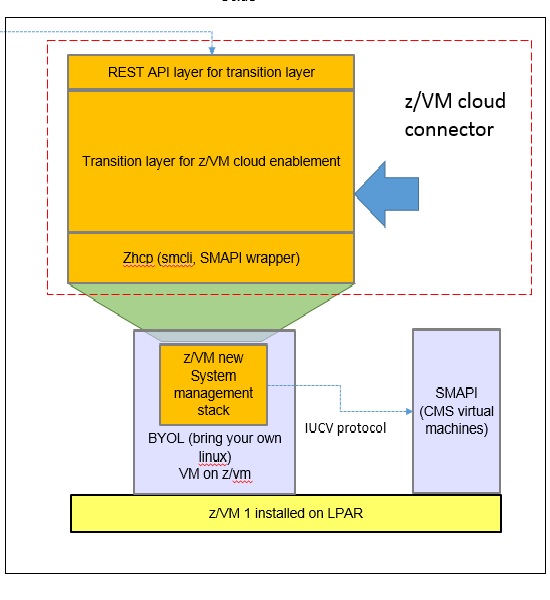
What about writing a terraform Feilong provider, just like we have the terraform libvirt provider? That would allow to transparently call Feilong from your main.tf files to deploy and destroy resources on your z/VM system.
Goal for Hackweek 23
I would like to be able to easily deploy and provision VMs automatically on a z/VM system, in a way that people might enjoy even outside of SUSE.
My technical preference is to write a terraform provider plugin, as it is the approach that involves the least software components for our deployments, while remaining clean, and compatible with our existing development infrastructure.
Goals for Hackweek 24
Feilong provider works and is used internally by SUSE Manager team. Let's push it forward!
Let's add support for fiberchannel disks and multipath.
Goals for Hackweek 25
Modernization, maturity, and maintenance: support for SLES 16 and openTofu, new API calls, fixes...
Resources
Outcome
Contribute to terraform-provider-libvirt by pinvernizzi
Description
The SUSE Manager (SUMA) teams' main tool for infrastructure automation, Sumaform, largely relies on terraform-provider-libvirt. That provider is also widely used by other teams, both inside and outside SUSE.
It would be good to help the maintainers of this project and give back to the community around it, after all the amazing work that has been already done.
If you're interested in any of infrastructure automation, Terraform, virtualization, tooling development, Go (...) it is also a good chance to learn a bit about them all by putting your hands on an interesting, real-use-case and complex project.
Goals
- Get more familiar with Terraform provider development and libvirt bindings in Go
- Solve some issues and/or implement some features
- Get in touch with the community around the project
Resources
- CONTRIBUTING readme
- Go libvirt library in use by the project
- Terraform plugin development
- "Good first issue" list
Cluster API Provider for Harvester by rcase
Project Description
The Cluster API "infrastructure provider" for Harvester, also named CAPHV, makes it possible to use Harvester with Cluster API. This enables people and organisations to create Kubernetes clusters running on VMs created by Harvester using a declarative spec.
The project has been bootstrapped in HackWeek 23, and its code is available here.
Work done in HackWeek 2023
- Have a early working version of the provider available on Rancher Sandbox : *DONE *
- Demonstrated the created cluster can be imported using Rancher Turtles: DONE
- Stretch goal - demonstrate using the new provider with CAPRKE2: DONE and the templates are available on the repo
DONE in HackWeek 24:
- Add more Unit Tests
- Improve Status Conditions for some phases
- Add cloud provider config generation
- Testing with Harvester v1.3.2
- Template improvements
- Issues creation
DONE in 2025 (out of Hackweek)
- Support of ClusterClass
- Add to
clusterctlcommunity providers, you can add it directly withclusterctl - Testing on newer versions of Harvester v1.4.X and v1.5.X
- Support for
clusterctl generate cluster ... - Improve Status Conditions to reflect current state of Infrastructure
- Improve CI (some bugs for release creation)
Goals for HackWeek 2025
- FIRST and FOREMOST, any topic is important to you
- Add e2e testing
- Certify the provider for Rancher Turtles
- Add Machine pool labeling
- Add PCI-e passthrough capabilities.
- Other improvement suggestions are welcome!
Thanks to @isim and Dominic Giebert for their contributions!
Resources
Looking for help from anyone interested in Cluster API (CAPI) or who wants to learn more about Harvester.
This will be an infrastructure provider for Cluster API. Some background reading for the CAPI aspect:
Preparing KubeVirtBMC for project transfer to the KubeVirt organization by zchang
Description
KubeVirtBMC is preparing to transfer the project to the KubeVirt organization. One requirement is to enhance the modeling design's security. The current v1alpha1 API (the VirtualMachineBMC CRD) was designed during the proof-of-concept stage. It's immature and inherently insecure due to its cross-namespace object references, exposing security concerns from an RBAC perspective.
The other long-awaited feature is the ability to mount virtual media so that virtual machines can boot from remote ISO images.
Goals
- Deliver the v1beta1 API and its corresponding controller implementation
- Enable the Redfish virtual media mount function for KubeVirt virtual machines
Resources
- The KubeVirtBMC repo: https://github.com/starbops/kubevirtbmc
- The new v1beta1 API: https://github.com/starbops/kubevirtbmc/issues/83
- Redfish virtual media mount: https://github.com/starbops/kubevirtbmc/issues/44
Technical talks at universities by agamez
Description
This project aims to empower the next generation of tech professionals by offering hands-on workshops on containerization and Kubernetes, with a strong focus on open-source technologies. By providing practical experience with these cutting-edge tools and fostering a deep understanding of open-source principles, we aim to bridge the gap between academia and industry.
For now, the scope is limited to Spanish universities, since we already have the contacts and have started some conversations.
Goals
- Technical Skill Development: equip students with the fundamental knowledge and skills to build, deploy, and manage containerized applications using open-source tools like Kubernetes.
- Open-Source Mindset: foster a passion for open-source software, encouraging students to contribute to open-source projects and collaborate with the global developer community.
- Career Readiness: prepare students for industry-relevant roles by exposing them to real-world use cases, best practices, and open-source in companies.
Resources
- Instructors: experienced open-source professionals with deep knowledge of containerization and Kubernetes.
- SUSE Expertise: leverage SUSE's expertise in open-source technologies to provide insights into industry trends and best practices.
A CLI for Harvester by mohamed.belgaied
Harvester does not officially come with a CLI tool, the user is supposed to interact with Harvester mostly through the UI. Though it is theoretically possible to use kubectl to interact with Harvester, the manipulation of Kubevirt YAML objects is absolutely not user friendly. Inspired by tools like multipass from Canonical to easily and rapidly create one of multiple VMs, I began the development of Harvester CLI. Currently, it works but Harvester CLI needs some love to be up-to-date with Harvester v1.0.2 and needs some bug fixes and improvements as well.
Project Description
Harvester CLI is a command line interface tool written in Go, designed to simplify interfacing with a Harvester cluster as a user. It is especially useful for testing purposes as you can easily and rapidly create VMs in Harvester by providing a simple command such as:
harvester vm create my-vm --count 5
to create 5 VMs named my-vm-01 to my-vm-05.
Harvester CLI is functional but needs a number of improvements: up-to-date functionality with Harvester v1.0.2 (some minor issues right now), modifying the default behaviour to create an opensuse VM instead of an ubuntu VM, solve some bugs, etc.
Github Repo for Harvester CLI: https://github.com/belgaied2/harvester-cli
Done in previous Hackweeks
- Create a Github actions pipeline to automatically integrate Harvester CLI to Homebrew repositories: DONE
- Automatically package Harvester CLI for OpenSUSE / Redhat RPMs or DEBs: DONE
Goal for this Hackweek
The goal for this Hackweek is to bring Harvester CLI up-to-speed with latest Harvester versions (v1.3.X and v1.4.X), and improve the code quality as well as implement some simple features and bug fixes.
Some nice additions might be: * Improve handling of namespaced objects * Add features, such as network management or Load Balancer creation ? * Add more unit tests and, why not, e2e tests * Improve CI * Improve the overall code quality * Test the program and create issues for it
Issue list is here: https://github.com/belgaied2/harvester-cli/issues
Resources
The project is written in Go, and using client-go the Kubernetes Go Client libraries to communicate with the Harvester API (which is Kubernetes in fact).
Welcome contributions are:
- Testing it and creating issues
- Documentation
- Go code improvement
What you might learn
Harvester CLI might be interesting to you if you want to learn more about:
- GitHub Actions
- Harvester as a SUSE Product
- Go programming language
- Kubernetes API
- Kubevirt API objects (Manipulating VMs and VM Configuration in Kubernetes using Kubevirt)
The Agentic Rancher Experiment: Do Androids Dream of Electric Cattle? by moio
Rancher is a beast of a codebase. Let's investigate if the new 2025 generation of GitHub Autonomous Coding Agents and Copilot Workspaces can actually tame it. 
The Plan
Create a sandbox GitHub Organization, clone in key Rancher repositories, and let the AI loose to see if it can handle real-world enterprise OSS maintenance - or if it just hallucinates new breeds of Kubernetes resources!
Specifically, throw "Agentic Coders" some typical tasks in a complex, long-lived open-source project, such as:
❥ The Grunt Work: generate missing GoDocs, unit tests, and refactorings. Rebase PRs.
❥ The Complex Stuff: fix actual (historical) bugs and feature requests to see if they can traverse the complexity without (too much) human hand-holding.
❥ Hunting Down Gaps: find areas lacking in docs, areas of improvement in code, dependency bumps, and so on.
If time allows, also experiment with Model Context Protocol (MCP) to give agents context on our specific build pipelines and CI/CD logs.
Why?
We know AI can write "Hello World." and also moderately complex programs from a green field. But can it rebase a 3-month-old PR with conflicts in rancher/rancher? I want to find the breaking point of current AI agents to determine if and how they can help us to reduce our technical debt, work faster and better. At the same time, find out about pitfalls and shortcomings.
The CONCLUSION!!!
A  State of the Union document was compiled to summarize lessons learned this week. For more gory details, just read on the diary below!
Testing and adding GNU/Linux distributions on Uyuni by juliogonzalezgil
Join the Gitter channel! https://gitter.im/uyuni-project/hackweek
Uyuni is a configuration and infrastructure management tool that saves you time and headaches when you have to manage and update tens, hundreds or even thousands of machines. It also manages configuration, can run audits, build image containers, monitor and much more!
Currently there are a few distributions that are completely untested on Uyuni or SUSE Manager (AFAIK) or just not tested since a long time, and could be interesting knowing how hard would be working with them and, if possible, fix whatever is broken.
For newcomers, the easiest distributions are those based on DEB or RPM packages. Distributions with other package formats are doable, but will require adapting the Python and Java code to be able to sync and analyze such packages (and if salt does not support those packages, it will need changes as well). So if you want a distribution with other packages, make sure you are comfortable handling such changes.
No developer experience? No worries! We had non-developers contributors in the past, and we are ready to help as long as you are willing to learn. If you don't want to code at all, you can also help us preparing the documentation after someone else has the initial code ready, or you could also help with testing :-)
The idea is testing Salt (including bootstrapping with bootstrap script) and Salt-ssh clients
To consider that a distribution has basic support, we should cover at least (points 3-6 are to be tested for both salt minions and salt ssh minions):
- Reposync (this will require using spacewalk-common-channels and adding channels to the .ini file)
- Onboarding (salt minion from UI, salt minion from bootstrap scritp, and salt-ssh minion) (this will probably require adding OS to the bootstrap repository creator)
- Package management (install, remove, update...)
- Patching
- Applying any basic salt state (including a formula)
- Salt remote commands
- Bonus point: Java part for product identification, and monitoring enablement
- Bonus point: sumaform enablement (https://github.com/uyuni-project/sumaform)
- Bonus point: Documentation (https://github.com/uyuni-project/uyuni-docs)
- Bonus point: testsuite enablement (https://github.com/uyuni-project/uyuni/tree/master/testsuite)
If something is breaking: we can try to fix it, but the main idea is research how supported it is right now. Beyond that it's up to each project member how much to hack :-)
- If you don't have knowledge about some of the steps: ask the team
- If you still don't know what to do: switch to another distribution and keep testing.
This card is for EVERYONE, not just developers. Seriously! We had people from other teams helping that were not developers, and added support for Debian and new SUSE Linux Enterprise and openSUSE Leap versions :-)
In progress/done for Hack Week 25
Guide
We started writin a Guide: Adding a new client GNU Linux distribution to Uyuni at https://github.com/uyuni-project/uyuni/wiki/Guide:-Adding-a-new-client-GNU-Linux-distribution-to-Uyuni, to make things easier for everyone, specially those not too familiar wht Uyuni or not technical.
openSUSE Leap 16.0
The distribution will all love!
https://en.opensuse.org/openSUSE:Roadmap#DRAFTScheduleforLeap16.0
Curent Status We started last year, it's complete now for Hack Week 25! :-D
[W]Reposync (this will require using spacewalk-common-channels and adding channels to the .ini file) NOTE: Done, client tools for SLMicro6 are using as those for SLE16.0/openSUSE Leap 16.0 are not available yet[W]Onboarding (salt minion from UI, salt minion from bootstrap scritp, and salt-ssh minion) (this will probably require adding OS to the bootstrap repository creator)[W]Package management (install, remove, update...). Works, even reboot requirement detection
Multimachine on-prem test with opentofu, ansible and Robot Framework by apappas
Description
A long time ago I explored using the Robot Framework for testing. A big deficiency over our openQA setup is that bringing up and configuring the connection to a test machine is out of scope.
Nowadays we have a way¹ to deploy SUTs outside openqa, but we only use if for cloud tests in conjuction with openqa. Using knowledge gained from that project I am going to try to create a test scenario that replicates an openqa test but this time including the deployment and setup of the SUT.
Goals
Create a simple multimachine test scenario with the support server and SUT all created by the robot framework.
Resources
- https://github.com/SUSE/qe-sap-deployment
- terraform-libvirt-provider
openQA tests needles elaboration using AI image recognition by mdati
Description
In the openQA test framework, to identify the status of a target SUT image, a screenshots of GUI or CLI-terminal images,
the needles framework scans the many pictures in its repository, having associated a given set of tags (strings), selecting specific smaller parts of each available image. For the needles management actually we need to keep stored many screenshots, variants of GUI and CLI-terminal images, eachone accompanied by a dedicated set of data references (json).
A smarter framework, using image recognition based on AI or other image elaborations tools, nowadays widely available, could improve the matching process and hopefully reduce time and errors, during the images verification and detection process.
Goals
Main scope of this idea is to match a "graphical" image of the console or GUI status of a running openQA test, an image of a shell console or application-GUI screenshot, using less time and resources and with less errors in data preparation and use, than the actual openQA needles framework; that is:
- having a given SUT (system under test) GUI or CLI-terminal screenshot, with a local distribution of pixels or text commands related to a running test status,
- we want to identify a desired target, e.g. a screen image status or data/commands context,
- based on AI/ML-pretrained archives containing object or other proper elaboration tools,
- possibly able to identify also object not present in the archive, i.e. by means of AI/ML mechanisms.
- the matching result should be then adapted to continue working in the openQA test, likewise and in place of the same result that would have been produced by the original openQA needles framework.
- We expect an improvement of the matching-time(less time), reliability of the expected result(less error) and simplification of archive maintenance in adding/removing objects(smaller DB and less actions).
Hackweek POC:
Main steps
- Phase 1 - Plan
- study the available tools
- prepare a plan for the process to build
- Phase 2 - Implement
- write and build a draft application
- Phase 3 - Data
- prepare the data archive from a subset of needles
- initialize/pre-train the base archive
- select a screenshot from the subset, removing/changing some part
- Phase 4 - Test
- run the POC application
- expect the image type is identified in a good %.
Resources
First step of this project is quite identification of useful resources for the scope; some possibilities are:
- SUSE AI and other ML tools (i.e. Tensorflow)
- Tools able to manage images
- RPA test tools (like i.e. Robot framework)
- other.
Project references
- Repository: openqa-needles-AI-driven