
an invention by juliogonzalezgil
Last year I developed Terracumber and, for the moment published it at one internal GitLab repository.
We intended to replace the set of scripts we have to launch sumaform for the Uyuni and SUSE Manager CI, but lacked adding the monitoring part.
Since then, I could not dedicate more time for this, and terraform 0.12 came out, and sumaform changed.
The work this time is:
- Fix whatever is needed so terracumber can work with the new terraform 0.12 and the new sumaform.
- Start adding some unit tests (I don't have any idea of how to do it, so I will use the opportunity to learn about it)
- Get help from @jcavalheiro so he can add the monitoring back, and so he can use the opportunity to learn about terracumber
- Publish the code at the uyuni-project in GitHub.
A bonus could be if someone else joins and ports whatever changes changes we had at the current set of scripts to terracumber.

Looking for hackers with the skills:
This project is part of:
Hack Week 19
Activity
Comments
Be the first to comment!
Similar Projects
mgr-ansible-ssh - Intelligent, Lightweight CLI for Distributed Remote Execution by deve5h
Description
By the end of Hack Week, the target will be to deliver a minimal functional version 1 (MVP) of a custom command-line tool named mgr-ansible-ssh (a unified wrapper for BOTH ad-hoc shell & playbooks) that allows operators to:
- Execute arbitrary shell commands on thousand of remote machines simultaneously using Ansible Runner with artifacts saved locally.
- Pass runtime options such as inventory file, remote command string/ playbook execution, parallel forks, limits, dry-run mode, or no-std-ansible-output.
- Leverage existing SSH trust relationships without additional setup.
- Provide a clean, intuitive CLI interface with --help for ease of use. It should provide consistent UX & CI-friendly interface.
- Establish a foundation that can later be extended with advanced features such as logging, grouping, interactive shell mode, safe-command checks, and parallel execution tuning.
The MVP should enable day-to-day operations to efficiently target thousands of machines with a single, consistent interface.
Goals
Primary Goals (MVP):
Build a functional CLI tool (mgr-ansible-ssh) capable of executing shell commands on multiple remote hosts using Ansible Runner. Test the tool across a large distributed environment (1000+ machines) to validate its performance and reliability.
Looking forward to significantly reducing the zypper deployment time across all 351 RMT VM servers in our MLM cluster by eliminating the dependency on the taskomatic service, bringing execution down to a fraction of the current duration. The tool should also support multiple runtime flags, such as:
mgr-ansible-ssh: Remote command execution wrapper using Ansible Runner

Usage: mgr-ansible-ssh [--help] [--version] [--inventory INVENTORY]
                   [--run RUN] [--playbook PLAYBOOK] [--limit LIMIT]
                   [--forks FORKS] [--dry-run] [--no-ansible-output]

Required Arguments
--inventory, -i      Path to Ansible inventory file to use

Any One of the Arguments Is Required
--run, -r            Execute the specified shell command on target hosts
--playbook, -p       Execute the specified Ansible playbook on target hosts

Optional Arguments
--help, -h           Show the help message and exit
--version, -v        Show the version and exit
--limit, -l          Limit execution to specific hosts or groups
--forks, -f          Number of parallel Ansible forks
--dry-run            Run in Ansible check mode (requires -p or --playbook)
--no-ansible-output  Suppress Ansible stdout output
Secondary/Stretched Goals (if time permits):
- Add pretty output formatting (success/failure summary per host).
- Implement basic logging of executed commands and results.
- Introduce safety checks for risky commands (shutdown, rm -rf, etc.).
- Package the tool so it can be installed with pip or stored internally.
Resources
Collaboration is welcome from anyone interested in CLI tooling, automation, or distributed systems. Skills that would be particularly valuable include:
- Python especially around CLI dev (argparse, click, rich)
openQA log viewer by mpagot
Description
*** Warning: Are You at Risk for VOMIT? ***
Do you find yourself staring at a screen, your eyes glossing over as thousands of lines of text scroll by? Do you feel a wave of text-based nausea when someone asks you to "just check the logs"?
You may be suffering from VOMIT (Verbose Output Mental Irritation Toxicity).
This dangerous, work-induced ailment is triggered by exposure to an overwhelming quantity of log data, especially from parallel systems. The human brain, not designed to mentally process 12 simultaneous autoinst-log.txt files, enters a state of toxic shock. It rejects the "Verbose Output," making it impossible to find the one critical error line buried in a 50,000-line sea of "INFO: doing a thing."
Before you're forced to rm -rf /var/log in a fit of desperation, we present the digital antacid.
No panic: we have The openQA Log Visualizer
This is the UI antidote for handling toxic log environments. It bravely dives into the chaotic, multi-machine mess of your openQA test runs, finds all the related, verbose logs, and force-feeds them into a parser.

Goals
Work on the existing POC openqa-log-visualizer about few specific tasks:
- add support for more type of logs
- extend the configuration file syntax beyond the actual one
- work on log parsing performance
Find some beta-tester and collect feedback and ideas about features
If time allow for it evaluate other UI frameworks and solutions (something more simple to distribute and run, maybe more low level to gain in performance).
Resources
Improve chore and screen time doc generator script `wochenplaner` by gniebler
Description
I wrote a little Python script to generate PDF docs, which can be used to track daily chore completion and screen time usage for several people, with one page per person/week.
I named this script wochenplaner and have been using it for a few months now.
It needs some improvements and adjustments in how the screen time should be tracked and how chores are displayed.
Goals
- Fix chore field separation lines
- Change screen time tracking logic from "global" (week-long) to daily subtraction and weekly addition of remainders (more intuitive than current "weekly time budget method)
- Add logic to fill in chore fields/lines, ideally with pictures, falling back to text.
Resources
tbd (Gitlab repo)
Improve/rework household chore tracker `chorazon` by gniebler
Description
I wrote a household chore tracker named chorazon, which is meant to be deployed as a web application in the household's local network.
It features the ability to set up different (so far only weekly) schedules per task and per person, where tasks may span several days.
There are "tokens", which can be collected by users. Tasks can (and usually will) have rewards configured where they yield a certain amount of tokens. The idea is that they can later be redeemed for (surprise) gifts, but this is not implemented yet. (So right now one needs to edit the DB manually to subtract tokens when they're redeemed.)
Days are not rolled over automatically, to allow for task completion control.
We used it in my household for several months, with mixed success. There are many limitations in the system that would warrant a revisit.
It's written using the Pyramid Python framework with URL traversal, ZODB as the data store and Web Components for the frontend.
Goals
- Add admin screens for users, tasks and schedules
- Add models, pages etc. to allow redeeming tokens for gifts/surprises
- …?
Resources
tbd (Gitlab repo)
terraform-provider-feilong by e_bischoff
Project Description
People need to test operating systems and applications on s390 platform. While this is straightforward with KVM, this is very difficult with z/VM.
IBM Cloud Infrastructure Center (ICIC) harnesses the Feilong API, but you can use Feilong without installing ICIC(see this schema).
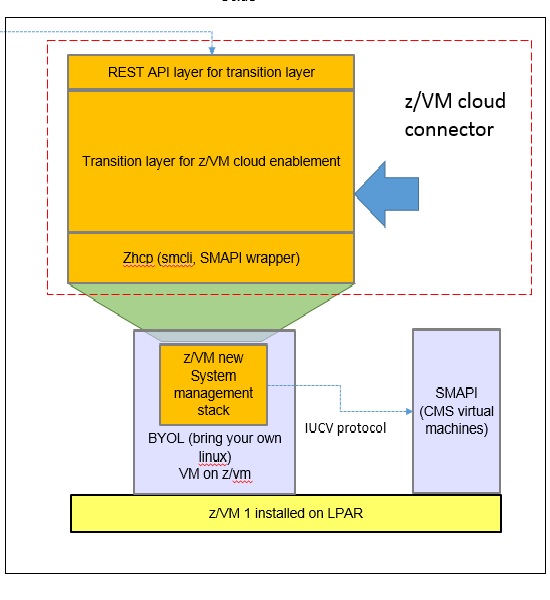
What about writing a terraform Feilong provider, just like we have the terraform libvirt provider? That would allow to transparently call Feilong from your main.tf files to deploy and destroy resources on your z/VM system.
Goal for Hackweek 23
I would like to be able to easily deploy and provision VMs automatically on a z/VM system, in a way that people might enjoy even outside of SUSE.
My technical preference is to write a terraform provider plugin, as it is the approach that involves the least software components for our deployments, while remaining clean, and compatible with our existing development infrastructure.
Goals for Hackweek 24
Feilong provider works and is used internally by SUSE Manager team. Let's push it forward!
Let's add support for fiberchannel disks and multipath.
Goals for Hackweek 25
Modernization, maturity, and maintenance: support for SLES 16 and openTofu, new API calls, fixes...
Resources
Outcome
Contribute to terraform-provider-libvirt by pinvernizzi
Description
The SUSE Manager (SUMA) teams' main tool for infrastructure automation, Sumaform, largely relies on terraform-provider-libvirt. That provider is also widely used by other teams, both inside and outside SUSE.
It would be good to help the maintainers of this project and give back to the community around it, after all the amazing work that has been already done.
If you're interested in any of infrastructure automation, Terraform, virtualization, tooling development, Go (...) it is also a good chance to learn a bit about them all by putting your hands on an interesting, real-use-case and complex project.
Goals
- Get more familiar with Terraform provider development and libvirt bindings in Go
- Solve some issues and/or implement some features
- Get in touch with the community around the project
Resources
- CONTRIBUTING readme
- Go libvirt library in use by the project
- Terraform plugin development
- "Good first issue" list
Rancher/k8s Trouble-Maker by tonyhansen
Project Description
When studying for my RHCSA, I found trouble-maker, which is a program that breaks a Linux OS and requires you to fix it. I want to create something similar for Rancher/k8s that can allow for troubleshooting an unknown environment.
Goals for Hackweek 25
- Update to modern Rancher and verify that existing tests still work
- Change testing logic to populate secrets instead of requiring a secondary script
- Add new tests
Goals for Hackweek 24 (Complete)
- Create a basic framework for creating Rancher/k8s cluster lab environments as needed for the Break/Fix
- Create at least 5 modules that can be applied to the cluster and require troubleshooting
Resources
- https://github.com/celidon/rancher-troublemaker
- https://github.com/rancher/terraform-provider-rancher2
- https://github.com/rancher/tf-rancher-up
- https://github.com/rancher/quickstart
Multimachine on-prem test with opentofu, ansible and Robot Framework by apappas
Description
A long time ago I explored using the Robot Framework for testing. A big deficiency over our openQA setup is that bringing up and configuring the connection to a test machine is out of scope.
Nowadays we have a way¹ to deploy SUTs outside openqa, but we only use if for cloud tests in conjuction with openqa. Using knowledge gained from that project I am going to try to create a test scenario that replicates an openqa test but this time including the deployment and setup of the SUT.
Goals
Create a simple multimachine test scenario with the support server and SUT all created by the robot framework.
Resources
- https://github.com/SUSE/qe-sap-deployment
- terraform-libvirt-provider
Testing and adding GNU/Linux distributions on Uyuni by juliogonzalezgil
Join the Gitter channel! https://gitter.im/uyuni-project/hackweek
Uyuni is a configuration and infrastructure management tool that saves you time and headaches when you have to manage and update tens, hundreds or even thousands of machines. It also manages configuration, can run audits, build image containers, monitor and much more!
Currently there are a few distributions that are completely untested on Uyuni or SUSE Manager (AFAIK) or just not tested since a long time, and could be interesting knowing how hard would be working with them and, if possible, fix whatever is broken.
For newcomers, the easiest distributions are those based on DEB or RPM packages. Distributions with other package formats are doable, but will require adapting the Python and Java code to be able to sync and analyze such packages (and if salt does not support those packages, it will need changes as well). So if you want a distribution with other packages, make sure you are comfortable handling such changes.
No developer experience? No worries! We had non-developers contributors in the past, and we are ready to help as long as you are willing to learn. If you don't want to code at all, you can also help us preparing the documentation after someone else has the initial code ready, or you could also help with testing :-)
The idea is testing Salt (including bootstrapping with bootstrap script) and Salt-ssh clients
To consider that a distribution has basic support, we should cover at least (points 3-6 are to be tested for both salt minions and salt ssh minions):
- Reposync (this will require using spacewalk-common-channels and adding channels to the .ini file)
- Onboarding (salt minion from UI, salt minion from bootstrap scritp, and salt-ssh minion) (this will probably require adding OS to the bootstrap repository creator)
- Package management (install, remove, update...)
- Patching
- Applying any basic salt state (including a formula)
- Salt remote commands
- Bonus point: Java part for product identification, and monitoring enablement
- Bonus point: sumaform enablement (https://github.com/uyuni-project/sumaform)
- Bonus point: Documentation (https://github.com/uyuni-project/uyuni-docs)
- Bonus point: testsuite enablement (https://github.com/uyuni-project/uyuni/tree/master/testsuite)
If something is breaking: we can try to fix it, but the main idea is research how supported it is right now. Beyond that it's up to each project member how much to hack :-)
- If you don't have knowledge about some of the steps: ask the team
- If you still don't know what to do: switch to another distribution and keep testing.
This card is for EVERYONE, not just developers. Seriously! We had people from other teams helping that were not developers, and added support for Debian and new SUSE Linux Enterprise and openSUSE Leap versions :-)
In progress/done for Hack Week 25
Guide
We started writin a Guide: Adding a new client GNU Linux distribution to Uyuni at https://github.com/uyuni-project/uyuni/wiki/Guide:-Adding-a-new-client-GNU-Linux-distribution-to-Uyuni, to make things easier for everyone, specially those not too familiar wht Uyuni or not technical.
openSUSE Leap 16.0
The distribution will all love!
https://en.opensuse.org/openSUSE:Roadmap#DRAFTScheduleforLeap16.0
Curent Status We started last year, it's complete now for Hack Week 25! :-D
[W]Reposync (this will require using spacewalk-common-channels and adding channels to the .ini file) NOTE: Done, client tools for SLMicro6 are using as those for SLE16.0/openSUSE Leap 16.0 are not available yet[W]Onboarding (salt minion from UI, salt minion from bootstrap scritp, and salt-ssh minion) (this will probably require adding OS to the bootstrap repository creator)[W]Package management (install, remove, update...). Works, even reboot requirement detection
Move Uyuni Test Framework from Selenium to Playwright + AI by oscar-barrios
Description
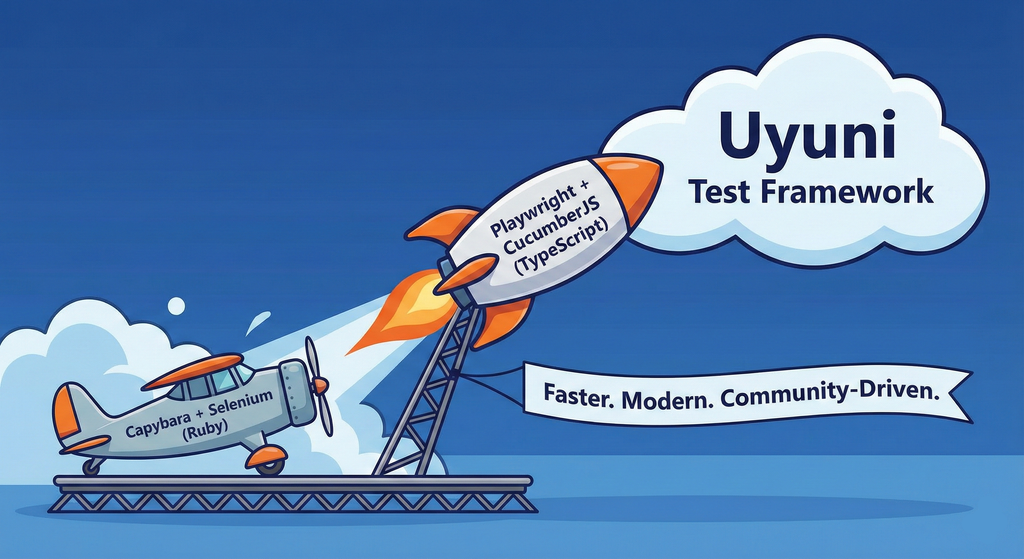
This project aims to migrate the existing Uyuni Test Framework from Selenium to Playwright. The move will improve the stability, speed, and maintainability of our end-to-end tests by leveraging Playwright's modern features. We'll be rewriting the current Selenium code in Ruby to Playwright code in TypeScript, which includes updating the test framework runner, step definitions, and configurations. This is also necessary because we're moving from Cucumber Ruby to CucumberJS.
If you're still curious about the AI in the title, it was just a way to grab your attention. Thanks for your understanding.
Nah, let's be honest  AI helped a lot to vibe code a good part of the Ruby methods of the Test framework, moving them to Typescript, along with the migration from Capybara to Playwright. I've been using "Cline" as plugin for WebStorm IDE, using Gemini API behind it.
Goals
- Migrate Core tests including Onboarding of clients
- Improve test reliabillity: Measure and confirm a significant reduction of flakiness.
- Implement a robust framework: Establish a well-structured and reusable Playwright test framework using the CucumberJS
Resources
- Existing Uyuni Test Framework (Cucumber Ruby + Capybara + Selenium)
- My Template for CucumberJS + Playwright in TypeScript
- Started Hackweek Project
Testing and adding GNU/Linux distributions on Uyuni by juliogonzalezgil
Join the Gitter channel! https://gitter.im/uyuni-project/hackweek
Uyuni is a configuration and infrastructure management tool that saves you time and headaches when you have to manage and update tens, hundreds or even thousands of machines. It also manages configuration, can run audits, build image containers, monitor and much more!
Currently there are a few distributions that are completely untested on Uyuni or SUSE Manager (AFAIK) or just not tested since a long time, and could be interesting knowing how hard would be working with them and, if possible, fix whatever is broken.
For newcomers, the easiest distributions are those based on DEB or RPM packages. Distributions with other package formats are doable, but will require adapting the Python and Java code to be able to sync and analyze such packages (and if salt does not support those packages, it will need changes as well). So if you want a distribution with other packages, make sure you are comfortable handling such changes.
No developer experience? No worries! We had non-developers contributors in the past, and we are ready to help as long as you are willing to learn. If you don't want to code at all, you can also help us preparing the documentation after someone else has the initial code ready, or you could also help with testing :-)
The idea is testing Salt (including bootstrapping with bootstrap script) and Salt-ssh clients
To consider that a distribution has basic support, we should cover at least (points 3-6 are to be tested for both salt minions and salt ssh minions):
- Reposync (this will require using spacewalk-common-channels and adding channels to the .ini file)
- Onboarding (salt minion from UI, salt minion from bootstrap scritp, and salt-ssh minion) (this will probably require adding OS to the bootstrap repository creator)
- Package management (install, remove, update...)
- Patching
- Applying any basic salt state (including a formula)
- Salt remote commands
- Bonus point: Java part for product identification, and monitoring enablement
- Bonus point: sumaform enablement (https://github.com/uyuni-project/sumaform)
- Bonus point: Documentation (https://github.com/uyuni-project/uyuni-docs)
- Bonus point: testsuite enablement (https://github.com/uyuni-project/uyuni/tree/master/testsuite)
If something is breaking: we can try to fix it, but the main idea is research how supported it is right now. Beyond that it's up to each project member how much to hack :-)
- If you don't have knowledge about some of the steps: ask the team
- If you still don't know what to do: switch to another distribution and keep testing.
This card is for EVERYONE, not just developers. Seriously! We had people from other teams helping that were not developers, and added support for Debian and new SUSE Linux Enterprise and openSUSE Leap versions :-)
In progress/done for Hack Week 25
Guide
We started writin a Guide: Adding a new client GNU Linux distribution to Uyuni at https://github.com/uyuni-project/uyuni/wiki/Guide:-Adding-a-new-client-GNU-Linux-distribution-to-Uyuni, to make things easier for everyone, specially those not too familiar wht Uyuni or not technical.
openSUSE Leap 16.0
The distribution will all love!
https://en.opensuse.org/openSUSE:Roadmap#DRAFTScheduleforLeap16.0
Curent Status We started last year, it's complete now for Hack Week 25! :-D
[W]Reposync (this will require using spacewalk-common-channels and adding channels to the .ini file) NOTE: Done, client tools for SLMicro6 are using as those for SLE16.0/openSUSE Leap 16.0 are not available yet[W]Onboarding (salt minion from UI, salt minion from bootstrap scritp, and salt-ssh minion) (this will probably require adding OS to the bootstrap repository creator)[W]Package management (install, remove, update...). Works, even reboot requirement detection
Enhance git-sha-verify: A tool to checkout validated git hashes by gpathak
Description
git-sha-verify is a simple shell utility to verify and checkout trusted git commits signed using GPG key. This tool helps ensure that only authorized or validated commit hashes are checked out from a git repository, supporting better code integrity and security within the workflow.
Supports:
- Verifying commit authenticity signed using gpg key
- Checking out trusted commits
Ideal for teams and projects where the integrity of git history is crucial.
Goals
A minimal python code of the shell script exists as a pull request.
The goal of this hackweek is to:
- DONE: Add more unit tests
- New and more tests can be added later
- New and more tests can be added later
- Partially DONE: Make the python code modular
- DONE: Add code coverage if possible
Resources
- Link to GitHub Repository: https://github.com/openSUSE/git-sha-verify
Flaky Tests AI Finder for Uyuni and MLM Test Suites by oscar-barrios
Description
Our current Grafana dashboards provide a great overview of test suite health, including a panel for "Top failed tests." However, identifying which of these failures are due to legitimate bugs versus intermittent "flaky tests" is a manual, time-consuming process. These flaky tests erode trust in our test suites and slow down development.
This project aims to build a simple but powerful Python script that automates flaky test detection. The script will directly query our Prometheus instance for the historical data of each failed test, using the jenkins_build_test_case_failure_age metric. It will then format this data and send it to the Gemini API with a carefully crafted prompt, asking it to identify which tests show a flaky pattern.
The final output will be a clean JSON list of the most probable flaky tests, which can then be used to populate a new "Top Flaky Tests" panel in our existing Grafana test suite dashboard.
Goals
By the end of Hack Week, we aim to have a single, working Python script that:
- Connects to Prometheus and executes a query to fetch detailed test failure history.
- Processes the raw data into a format suitable for the Gemini API.
- Successfully calls the Gemini API with the data and a clear prompt.
- Parses the AI's response to extract a simple list of flaky tests.
- Saves the list to a JSON file that can be displayed in Grafana.
- New panel in our Dashboard listing the Flaky tests
Resources
- Jenkins Prometheus Exporter: https://github.com/uyuni-project/jenkins-exporter/
- Data Source: Our internal Prometheus server.
- Key Metric:
jenkins_build_test_case_failure_age{jobname, buildid, suite, case, status, failedsince}. - Existing Query for Reference:
count by (suite) (max_over_time(jenkins_build_test_case_failure_age{status=~"FAILED|REGRESSION", jobname="$jobname"}[$__range])). - AI Model: The Google Gemini API.
- Example about how to interact with Gemini API: https://github.com/srbarrios/FailTale/
- Visualization: Our internal Grafana Dashboard.
- Internal IaC: https://gitlab.suse.de/galaxy/infrastructure/-/tree/master/srv/salt/monitoring
Outcome
- Jenkins Flaky Test Detector: https://github.com/srbarrios/jenkins-flaky-tests-detector and its container
- IaC on MLM Team: https://gitlab.suse.de/galaxy/infrastructure/-/tree/master/srv/salt/monitoring/jenkinsflakytestsdetector?reftype=heads, https://gitlab.suse.de/galaxy/infrastructure/-/blob/master/srv/salt/monitoring/grafana/dashboards/flaky-tests.json?ref_type=heads, and others.
- Grafana Dashboard: https://grafana.mgr.suse.de/d/flaky-tests/flaky-tests-detection @ @ text