
 SUSE Prague claw machine
Project Description
The idea is to build a claw machine similar to e.g. this one:
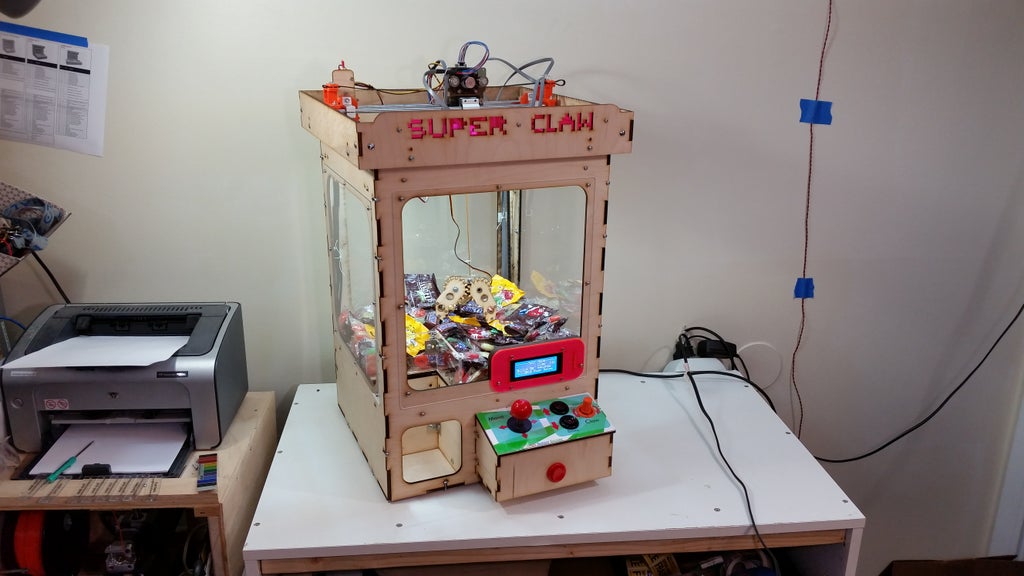
Why? Well, it could be a lot of fun!
But also it's a great way to dispense SUSE and openSUSE merch like little Geekos at events like conferences, career fairs and open house events.
Goal for this Hackweek
Build an arcade claw machine.
Resources
In French, an article about why you always lose in claw machine games:
We're looking for handy/crafty people in the Prague office:
- woodworking XP or equipment
- arduino/raspi embedded programming knowledge
- Anthony can find a budget for going to GM and buying servos and such ;)


This project is part of:
Hack Week 23 Hack Week 24
Activity
Comments
Be the first to comment!
Similar Projects
OSHW USB token for Passkeys (FIDO2, U2F, WebAuthn) and PGP by duwe
Description
The idea to carry your precious key material along in a specially secured hardware item is almost as old as public keys themselves, starting with the OpenPGP card. Nowadays, an USB plug or NFC are the hardware interfaces of choice, and password-less log-ins are fortunately becoming more popular and standardised.
Meanwhile there are a few products available in that field, for example
yubikey - the "market leader", who continues to sell off buggy, allegedly unfixable firmware ROMs from old stock. Needless to say, it's all but open source, so assume backdoors.
nitrokey - the "start" variant is open source, but the hardware was found to leak its flash ROM content via the SWD debugging interface (even when the flash is read protected !) Compute power is barely enough for Curve25519, Flash memory leaves room for only 3 keys.
solokey(2) - quite neat hardware, with a secure enclave called "TrustZone-M". Unfortunately, the OSS firmware development is stuck in a rusty dead end and cannot use it. Besides, NXP's support for open source toolchains for its devboards is extremely limited.
I plan to base this project on the not-so-tiny USB stack, which is extremely easy to retarget, and to rewrite / refactor the crypto protocols to use the keys only via handles, so the actual key material can be stored securely. Best OSS support seems to be for STM32-based products.
Goals
Create a proof-of-concept item that can provide a second factor for logins and/or decrypt a PGP mail with your private key without disclosing the key itself. Implement or at least show a migration path to store the private key in a location with elevated hardware security.
Resources
STM32 Nucleo, blackmagic probe, tropicsquare tropic01, arm-none cross toolchain
Smart lighting with Pico 2 by jmodak
Description
I am trying to create a smart-lighting project with a Raspberry Pi Pico that reacts to a movie's visuals and audio that involves combining two distinct functions: ambient screen lighting(visual response) and sound-reactive lighting(audio response)
Goals
- Visuals: Capturing the screen's colour requires an external device to analyse screen content and send colour data to the MCU via serial communication.
- Audio: A sound sensor module connected directly to the Pico that can detect sound volume.
- Pico 2W: The MCU receives data fro, both inputs and controls an LED strip.
Resources
- Raspberry Pi Pico 2 W
- RGB LED strip
- Sound detecting sensor
- Power supply
- breadboard and wires
Creating test suite using LLM on existing codebase of a solar router by fcrozat
Description
Two years ago, I evaluated solar routers as part of hackweek24, I've assembled one and it is running almost smoothly.
However, its code quality is not perfect and the codebase doesn't have any testcase (which is tricky, since it is embedded code and rely on getting external data to react).
Before improving the code itself, a testsuite should be created to ensure code additional don't cause regression.
Goals
Create a testsuite, allowing to test solar router code in a virtual environment. Using LLM to help to create this test suite.
If succesful, try to improve the codebase itself by having it reviewed by LLM.
Resources
Learn a bit of embedded programming with Rust in a micro:bit v2 by aplanas
Description
micro:bit is a small single board computer with a ARM Cortex-M4 with the FPU extension, with a very constrain amount of memory and a bunch of sensors and leds.
The board is very well documented, with schematics and code for all the features available, so is an excellent platform for learning embedded programming.
Rust is a system programming language that can generate ARM code, and has crates (libraries) to access the micro:bit hardware. There is plenty documentation about how to make small programs that will run in the micro:bit.
Goals
Start learning about embedded programming in Rust, and maybe make some code to the small KS4036F Robot car from keyestudio.
Resources
- micro:bit
- KS4036F
- microbit technical documentation
- schematic
- impl Rust for micro:bit
- Rust Embedded MB2 Discovery Book
- nRF-HAL
- nRF Microbit-v2 BSP (blocking)
- knurling-rs
- C++ microbit codal
- microbit-bsp for Embassy
- Embassy
Diary
Day 1
- Start reading https://mb2.implrust.com/abstraction-layers.html
- Prepare the dev environment (cross compiler, probe-rs)
- Flash first code in the board (blinky led)
- Checking differences between BSP and HAL
- Compile and install a more complex example, with stack protection
- Reading about the simplicity of xtask, as alias for workspace execution
- Reading the CPP code of the official micro:bit libraries. They have a font!
Day 2
- There are multiple BSP for the microbit. One is using async code for non-blocking operations
- Download and study a bit the API for microbit-v2, the nRF official crate
- Take a look of the KS4036F programming, seems that the communication is multiplexed via I2C
- The motor speed can be selected via PWM (pulse with modulation): power it longer (high frequency), and it will increase the speed
- Scrolling some text
- Debug by printing! defmt is a crate that can be used with probe-rs to emit logs
- Start reading input from the board: buttons
- The logo can be touched and detected as a floating point value
Day 3
- A bit confused how to read the float value from a pin
VimGolf Station by emiler
Description
VimGolf is a challenge game where the goal is to edit a given piece of text into a desired final form using as few keystrokes as possible in Vim.
Some time ago, I built a rough portable station using a Raspberry Pi and a spare monitor. It was initially used to play VimGolf at the office and later repurposed for publicity at several events. This project aims to create a more robust version of that station and provide the necessary scripts and Ansible playbooks to make configuring your own VimGolf station easy.
Goals
- Refactor old existing scripts
- Implement challenge selecion
- Load external configuration files
- Create Ansible playbooks
- Publish on GitHub
Resources
- https://www.vimgolf.com/
- https://github.com/dstein64/vimgolf
- https://github.com/igrigorik/vimgolf
Backfire TV - Take back control of your Firestick by andreabenini
Take Back Control of Your Amazon Firestick.
Tired of Ads, a cluttered launcher, and buttons you can't change? BackFireTV is a project to liberate your Firestick from Amazon's walled garden and make it truly yours. They call it the firestick. To fight fire with fire, you need a backfire.
That's the soul of BackFireTV. To truly liberate it and return back to its core capabilities this project uses a linux script, one Android app and ADB access against Amazon's restrictive policies. We leverage these internal tools to create a "backfire" against the incessant ads and locked ecosystem, transforming your Firestick back into the useful, customizable device it was always meant to be.
The Problem
The Amazon Firestick starts as an excellent, affordable streaming device. However, Amazon's
aggressive Ad policies and restrictive ecosystem have turned it into an increasingly annoying
and a less useful device. It comes with frustrations:
- Messy interface. The less the better was probably the best slogan for the early device,
its interface is now cluttered and chaotic when you probably need just a couple of buttons
for starting your favorite applications.
- Constant Ads. The default launcher is filled with commercials and sponsored content.
- Bloated Interface. A cluttered and slow home screen you can't customize.
- Locked Buttons. Dedicated buttons for services you don't use (like popular streaming
providers) that can't be easily changed.
- Lack of Control. A closed ecosystem that limits what you can do.
I could overlook them all if the device was provided for free. But since you pay and you own it it should be legit to do whatever you please in your personal device and network.
The Solution: BackFireTV
BackFireTV hacks your Firestick to give you back control. It uses a clever system of DHCP hooks
and ADB (Android Debug Bridge) commands to remotely manage your device, block annoyances and
customize your experience from the moment it connects to your network.
The dhcp lease action starts a nohup command on the firestick and forgets about it, the daemon
then manages running programs, hacks remote control features and keys. It can be paused or
resumed, no rooting required.
Features
- Custom Launcher. Automatically replaces the default Amazon launcher with the lean and clean Wolf Launcher.
- Ad-Free Experience:. Blocks annoying ads and sponsored content for a cleaner interface.
- Button Remapping. Reprogram the physical buttons on your remote. For example, make the Disney+ button launch Kodi or your favorite application.
- Works on every firestick 4K. Tested on: Firestick TV 4k (1st/2nd gen), Firestick TV 4k Max.
- No rooting required. It runs on basic user permissions with standard privileges. It also works on standard devices: latest firmware, with or without external hw attached (usb storage, network cards, usb hubs, ...).
- No banned apps. This hack relies on the linux subsystem underneath, no matter what Amazon does on the AppStore, this script can always be sideloaded and cannot be banned (no fingerprints on android app layer).
- Toggle to default anytime. Standard amazon launcher can still be toggled any time for administrative tasks or just as a comparison. Feel free to manage it as usual and switch back to
Capyboard, ESP32 Development Board for Education by emiler
Capyboard is an ESP32 development board built to accept individual custom-made modules. The board is created primarily for use in education, where you want to focus on embedded programming instead of spending time with connecting cables and parts on a breadboard, as you would with Arduino and other such devices. The board is not limited only to education and it can be used to build, for instance, a very powerful internal meteo-station and so on.
- github.com/realcharmer/capyboard
- github.com/realcharmer/capyboard-starter
- github.com/realcharmer/capyboard-docs
- github.com/realcharmer/capyboard-examples
- docs.capyboard.dev
Hack Week 25
My plan is to create a new revision of the board with updated dimensions and possibly even use a new ESP32 with Zigbee/Thread support. I also want to create an extensive library of example projects and expand the documentation. It would be nice to also design additional modules, such as multiplexer or an environment module.
Goals
- Implement changes to a new board revision
- Design additional modules
- Expand documentation and examples
- Migrate documentation backend from MkDocs to Zensical
Hack Week 24
I created a new motherboard revision after testing my previous prototype, as well as a light module. This project was also a part of my master's thesis, which was defended successfully.
Goals
- Finish testing of a new prototype
- Publish source files
- Documentation completion
- Finish writing thesis
OSHW USB token for Passkeys (FIDO2, U2F, WebAuthn) and PGP by duwe
Description
The idea to carry your precious key material along in a specially secured hardware item is almost as old as public keys themselves, starting with the OpenPGP card. Nowadays, an USB plug or NFC are the hardware interfaces of choice, and password-less log-ins are fortunately becoming more popular and standardised.
Meanwhile there are a few products available in that field, for example
yubikey - the "market leader", who continues to sell off buggy, allegedly unfixable firmware ROMs from old stock. Needless to say, it's all but open source, so assume backdoors.
nitrokey - the "start" variant is open source, but the hardware was found to leak its flash ROM content via the SWD debugging interface (even when the flash is read protected !) Compute power is barely enough for Curve25519, Flash memory leaves room for only 3 keys.
solokey(2) - quite neat hardware, with a secure enclave called "TrustZone-M". Unfortunately, the OSS firmware development is stuck in a rusty dead end and cannot use it. Besides, NXP's support for open source toolchains for its devboards is extremely limited.
I plan to base this project on the not-so-tiny USB stack, which is extremely easy to retarget, and to rewrite / refactor the crypto protocols to use the keys only via handles, so the actual key material can be stored securely. Best OSS support seems to be for STM32-based products.
Goals
Create a proof-of-concept item that can provide a second factor for logins and/or decrypt a PGP mail with your private key without disclosing the key itself. Implement or at least show a migration path to store the private key in a location with elevated hardware security.
Resources
STM32 Nucleo, blackmagic probe, tropicsquare tropic01, arm-none cross toolchain