
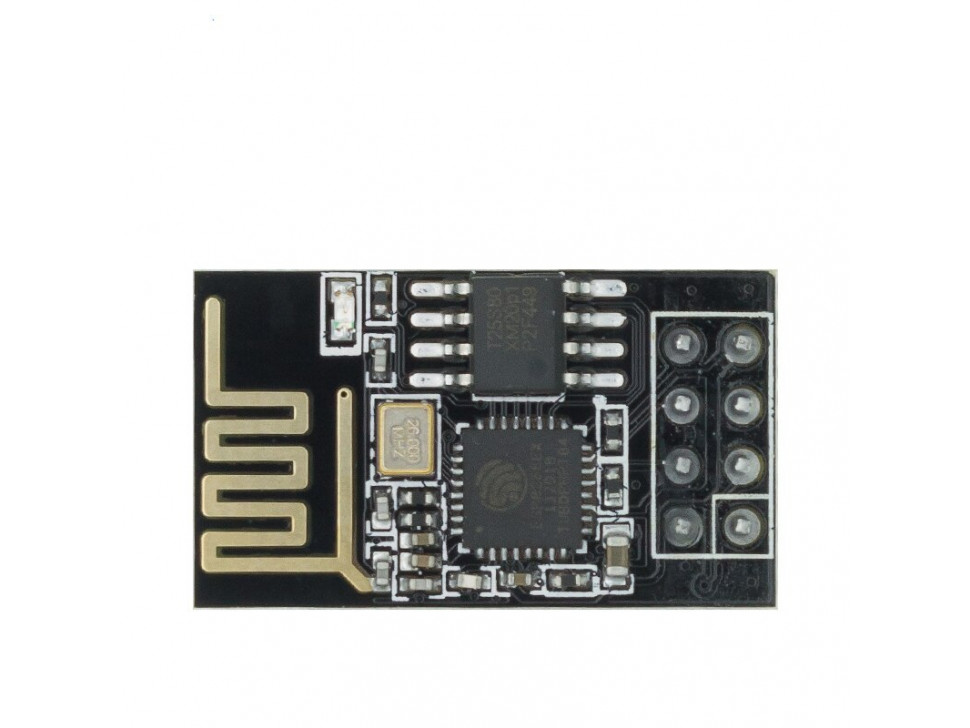
 Use ESP-01S as WiFi to UART bridge
Project Description
Currently with just with 8 RPi devices cables occupy most of the space in the 'rack. Reduce the clutter with replacing USB to UART converter with WiFi to UART ones.
Goal for this Hackweek
- Devices are ordered
- Prepare device programmer
- Study platform
- Create clean WiFi to UART bridge implementation
Resources
Result

This project is part of:
Hack Week 21
Activity
Comments


Similar Projects
Smart lighting with Pico 2 by jmodak
Description
I am trying to create a smart-lighting project with a Raspberry Pi Pico that reacts to a movie's visuals and audio that involves combining two distinct functions: ambient screen lighting(visual response) and sound-reactive lighting(audio response)
Goals
- Visuals: Capturing the screen's colour requires an external device to analyse screen content and send colour data to the MCU via serial communication.
- Audio: A sound sensor module connected directly to the Pico that can detect sound volume.
- Pico 2W: The MCU receives data fro, both inputs and controls an LED strip.
Resources
- Raspberry Pi Pico 2 W
- RGB LED strip
- Sound detecting sensor
- Power supply
- breadboard and wires
OSHW USB token for Passkeys (FIDO2, U2F, WebAuthn) and PGP by duwe
Description
The idea to carry your precious key material along in a specially secured hardware item is almost as old as public keys themselves, starting with the OpenPGP card. Nowadays, an USB plug or NFC are the hardware interfaces of choice, and password-less log-ins are fortunately becoming more popular and standardised.
Meanwhile there are a few products available in that field, for example
yubikey - the "market leader", who continues to sell off buggy, allegedly unfixable firmware ROMs from old stock. Needless to say, it's all but open source, so assume backdoors.
nitrokey - the "start" variant is open source, but the hardware was found to leak its flash ROM content via the SWD debugging interface (even when the flash is read protected !) Compute power is barely enough for Curve25519, Flash memory leaves room for only 3 keys.
solokey(2) - quite neat hardware, with a secure enclave called "TrustZone-M". Unfortunately, the OSS firmware development is stuck in a rusty dead end and cannot use it. Besides, NXP's support for open source toolchains for its devboards is extremely limited.
I plan to base this project on the not-so-tiny USB stack, which is extremely easy to retarget, and to rewrite / refactor the crypto protocols to use the keys only via handles, so the actual key material can be stored securely. Best OSS support seems to be for STM32-based products.
Goals
Create a proof-of-concept item that can provide a second factor for logins and/or decrypt a PGP mail with your private key without disclosing the key itself. Implement or at least show a migration path to store the private key in a location with elevated hardware security.
Resources
STM32 Nucleo, blackmagic probe, tropicsquare tropic01, arm-none cross toolchain
Creating test suite using LLM on existing codebase of a solar router by fcrozat
Description
Two years ago, I evaluated solar routers as part of hackweek24, I've assembled one and it is running almost smoothly.
However, its code quality is not perfect and the codebase doesn't have any testcase (which is tricky, since it is embedded code and rely on getting external data to react).
Before improving the code itself, a testsuite should be created to ensure code additional don't cause regression.
Goals
Create a testsuite, allowing to test solar router code in a virtual environment. Using LLM to help to create this test suite.
If succesful, try to improve the codebase itself by having it reviewed by LLM.
Resources
Learn a bit of embedded programming with Rust in a micro:bit v2 by aplanas
Description
micro:bit is a small single board computer with a ARM Cortex-M4 with the FPU extension, with a very constrain amount of memory and a bunch of sensors and leds.
The board is very well documented, with schematics and code for all the features available, so is an excellent platform for learning embedded programming.
Rust is a system programming language that can generate ARM code, and has crates (libraries) to access the micro:bit hardware. There is plenty documentation about how to make small programs that will run in the micro:bit.
Goals
Start learning about embedded programming in Rust, and maybe make some code to the small KS4036F Robot car from keyestudio.
Resources
- micro:bit
- KS4036F
- microbit technical documentation
- schematic
- impl Rust for micro:bit
- Rust Embedded MB2 Discovery Book
- nRF-HAL
- nRF Microbit-v2 BSP (blocking)
- knurling-rs
- C++ microbit codal
- microbit-bsp for Embassy
- Embassy
Diary
Day 1
- Start reading https://mb2.implrust.com/abstraction-layers.html
- Prepare the dev environment (cross compiler, probe-rs)
- Flash first code in the board (blinky led)
- Checking differences between BSP and HAL
- Compile and install a more complex example, with stack protection
- Reading about the simplicity of xtask, as alias for workspace execution
- Reading the CPP code of the official micro:bit libraries. They have a font!
Day 2
- There are multiple BSP for the microbit. One is using async code for non-blocking operations
- Download and study a bit the API for microbit-v2, the nRF official crate
- Take a look of the KS4036F programming, seems that the communication is multiplexed via I2C
- The motor speed can be selected via PWM (pulse with modulation): power it longer (high frequency), and it will increase the speed
- Scrolling some text
- Debug by printing! defmt is a crate that can be used with probe-rs to emit logs
- Start reading input from the board: buttons
- The logo can be touched and detected as a floating point value
Day 3
- A bit confused how to read the float value from a pin
Build a Single Camera 3D Scanner (Photogrammetry). by lparkin
Description
I want to see how fast I can develop a single-camera (pi camera module v3) rig with a stepper motor controlling a turntable that rotates the model being scanned. The trick here is not to be super fancy with 100's of sensors and data inputs, quite the opposite. I want to see how accurate I can scan objects into 3D-printable models using only a camera and as many fixed and known parameters as possible.
Speed to be augmented with agentic AI coding companion. As it stands, I have a 3D printer, pretty much all the electronics I need.
Goals
- Design and print working/workable camera rig
- Design and print working/workable turntable (considering printing my own cylinder-style bearings as well)
- Assemble rig components into MVP assembly
- Develop application that can hook into existing tools, or leverage a library like openCV, to process 2D images into a 3D model.
- Iterate until models are good enough to 3D print.
Resources
- https://www.instructables.com/3D-scanning-Photogrammetry-with-a-rotating-platfor/
- https://www.instructables.com/3d-Scan-Anything-Using-Just-a-Camera/
- https://www.instructables.com/Build-a-DIY-Desktop-3d-Scanner-With-Infinite-Resol/
- https://www.instructables.com/3D-Laser-Scanning-DIY/
Add a machine-readable output to dmidecode by jdelvare
Description
There have been repeated requests for a machine-friendly dmidecode output over the last decade. During Hack Week 19, 5 years ago, I prepared the code to support alternative output formats, but didn't have the time to go further. Last year, Jiri Hnidek from Red Hat Linux posted a proof-of-concept implementation to add JSON output support. This is a fairly large pull request which needs to be carefully reviewed and tested.
Goals
Review Jiri's work and provide constructive feedback. Merge the code if acceptable. Evaluate the costs and benefits of using a library such as json-c.
Smart lighting with Pico 2 by jmodak
Description
I am trying to create a smart-lighting project with a Raspberry Pi Pico that reacts to a movie's visuals and audio that involves combining two distinct functions: ambient screen lighting(visual response) and sound-reactive lighting(audio response)
Goals
- Visuals: Capturing the screen's colour requires an external device to analyse screen content and send colour data to the MCU via serial communication.
- Audio: A sound sensor module connected directly to the Pico that can detect sound volume.
- Pico 2W: The MCU receives data fro, both inputs and controls an LED strip.
Resources
- Raspberry Pi Pico 2 W
- RGB LED strip
- Sound detecting sensor
- Power supply
- breadboard and wires
Port OTPClient to GTK >= 4.18 by pstivanin
Project Description
OTPClient is currently using GTK3 and cannot easily be ported to GTK4. Since GTK4 came out, there have been quite some big changes. Also, there are now some new deprecation that will take effect with GTK5 (and are active starting from 4.10 as warnings), so I need to think ahead and port OTPClient without using any of those deprecated features.
Goal for this Hackweek
- fix the last 3 opened issues (https://github.com/paolostivanin/OTPClient/issues/402, https://github.com/paolostivanin/OTPClient/issues/404, https://github.com/paolostivanin/OTPClient/issues/406) and release a new version
- continue the rewrite from where we left last year
- if possible, finally close this 6 years old issue: https://github.com/paolostivanin/OTPClient/issues/123
Improve the picotm Transaction Manager by tdz
Picotm is a system-level transaction manager. It provides transactional semantics to low-level C operations, such as
- memory access,
- modifying data structures,
- (some) file I/O, and
- common interfaces from the C Standard Library and POSIX.
Picotm also handles error detection and recovery for all it's functionality. It's fully modular, so new functionality can be added.
For the Hackweek, I want to dedicate some time to picotm. I want to finish some of the refactoring work that I have been working on. If there's time left, I'd like to investigate two-phase commits and how to support them in picotm.
Picotm is available at http://picotm.org/.
x64id: An x86/x64 instruction disassembler by m.crivellari
Description
This is an old side project. An x86/x64 machine code decoder. It is useful to get instructions' length and identify each of its fields.
Example:
C7 85 68 FF FF FF 00 00 00 00
This is the instruction:
MOV DWORD PTR SS:[LOCAL.38],0
What follows are some of the information collected by the disassembler, based on the specific instruction:
RAW bytes (hex): C7 85 68 FF FF FF 00 00 00 00
Instr. length: 10
Print instruction fields:
        Located Prefixes 0:

        OP: 0xC7
        mod_reg_rm: 0x85
        disp (4): 0xFFFFFF68
        Iimm: 0x0
Lacks the mnemonic representation: from the previous machine code is not able to produce the "MOV..." instruction, for example.
Goals
The goal is almost easy: partially implement the mnemonic representation. I have already started during the weekend, likely tomorrow I will push the branch!
Resources
- The project: https://github.com/DispatchCode/x64-Instruction-Decoder/
- This is useful to avoid gdb and objdump in local: https://defuse.ca/online-x86-assembler.htm
- Another interesting resource is https://godbolt.org/
Progress
- An initial implementation can be found at: https://github.com/DispatchCode/x64-Instruction-Decoder/tree/mnemonic-support It is described under the "Mnemonic translation" in the README file!
Let's consider this example:
[...other bytes...] 43 89 44 B5 00 01 00 [...other bytes...]