
Project Description
Build a tool that provides a GUI for Terraform and is able to spin up machines directly on KVM. The user should not be required to have any Terraform skills and should be guided through the GUI when he wants to create new Terraform scripts. Furthermore it would be helpful if the tool could export its configuration to HCL.
Goal for this Hackweek
Having at least a prototype that can spin up simple machine configurations.
Resources
The libivrt provider for Terraform should be used:
https://github.com/dmacvicar/terraform-provider-libvirt


This project is part of:
Hack Week 20
Activity
Comments
-

almost 5 years ago by dominic_vieira | Reply
Have you looked at the Blue Horizon project? This was created by the Public Cloud Engineering Team - https://github.com/SUSE-Enceladus/blue-horizon
-

almost 5 years ago by kevinklinger | Reply
@dominic_vieira I think the difference is that Blue Horizon requires that you have the desired scripts already coded. This GUI I'm thinking of would be something to guide the user through the process of creating Terraform scripts.
But thanks for the link

-

almost 5 years ago by pagarcia | Reply
If you don't want to build the UI from scratch but rather focus on the HCL-generation problem, this might come handy: https://appsmith.com/ https://github.com/appsmithorg/appsmith
Add new widgets for Terraform-related concepts, then generate HCL from that.
The inverse (HCL to UI) is even more interesting :-)
-

Reply to kevinklinger
@dominic_vieira I think the difference is that Blue Horizon requires that you have the desired scripts already coded. This GUI I'm thinking of would be something to guide the user through the process of creating Terraform scripts.
But thanks for the link
# A First Level Header ## A Second Level Header Use one asterisk to *emphasize* Use two asterisks for **strong emphasis** - Use hyphens - for unordereed - lists This is an [link to example.com](http://example.com/) This is an image  This is a user link @hans This is a project link hw#some-cool-title
Similar Projects
Rewrite Distrobox in go (POC) by fabriziosestito
Description
Rewriting Distrobox in Go.
Main benefits:
- Easier to maintain and to test
- Adapter pattern for different container backends (LXC, systemd-nspawn, etc.)
Goals
- Build a minimal starting point with core commands
- Keep the CLI interface compatible: existing users shouldn't notice any difference
- Use a clean Go architecture with adapters for different container backends
- Keep dependencies minimal and binary size small
- Benchmark against the original shell script
Resources
- Upstream project: https://github.com/89luca89/distrobox/
- Distrobox site: https://distrobox.it/
- ArchWiki: https://wiki.archlinux.org/title/Distrobox
terraform-provider-feilong by e_bischoff
Project Description
People need to test operating systems and applications on s390 platform. While this is straightforward with KVM, this is very difficult with z/VM.
IBM Cloud Infrastructure Center (ICIC) harnesses the Feilong API, but you can use Feilong without installing ICIC(see this schema).
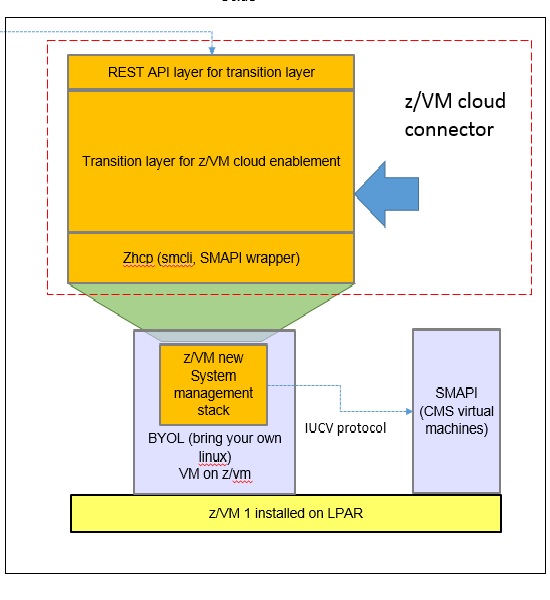
What about writing a terraform Feilong provider, just like we have the terraform libvirt provider? That would allow to transparently call Feilong from your main.tf files to deploy and destroy resources on your z/VM system.
Goal for Hackweek 23
I would like to be able to easily deploy and provision VMs automatically on a z/VM system, in a way that people might enjoy even outside of SUSE.
My technical preference is to write a terraform provider plugin, as it is the approach that involves the least software components for our deployments, while remaining clean, and compatible with our existing development infrastructure.
Goals for Hackweek 24
Feilong provider works and is used internally by SUSE Manager team. Let's push it forward!
Let's add support for fiberchannel disks and multipath.
Goals for Hackweek 25
Modernization, maturity, and maintenance: support for SLES 16 and openTofu, new API calls, fixes...
Resources
Outcome
Q2Boot - A handy QEMU VM launcher by amanzini
Description
Q2Boot (Qemu Quick Boot) is a command-line tool that wraps QEMU to provide a streamlined experience for launching virtual machines. It automatically configures common settings like KVM acceleration, virtio drivers, and networking while allowing customization through both configuration files and command-line options.
The project originally was a personal utility in D, now recently rewritten in idiomatic Go. It lives at repository https://github.com/ilmanzo/q2boot
Goals
Improve the project, testing with different scenarios , address issues and propose new features. It will benefit of some basic integration testing by providing small sample disk images.
Updates
- Dec 1, 2025 : refactor command line options, added structured logging. Released v0.0.2
- Dec 2, 2025 : added external monitor via telnet option
- Dec 4, 2025 : released v0.0.3 with architecture auto-detection
- Dec 5, 2025 : filing new issues and general polishment. Designing E2E testing
Resources
Create a Cloud-Native policy engine with notifying capabilities to optimize resource usage by gbazzotti
Description
The goal of this project is to begin the initial phase of development of an all-in-one Cloud-Native Policy Engine that notifies resource owners when their resources infringe predetermined policies. This was inspired by a current issue in the CES-SRE Team where other solutions seemed to not exactly correspond to the needs of the specific workloads running on the Public Cloud Team space.
The initial architecture can be checked out on the Repository listed under Resources.
Among the features that will differ this project from other monitoring/notification systems:
- Pre-defined sensible policies written at the software-level, avoiding a learning curve by requiring users to write their own policies
- All-in-one functionality: logging, mailing and all other actions are not required to install any additional plugins/packages
- Easy account management, being able to parse all required configuration by a single JSON file
- Eliminate integrations by not requiring metrics to go through a data-agreggator
Goals
- Create a minimal working prototype following the workflow specified on the documentation
- Provide instructions on installation/usage
- Work on email notifying capabilities
Resources
Contribute to terraform-provider-libvirt by pinvernizzi
Description
The SUSE Manager (SUMA) teams' main tool for infrastructure automation, Sumaform, largely relies on terraform-provider-libvirt. That provider is also widely used by other teams, both inside and outside SUSE.
It would be good to help the maintainers of this project and give back to the community around it, after all the amazing work that has been already done.
If you're interested in any of infrastructure automation, Terraform, virtualization, tooling development, Go (...) it is also a good chance to learn a bit about them all by putting your hands on an interesting, real-use-case and complex project.
Goals
- Get more familiar with Terraform provider development and libvirt bindings in Go
- Solve some issues and/or implement some features
- Get in touch with the community around the project
Resources
- CONTRIBUTING readme
- Go libvirt library in use by the project
- Terraform plugin development
- "Good first issue" list
terraform-provider-feilong by e_bischoff
Project Description
People need to test operating systems and applications on s390 platform. While this is straightforward with KVM, this is very difficult with z/VM.
IBM Cloud Infrastructure Center (ICIC) harnesses the Feilong API, but you can use Feilong without installing ICIC(see this schema).
What about writing a terraform Feilong provider, just like we have the terraform libvirt provider? That would allow to transparently call Feilong from your main.tf files to deploy and destroy resources on your z/VM system.
Goal for Hackweek 23
I would like to be able to easily deploy and provision VMs automatically on a z/VM system, in a way that people might enjoy even outside of SUSE.
My technical preference is to write a terraform provider plugin, as it is the approach that involves the least software components for our deployments, while remaining clean, and compatible with our existing development infrastructure.
Goals for Hackweek 24
Feilong provider works and is used internally by SUSE Manager team. Let's push it forward!
Let's add support for fiberchannel disks and multipath.
Goals for Hackweek 25
Modernization, maturity, and maintenance: support for SLES 16 and openTofu, new API calls, fixes...
Resources
Outcome
Testing and adding GNU/Linux distributions on Uyuni by juliogonzalezgil
Join the Gitter channel! https://gitter.im/uyuni-project/hackweek
Uyuni is a configuration and infrastructure management tool that saves you time and headaches when you have to manage and update tens, hundreds or even thousands of machines. It also manages configuration, can run audits, build image containers, monitor and much more!
Currently there are a few distributions that are completely untested on Uyuni or SUSE Manager (AFAIK) or just not tested since a long time, and could be interesting knowing how hard would be working with them and, if possible, fix whatever is broken.
For newcomers, the easiest distributions are those based on DEB or RPM packages. Distributions with other package formats are doable, but will require adapting the Python and Java code to be able to sync and analyze such packages (and if salt does not support those packages, it will need changes as well). So if you want a distribution with other packages, make sure you are comfortable handling such changes.
No developer experience? No worries! We had non-developers contributors in the past, and we are ready to help as long as you are willing to learn. If you don't want to code at all, you can also help us preparing the documentation after someone else has the initial code ready, or you could also help with testing :-)
The idea is testing Salt (including bootstrapping with bootstrap script) and Salt-ssh clients
To consider that a distribution has basic support, we should cover at least (points 3-6 are to be tested for both salt minions and salt ssh minions):
- Reposync (this will require using spacewalk-common-channels and adding channels to the .ini file)
- Onboarding (salt minion from UI, salt minion from bootstrap scritp, and salt-ssh minion) (this will probably require adding OS to the bootstrap repository creator)
- Package management (install, remove, update...)
- Patching
- Applying any basic salt state (including a formula)
- Salt remote commands
- Bonus point: Java part for product identification, and monitoring enablement
- Bonus point: sumaform enablement (https://github.com/uyuni-project/sumaform)
- Bonus point: Documentation (https://github.com/uyuni-project/uyuni-docs)
- Bonus point: testsuite enablement (https://github.com/uyuni-project/uyuni/tree/master/testsuite)
If something is breaking: we can try to fix it, but the main idea is research how supported it is right now. Beyond that it's up to each project member how much to hack :-)
- If you don't have knowledge about some of the steps: ask the team
- If you still don't know what to do: switch to another distribution and keep testing.
This card is for EVERYONE, not just developers. Seriously! We had people from other teams helping that were not developers, and added support for Debian and new SUSE Linux Enterprise and openSUSE Leap versions :-)
In progress/done for Hack Week 25
Guide
We started writin a Guide: Adding a new client GNU Linux distribution to Uyuni at https://github.com/uyuni-project/uyuni/wiki/Guide:-Adding-a-new-client-GNU-Linux-distribution-to-Uyuni, to make things easier for everyone, specially those not too familiar wht Uyuni or not technical.
openSUSE Leap 16.0
The distribution will all love!
https://en.opensuse.org/openSUSE:Roadmap#DRAFTScheduleforLeap16.0
Curent Status We started last year, it's complete now for Hack Week 25! :-D
[W]Reposync (this will require using spacewalk-common-channels and adding channels to the .ini file) NOTE: Done, client tools for SLMicro6 are using as those for SLE16.0/openSUSE Leap 16.0 are not available yet[W]Onboarding (salt minion from UI, salt minion from bootstrap scritp, and salt-ssh minion) (this will probably require adding OS to the bootstrap repository creator)[W]Package management (install, remove, update...). Works, even reboot requirement detection
Contribute to terraform-provider-libvirt by pinvernizzi
Description
The SUSE Manager (SUMA) teams' main tool for infrastructure automation, Sumaform, largely relies on terraform-provider-libvirt. That provider is also widely used by other teams, both inside and outside SUSE.
It would be good to help the maintainers of this project and give back to the community around it, after all the amazing work that has been already done.
If you're interested in any of infrastructure automation, Terraform, virtualization, tooling development, Go (...) it is also a good chance to learn a bit about them all by putting your hands on an interesting, real-use-case and complex project.
Goals
- Get more familiar with Terraform provider development and libvirt bindings in Go
- Solve some issues and/or implement some features
- Get in touch with the community around the project
Resources
- CONTRIBUTING readme
- Go libvirt library in use by the project
- Terraform plugin development
- "Good first issue" list
Multimachine on-prem test with opentofu, ansible and Robot Framework by apappas
Description
A long time ago I explored using the Robot Framework for testing. A big deficiency over our openQA setup is that bringing up and configuring the connection to a test machine is out of scope.
Nowadays we have a way¹ to deploy SUTs outside openqa, but we only use if for cloud tests in conjuction with openqa. Using knowledge gained from that project I am going to try to create a test scenario that replicates an openqa test but this time including the deployment and setup of the SUT.
Goals
Create a simple multimachine test scenario with the support server and SUT all created by the robot framework.
Resources
- https://github.com/SUSE/qe-sap-deployment
- terraform-libvirt-provider
Rancher/k8s Trouble-Maker by tonyhansen
Project Description
When studying for my RHCSA, I found trouble-maker, which is a program that breaks a Linux OS and requires you to fix it. I want to create something similar for Rancher/k8s that can allow for troubleshooting an unknown environment.
Goals for Hackweek 25
- Update to modern Rancher and verify that existing tests still work
- Change testing logic to populate secrets instead of requiring a secondary script
- Add new tests
Goals for Hackweek 24 (Complete)
- Create a basic framework for creating Rancher/k8s cluster lab environments as needed for the Break/Fix
- Create at least 5 modules that can be applied to the cluster and require troubleshooting
Resources
- https://github.com/celidon/rancher-troublemaker
- https://github.com/rancher/terraform-provider-rancher2
- https://github.com/rancher/tf-rancher-up
- https://github.com/rancher/quickstart
openQA log viewer by mpagot
Description
*** Warning: Are You at Risk for VOMIT? ***
Do you find yourself staring at a screen, your eyes glossing over as thousands of lines of text scroll by? Do you feel a wave of text-based nausea when someone asks you to "just check the logs"?
You may be suffering from VOMIT (Verbose Output Mental Irritation Toxicity).
This dangerous, work-induced ailment is triggered by exposure to an overwhelming quantity of log data, especially from parallel systems. The human brain, not designed to mentally process 12 simultaneous autoinst-log.txt files, enters a state of toxic shock. It rejects the "Verbose Output," making it impossible to find the one critical error line buried in a 50,000-line sea of "INFO: doing a thing."
Before you're forced to rm -rf /var/log in a fit of desperation, we present the digital antacid.
No panic: we have The openQA Log Visualizer
This is the UI antidote for handling toxic log environments. It bravely dives into the chaotic, multi-machine mess of your openQA test runs, finds all the related, verbose logs, and force-feeds them into a parser.

Goals
Work on the existing POC openqa-log-visualizer about few specific tasks:
- add support for more type of logs
- extend the configuration file syntax beyond the actual one
- work on log parsing performance
Find some beta-tester and collect feedback and ideas about features
If time allow for it evaluate other UI frameworks and solutions (something more simple to distribute and run, maybe more low level to gain in performance).
Resources