
What is Brine?
Simply put: A build system for Salt Formulas
The Vision
I started Brine years ago when I worked for another company to help people get started building Salt Formulas without requring them know Salt or read our internal Style Guide for writing Formulas. The original scope was small and so rather than being a build system, it is currently more of a Salt Formula initializer. However, I do see a need in the Salt community for something a but more than just an initializer. I think Brine can fill that gap.
Why Rewrite at all?
the current implementation of Brine is written in Python. This is mostly because Salt is in Python and I can somewhat write Python myself. Also I was around many, many people who knew Python very well.
Why Rewrite in Go?
Someone I worked with when I was working on Brine, build a tool to make it easier to work with GPG encrypted Pillar. In that tool, I see ways Brine to be able to integrate and leverage what he built.
Also, I here are some other reasons I want to work on this in Go:
- I have not really had a chance to write any Go in about two years and I didn't know much to begin with, so I'd like to re-familiarize myself with the language while building something that I already know what I expect from a working implementation.
- Statically-linked binary makes it easy for people to get started with Brine.
- Go's strong community.

Looking for hackers with the skills:
This project is part of:
Hack Week 17
Activity
Comments
Be the first to comment!
Similar Projects
Enhance setup wizard for Uyuni by PSuarezHernandez
Description
This project wants to enhance the intial setup on Uyuni after its installation, so it's easier for a user to start using with it.
Uyuni currently uses "uyuni-tools" (mgradm) as the installation entrypoint, to trigger the installation of Uyuni in the given host, but does not really perform an initial setup, for instance:
- user creation
- adding products / channels
- generating bootstrap repos
- create activation keys
- ...
Goals
- Provide initial setup wizard as part of mgradm uyuni installation
Resources
Testing and adding GNU/Linux distributions on Uyuni by juliogonzalezgil
Join the Gitter channel! https://gitter.im/uyuni-project/hackweek
Uyuni is a configuration and infrastructure management tool that saves you time and headaches when you have to manage and update tens, hundreds or even thousands of machines. It also manages configuration, can run audits, build image containers, monitor and much more!
Currently there are a few distributions that are completely untested on Uyuni or SUSE Manager (AFAIK) or just not tested since a long time, and could be interesting knowing how hard would be working with them and, if possible, fix whatever is broken.
For newcomers, the easiest distributions are those based on DEB or RPM packages. Distributions with other package formats are doable, but will require adapting the Python and Java code to be able to sync and analyze such packages (and if salt does not support those packages, it will need changes as well). So if you want a distribution with other packages, make sure you are comfortable handling such changes.
No developer experience? No worries! We had non-developers contributors in the past, and we are ready to help as long as you are willing to learn. If you don't want to code at all, you can also help us preparing the documentation after someone else has the initial code ready, or you could also help with testing :-)
The idea is testing Salt (including bootstrapping with bootstrap script) and Salt-ssh clients
To consider that a distribution has basic support, we should cover at least (points 3-6 are to be tested for both salt minions and salt ssh minions):
- Reposync (this will require using spacewalk-common-channels and adding channels to the .ini file)
- Onboarding (salt minion from UI, salt minion from bootstrap scritp, and salt-ssh minion) (this will probably require adding OS to the bootstrap repository creator)
- Package management (install, remove, update...)
- Patching
- Applying any basic salt state (including a formula)
- Salt remote commands
- Bonus point: Java part for product identification, and monitoring enablement
- Bonus point: sumaform enablement (https://github.com/uyuni-project/sumaform)
- Bonus point: Documentation (https://github.com/uyuni-project/uyuni-docs)
- Bonus point: testsuite enablement (https://github.com/uyuni-project/uyuni/tree/master/testsuite)
If something is breaking: we can try to fix it, but the main idea is research how supported it is right now. Beyond that it's up to each project member how much to hack :-)
- If you don't have knowledge about some of the steps: ask the team
- If you still don't know what to do: switch to another distribution and keep testing.
This card is for EVERYONE, not just developers. Seriously! We had people from other teams helping that were not developers, and added support for Debian and new SUSE Linux Enterprise and openSUSE Leap versions :-)
In progress/done for Hack Week 25
Guide
We started writin a Guide: Adding a new client GNU Linux distribution to Uyuni at https://github.com/uyuni-project/uyuni/wiki/Guide:-Adding-a-new-client-GNU-Linux-distribution-to-Uyuni, to make things easier for everyone, specially those not too familiar wht Uyuni or not technical.
openSUSE Leap 16.0
The distribution will all love!
https://en.opensuse.org/openSUSE:Roadmap#DRAFTScheduleforLeap16.0
Curent Status We started last year, it's complete now for Hack Week 25! :-D
[W]Reposync (this will require using spacewalk-common-channels and adding channels to the .ini file) NOTE: Done, client tools for SLMicro6 are using as those for SLE16.0/openSUSE Leap 16.0 are not available yet[W]Onboarding (salt minion from UI, salt minion from bootstrap scritp, and salt-ssh minion) (this will probably require adding OS to the bootstrap repository creator)[W]Package management (install, remove, update...). Works, even reboot requirement detection
Ansible to Salt integration by vizhestkov
Description
We already have initial integration of Ansible in Salt with the possibility to run playbooks from the salt-master on the salt-minion used as an Ansible Control node.
In this project I want to check if it possible to make Ansible working on the transport of Salt. Basically run playbooks with Ansible through existing established Salt (ZeroMQ) transport and not using ssh at all.
It could be a good solution for the end users to reuse Ansible playbooks or run Ansible modules they got used to with no effort of complex configuration with existing Salt (or Uyuni/SUSE Multi Linux Manager) infrastructure.
Goals
- [v] Prepare the testing environment with Salt and Ansible installed
- [v] Discover Ansible codebase to figure out possible ways of integration
- [v] Create Salt/Uyuni inventory module
- [v] Make basic modules to work with no using separate ssh connection, but reusing existing Salt connection
- [v] Test some most basic playbooks
Resources
Ansible to Salt integration by vizhestkov
Description
We already have initial integration of Ansible in Salt with the possibility to run playbooks from the salt-master on the salt-minion used as an Ansible Control node.
In this project I want to check if it possible to make Ansible working on the transport of Salt. Basically run playbooks with Ansible through existing established Salt (ZeroMQ) transport and not using ssh at all.
It could be a good solution for the end users to reuse Ansible playbooks or run Ansible modules they got used to with no effort of complex configuration with existing Salt (or Uyuni/SUSE Multi Linux Manager) infrastructure.
Goals
- [v] Prepare the testing environment with Salt and Ansible installed
- [v] Discover Ansible codebase to figure out possible ways of integration
- [v] Create Salt/Uyuni inventory module
- [v] Make basic modules to work with no using separate ssh connection, but reusing existing Salt connection
- [v] Test some most basic playbooks
Resources
A CLI for Harvester by mohamed.belgaied
Harvester does not officially come with a CLI tool, the user is supposed to interact with Harvester mostly through the UI. Though it is theoretically possible to use kubectl to interact with Harvester, the manipulation of Kubevirt YAML objects is absolutely not user friendly. Inspired by tools like multipass from Canonical to easily and rapidly create one of multiple VMs, I began the development of Harvester CLI. Currently, it works but Harvester CLI needs some love to be up-to-date with Harvester v1.0.2 and needs some bug fixes and improvements as well.
Project Description
Harvester CLI is a command line interface tool written in Go, designed to simplify interfacing with a Harvester cluster as a user. It is especially useful for testing purposes as you can easily and rapidly create VMs in Harvester by providing a simple command such as:
harvester vm create my-vm --count 5
to create 5 VMs named my-vm-01 to my-vm-05.

Harvester CLI is functional but needs a number of improvements: up-to-date functionality with Harvester v1.0.2 (some minor issues right now), modifying the default behaviour to create an opensuse VM instead of an ubuntu VM, solve some bugs, etc.
Github Repo for Harvester CLI: https://github.com/belgaied2/harvester-cli
Done in previous Hackweeks
- Create a Github actions pipeline to automatically integrate Harvester CLI to Homebrew repositories: DONE
- Automatically package Harvester CLI for OpenSUSE / Redhat RPMs or DEBs: DONE
Goal for this Hackweek
The goal for this Hackweek is to bring Harvester CLI up-to-speed with latest Harvester versions (v1.3.X and v1.4.X), and improve the code quality as well as implement some simple features and bug fixes.
Some nice additions might be: * Improve handling of namespaced objects * Add features, such as network management or Load Balancer creation ? * Add more unit tests and, why not, e2e tests * Improve CI * Improve the overall code quality * Test the program and create issues for it
Issue list is here: https://github.com/belgaied2/harvester-cli/issues
Resources
The project is written in Go, and using client-go the Kubernetes Go Client libraries to communicate with the Harvester API (which is Kubernetes in fact).
Welcome contributions are:
- Testing it and creating issues
- Documentation
- Go code improvement
What you might learn
Harvester CLI might be interesting to you if you want to learn more about:
- GitHub Actions
- Harvester as a SUSE Product
- Go programming language
- Kubernetes API
- Kubevirt API objects (Manipulating VMs and VM Configuration in Kubernetes using Kubevirt)
SUSE Health Check Tools by roseswe
SUSE HC Tools Overview
A collection of tools written in Bash or Go 1.24++ to make life easier with handling of a bunch of tar.xz balls created by supportconfig.
Background: For SUSE HC we receive a bunch of supportconfig tar balls to check them for misconfiguration, areas for improvement or future changes.
Main focus on these HC are High Availability (pacemaker), SLES itself and SAP workloads, esp. around the SUSE best practices.
Goals
- Overall improvement of the tools
- Adding new collectors
- Add support for SLES16
Resources
csv2xls* example.sh go.mod listprodids.txt sumtext* trails.go README.md csv2xls.go exceltest.go go.sum m.sh* sumtext.go vercheck.py* config.ini csvfiles/ getrpm* listprodids* rpmdate.sh* sumxls* verdriver* credtest.go example.py getrpm.go listprodids.go sccfixer.sh* sumxls.go verdriver.go
docollall.sh* extracthtml.go gethostnamectl* go.sum numastat.go cpuvul* extractcluster.go firmwarebug* gethostnamectl.go m.sh* numastattest.go cpuvul.go extracthtml* firmwarebug.go go.mod numastat* xtr_cib.sh*
$ getrpm -r pacemaker
>> Product ID: 2795 (SUSE Linux Enterprise Server for SAP Applications 15 SP7 x86_64), RPM Name:
+--------------+----------------------------+--------+--------------+--------------------+
| Package Name | Version                    | Arch   | Release      | Repository         |
+--------------+----------------------------+--------+--------------+--------------------+
| pacemaker    | 2.1.10+20250718.fdf796ebc8 | x86_64 | 150700.3.3.1 | sle-ha/15.7/x86_64 |
| pacemaker    | 2.1.9+20250410.471584e6a2  | x86_64 | 150700.1.9   | sle-ha/15.7/x86_64 |
+--------------+----------------------------+--------+--------------+--------------------+
Total packages found: 2
Q2Boot - A handy QEMU VM launcher by amanzini
Description
Q2Boot (Qemu Quick Boot) is a command-line tool that wraps QEMU to provide a streamlined experience for launching virtual machines. It automatically configures common settings like KVM acceleration, virtio drivers, and networking while allowing customization through both configuration files and command-line options.
The project originally was a personal utility in D, now recently rewritten in idiomatic Go. It lives at repository https://github.com/ilmanzo/q2boot
Goals
Improve the project, testing with different scenarios , address issues and propose new features. It will benefit of some basic integration testing by providing small sample disk images.
Updates
- Dec 1, 2025 : refactor command line options, added structured logging. Released v0.0.2
- Dec 2, 2025 : added external monitor via telnet option
- Dec 4, 2025 : released v0.0.3 with architecture auto-detection
- Dec 5, 2025 : filing new issues and general polishment. Designing E2E testing
Resources
Play with the userfaultfd(2) system call and download on demand using HTTP Range Requests with Golang by rbranco
Description
The userfaultfd(2) is a cool system call to handle page faults in user-space. This should allow me to list the contents of an ISO or similar archive without downloading the whole thing. The userfaultfd(2) part can also be done in theory with the PROT_NONE mprotect + SIGSEGV trick, for complete Unix portability, though reportedly being slower.
Goals
- Create my own library for userfaultfd(2) in Golang.
- Create my own library for HTTP Range Requests.
- Complete portability with Unix.
- Benchmarks.
- Contribute some tests to LTP.
Resources
- https://docs.kernel.org/admin-guide/mm/userfaultfd.html
- https://www.cons.org/cracauer/cracauer-userfaultfd.html
terraform-provider-feilong by e_bischoff
Project Description
People need to test operating systems and applications on s390 platform. While this is straightforward with KVM, this is very difficult with z/VM.
IBM Cloud Infrastructure Center (ICIC) harnesses the Feilong API, but you can use Feilong without installing ICIC(see this schema).
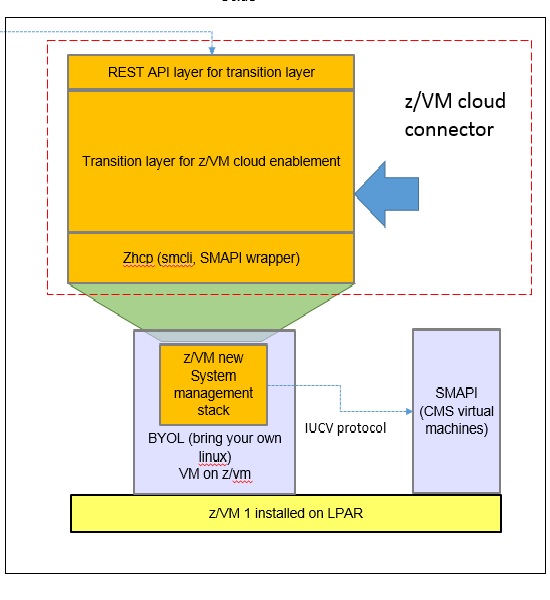
What about writing a terraform Feilong provider, just like we have the terraform libvirt provider? That would allow to transparently call Feilong from your main.tf files to deploy and destroy resources on your z/VM system.
Goal for Hackweek 23
I would like to be able to easily deploy and provision VMs automatically on a z/VM system, in a way that people might enjoy even outside of SUSE.
My technical preference is to write a terraform provider plugin, as it is the approach that involves the least software components for our deployments, while remaining clean, and compatible with our existing development infrastructure.
Goals for Hackweek 24
Feilong provider works and is used internally by SUSE Manager team. Let's push it forward!
Let's add support for fiberchannel disks and multipath.
Goals for Hackweek 25
Modernization, maturity, and maintenance: support for SLES 16 and openTofu, new API calls, fixes...
Resources
Outcome